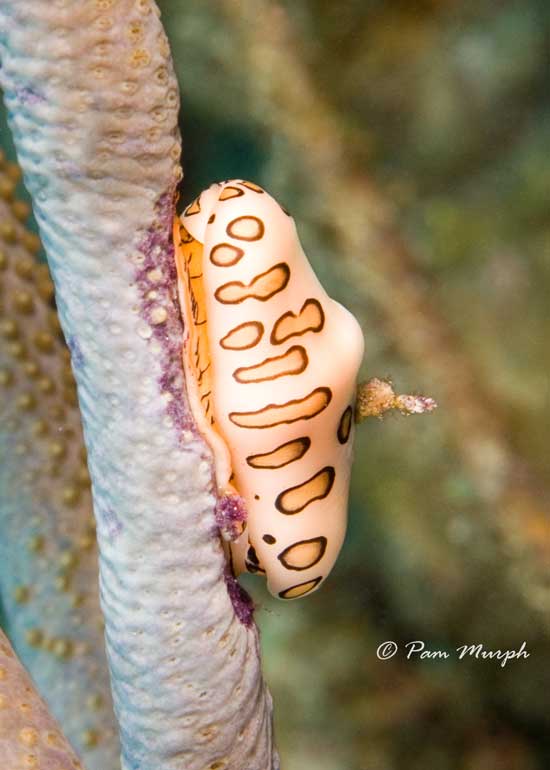
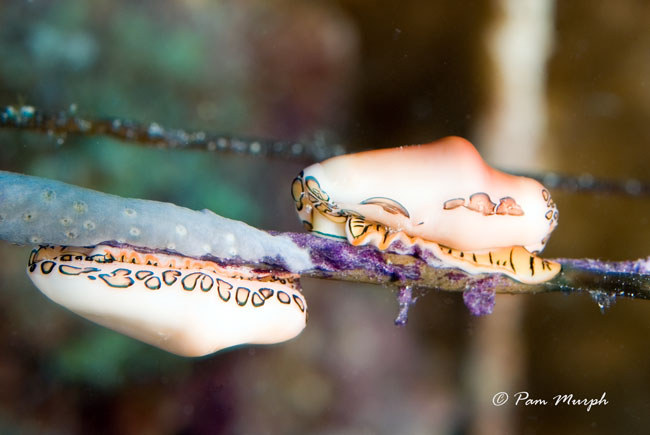
I am asking for help in IDing a picture. I got a picture of a what I am pretty sure is fingerprint cyphoma in Bonaire 2 weeks ago. I also got a pic of another which I am not sure about - is it a fingerprint cymphona or a flamingo tongue? It does not have enough markings on it for me to be sure - the second pic is my question. Can you guys help me with this ID?
I am including both pics here you to look at - in case I am wrong about the first ID too.
Thanks - DiverPam
What I labeled as the fingerprint cymphoma
The one I am not sure about and need an ID on - thanks
Hi Pam - In Cyphoma signata - the fingerprint - there are rows of patches with transverse brown lines on a yellow background. Occasionally the spots of Cyphoma gibbosa - the flamingo tongue - become more angular or distorted, or in just 1 few rows. The mantle is white and the spots have yellow centers & distinct brown outlines. I think these fall into gibbosa.
Cheers, Leslie
In Cyphoma signata - the fingerprint - there are rows of patches with transverse brown lines on a yellow background.
Here's a fingerprint for comparison ...
Thanks for the ID. And the pic. That really helped. I can see the difference plainly now. The shape of the spots threw me off and I did not realize that it was that distinct within the fingerprint portion.
Now...will be looking to find one for sure in the future and having a recodring shot for myself.