



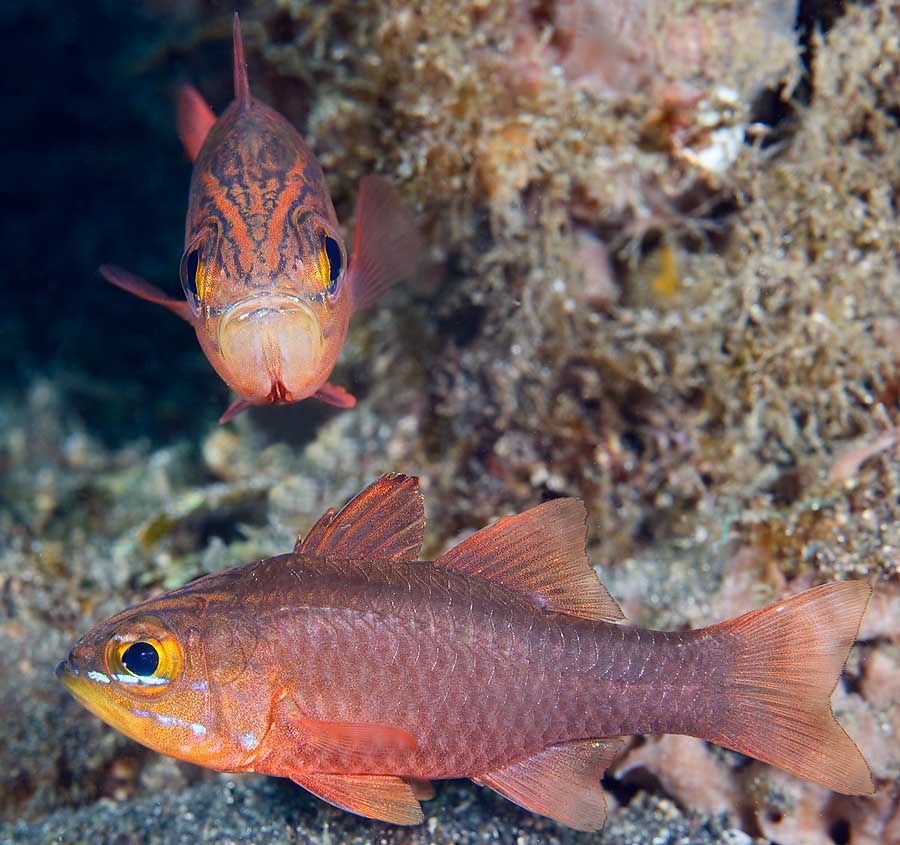
Taken in Lembeh last September. I cannot find a match for this fish - in particular anything that has this reddish V-shaped marking on its head.
Can anybody help please?
Read-only discussion
Taken in Lembeh last September. I cannot find a match for this fish - in particular anything that has this reddish V-shaped marking on its head.
Can anybody help please?
Very nice photo for an ID, yet, I cannot identify it with the books I have here. Mind if I send it to some colleagues and ask opinions?
Hi Jim, I jumped the gun here because I was curious too and asked some people. Just got an answer from Jack Randall, who suspects the fish in your picture is Apogon monospilus, or the Moluccen Cardinalfish (aka Yelloweyed Cardinalfish). You can find more information about it here:
http://fishbase.de/Summary/speciesSummary.php?ID=60354
The strong red coloration of the fish in your photo is what was confusing me, but Jack says the background color in this species is variable from pale yellow (like the one shown in Gerry Allen's book) to vivid red like yours.
That's great Luiz - many thanks for your trouble. You obviously have access to the right people. Certainly has the body shape for Moluccan but it was those red, v-shaped lines on the head that threw me. I realise of course that colours and markings can vary significantly by location, background and mood etc. These two must have been showing off a bit!
Thanks again
Hi Jim
I didn't post earlier because I couldn't help with the ID but spend a lot of time just looking at the image because I think it is gorgeous and impossibly perfect for fish identification. It should go into the next Pacific fish ID book from Paul Humann and frieds!
Bart

Terms of Use Privacy Policy Guidelines We have placed cookies on your device to help make this website better. You can adjust your cookie settings, otherwise we'll assume you're okay to continue.

A worldwide community for underwater imaging.
