



So finally I've been using 5D's and 7D's for topside jobs for a while and I am going to bite the bullet and get one for my business... since the release of the 550D what is everyone's thoughts 7D or 550D, it will be used mainly probably 95% for video but a small amount for stills. At this stage I won't be housing it but would probably consider doing that in the future.
- 13Posts
- 13Replies
Read-only discussion
7D or 550D
13 posts
-
-
Here's a reasonable side by side comparison.
Own a bunch of CF cards? Really like the rear dial? Shooting outside? Tough on equipment? If any of these are a big deal to you looks like 7D might be the way to go. Otherwise the video appears to be very close.
Cheers,
Steve
-
Thanks Steve, that was interesting. Yep I'm hard on gear and yep it will be used outside..... I am pretty much sold on the 7D but wanted some input from everyone here.
-
7d and 550 video is the same, however, the 7d is easier to use because of the rear dial.
On the 550, changing aperture is a 2 button task. You simultaneously hold down the AV button with your thumb and rotate the top dial with your finger to the aperture you want. You get used to it topside, but not sure how easy or hard it will be to use underwater in a housing.
Speaking of that, how do you rotate the dial on a 5d or 7d in an UW housing ?
-
Speaking of that, how do you rotate the dial on a 5d or 7d in an UW housing ?
On the Nauticam the dial is under your left thumb. Pretty slick. Aquatica is similar with a little bigger dial, roughly the same location.
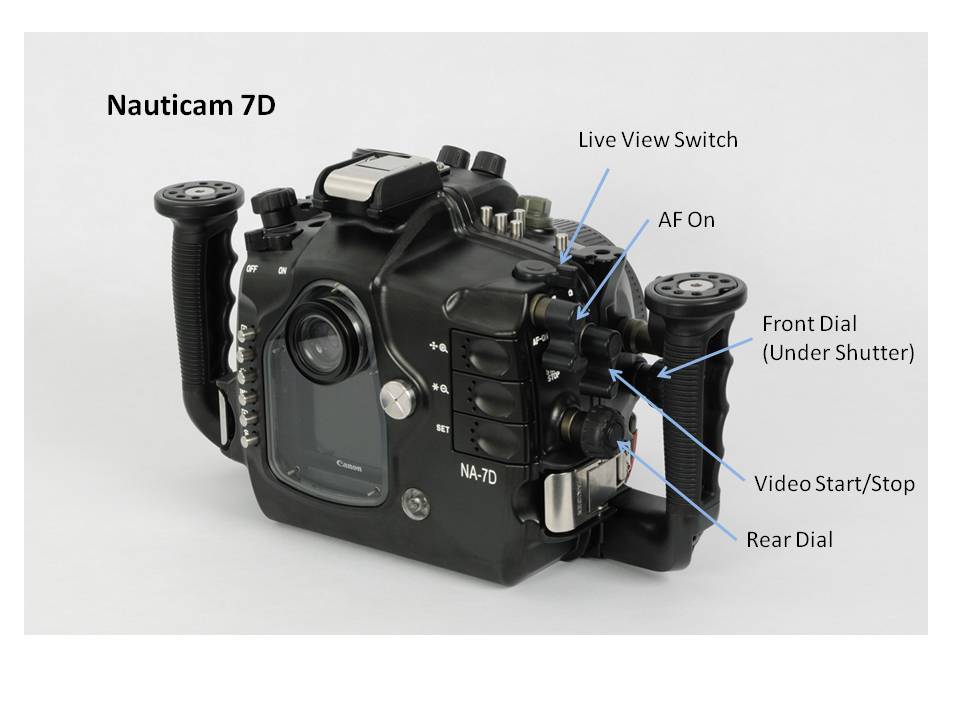
Steve
-
Steve:
For UW video, I would probably want to change the following settings relatively easily. Can you tell me how easy or hard it is to control ?
manual aperture
manual ISO
manual focus
manual WB
-
I think the ergonomics alone make a huge difference. I've not had too much to do with the 550D, but I used to have a 350D which had not rear dial. From the 30D onwards I've had that and couldn't go back. I think the rear dial is an important consideration for video shooting too, as I typically use it on land for video aperture adjustments rather than the forward dial (the forward one would be awkward when looking at the LCD).
If you're housing something later, you definitely want to get the best thing in the housing you can given the investment. In the end though if it comes down to cash the 550D is going to do a good job now though. I'd think twice before putting it in a housing though.
-
Steve:
For UW video, I would probably want to change the following settings relatively easily. Can you tell me how easy or hard it is to control ?
manual aperture
manual ISO
manual focus
manual WB
I'm with everyone else on the rear dial. After using the 7D I would struggle mightily without it.
manual aperture -- Very easy, direct change on rear dial
manual ISO -- Easy, press top button then front dial
manual focus-- Depends on the lens and port, easy for primes, like the 60mm or 100mm (need focus ring), left side dial. On zooms like the 10-17, not possible, but easy to AF and large DOF
manual WB -- Depends, Change to a preset, Cloudy, Shade, etc.- easy, top button then rear dial. Tougher to set custom WB, takes 5 button presses (Set piano key) and rear dial. There is also othe option to set the WB temp value directly on the same screen. I'm still wondering if that and the custom presets on the top left main dial would makes things simpler. Would only be helpful if your going back to known conditions or you know your lights temp.
The 7D also has the ability to modify the functions of the buttons and dials. It gives you the ability to setup the camera and change functionality. What I've shown here is the default function with the one exception of modifying the Set button to also bring up the menu for WB . (easy one time change)
It's not a camcorder, wasn't meant to be. I'm guesing that it takes a different approach to shooting than a videographer would be used to to really get the most out of the camera. It's also true that the still guy who thinks he's going to shoot some video has a learning curve to come up.
HTH,
Steve
-
Thanks Steve.
One more question. How about the focus assist buttons, where the LCD is 5x and 10x. I use them all the time to precisely set manual focus. Easy to use UW ?
-
Thanks Steve.
One more question. How about the focus assist buttons, where the LCD is 5x and 10x. I use them all the time to precisely set manual focus. Easy to use UW ?
It's the top piano key on the Nauticam right under the AF On. I think Ryan at Reef is working a monitor solution which would make framing and focusing even easier, it's beyond my needs but I hear some of you video guys like them.
Easy to use UW? It's easy to reach the controls, but an interesting question that brings in some other variables. On a tripod? Which lens? Lights? Super macro? Probably some others. I'm hesitant to make any claims in that I've only done very minimal video shooting with the rig. Just testing a few hours in the pool at this point. Jean of Aquatica fame, Mike at H20 Photos and I'm sure Ryan plus others have more experience using the system, and hopefully they'll jump in here and add their expertise.
I'm planning on testing some more this weekend. I'll throw the 100mm on and see what how it works for video. Guess we need a rubber duck that moves around.

Steve
-
Thanks Steve.
One more question. How about the focus assist buttons, where the LCD is 5x and 10x. Easy to use UW ?
Ron,
I tested the 7D with your question and the focus assist piano key works as I described until you hit record. Camera will not go to the 5x view if you're recording video, unless there is a mode I don't know about. So I guess it will work fine for static objects on a tripod for instance (I'm thinking macro here). You'd just frame, focus at 5x then shoot. I'll try some other ideas for moving subjects in the pool.
Steve
-
I'll throw the 100mm on and see what how it works for video. Guess we need a rubber duck that moves around.
Maybe would work Mr. Williams? Or perhaps this?.
-
Ha! I like the seahorse. Come to think of it I have a motorized fish around here someplace. I was trying some night macro video just now. Still dripping actually. Thought of just using a golf ball to roll across the scene. I learned something too. Night macro video is damn hard.
Cheers partner!
Steve


