How to attach an ultralight focus light on the top of Aquatica
Started by famorim ·
7Posts
7Replies
Read-only discussion
How to attach an ultralight focus light on the top of Aquatica
7 posts
Hi folks,
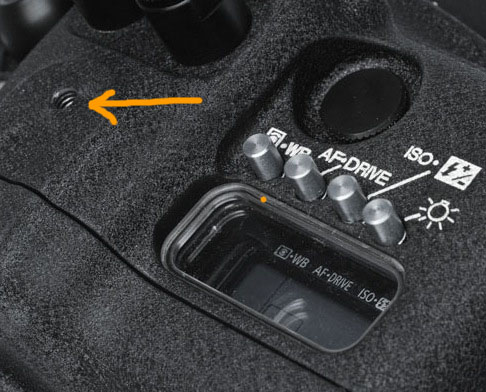
I am an Aquantica+utralight user, so I have a focus light support from Ultralight and I am trying to attach this part on the top of my 5dmk2 housing through a ball head using the hole on the top of my housing, but I didn't see any ULCS part that fit this hole.
does anyone knows what is the part number of this ball head ?
Here is attached a picture about the hole on the top.
Thanks
Fabio
I "IMAGINE" that the hole is the standard 1/4" 20TPI standard tri-pod mount hole.
this should work AD-1420-2 For Sartek video lights, Gates housings
or
this BA-HB - Ball with hole down center for 1/4-20 bolts or 6mm bolts
Yes it is a 1/4''-20 hole, same thread as a standard tripod, all accessories holes on Aquatica are the same 1/4''-20 holes dimensions
Great folks !!!!
Thank you!!
This is the one that worked from me, from Reef Photo: ULCS AD-1420
And for future reference, one of the nice things about Ultralight is that you don't actually need to know what part goes with what - if you call them, Terry and Dave know EXACTLY what goes with what, and can tell you right off the top of their heads!
i have a ball the ball shown that screws in to this hole, but it probably needs loc-tite to keep it from coming loose
i've ended up using the 4th Generation double balls on the handles to get enough mounts instead