Skip to content

Shooting Technique, Workflow and Editing / Archived topic

Bug eye video teaser from Lembeh

Started by echeng ·

  • 6Posts
  • 6Replies

Read-only discussion

Bug eye video teaser from Lembeh

6 posts
  1. Here's the INON insect eye lens teaser I put together for the Bay Area Dive Show:


    [vimeohd]12592624[/vimeohd]


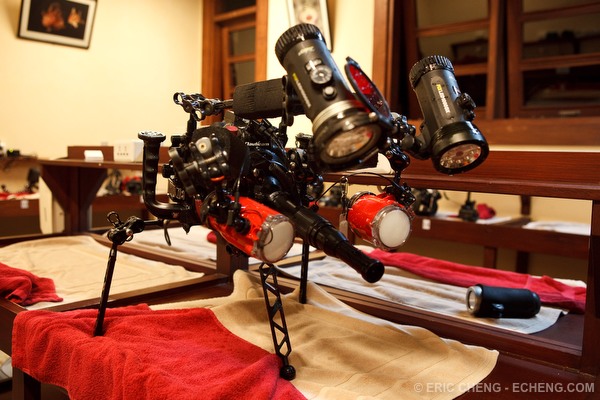
    All of the clips were shot with a Canon 7D, Nauticam underwater housing, 60mm macro lens, INON bug eye lens (NON Underwater Micro Semi-Fisheye Relay Lens UFL-MR130 EFS60), and XIT 404 tripod. Special thanks to Tony Wu, David Cheung, and Kasawari resort, who hosted me during a special Lembeh night safari.


    Here's a shot of the rig. :)


    echeng100308_0254366.jpg

    Edited by echeng
  2. I Like it !!! very cool, well done Eric :) Nice set up as well


    Dive safe


    DeanB

  3. Nice one.


    Just one question: In the first clip with the squid, there were "things" swimming around. Worms or something like that, right? Does anyone know exactly what they are?

    I'm wondering because I did a nightdive in Tubbattaha reef last april when there were millions of those in the water. You couldn't get the cameras to focus, because if you stayed at one place too long, they would block your lights totally, so you had to keep swimming and just take snapshots. Some of the divers got up from the water with them still in the hair, and I found some in my wetsuit as well... The dive was rather disgusting, but totally awesome at the same time.


    Cheers

  4. Wonderful Eric, and really tough to do. What the heck is that critter at 3:00?


    Steve

  5. Here's the INON insect eye lens teaser I put together for the Bay Area Dive Show:


    Here's a shot of the rig. :)


    That is some rig :P Shots look amazing. Did you settle on using the "good" ISOs or other items which hit a sweet spot?

  6. Wonderful Eric, and really tough to do. What the heck is that critter at 3:00?


    Steve


    Bobbit Worm :)


    Interesting stuff Eric

Sea & Sea

Account

Navigation

Search

Search

Configure browser push notifications

Chrome (Android)
  1. Tap the lock icon next to the address bar.
  2. Tap Permissions → Notifications.
  3. Adjust your preference.
Chrome (Desktop)
  1. Click the padlock icon in the address bar.
  2. Select Site settings.
  3. Find Notifications and adjust your preference.