



Skip to content

Lights, Strobes, and Lighting Technique / Archived topic

Color temperature

Started by rumblefish ·

  • 5Posts
  • 5Replies

Read-only discussion

Color temperature

5 posts
  1. Hi all,


    I read some threads on white balance and using gels to make subtle improvements to the blues and greens as described by Alex in the UWP story.

    However, I feel I need more than subtle improvements. This is the case:


    Usually I shoot in green water with white balance on auto. This turns out photos with a color temperature in the 4800 - 5100 range, matching the color temperature of my Sea &Sea strobes (about 5100K)

    This results in a distinct yellow cast in the raw files that I correct in Lightroom. In processing the color temperature ends up around 4100K.


    Now suppose I shoot with manual white balance set to 4100K (or slightly warmer to get a richer green), what filters or gels do I use on my strobes to get the foreground light match the ambient light? What is the right mix to get more realistic colors (in green water) to start with?


    Your recommendations will be greatly appreciated,

    --Rob

  2. You will get a richer green with cooler strobes. Say Inons or Sea & Seas at 5500K. Alex

  3. I was use CC correction filter cut from acetate, these are fairly easy to get from photo and lighting supplier and Lee Filters and Rosco are the two main source for those.


    For green water if you want to balance your strobes to match the ambient green water, then I would start by using 15cc of green, BTW these are pretty big sheets, so I would cut up 3 filters of 15cc for each strobes, make them larger with tabs of velcro on each side so you can stack them as you go deeper (greener).


    Here is something I tried in Bermuda a 2 years BMF (Before Magic Filter :) ) You start by putting a FLD correction filter on or behind the lens (basically a 30cc Magenta filter) and strapping 30cc of green on the strobes, you get the background blue much richer while the background stay neutral (both filter cancel each other for the strobe illuminated part, but the water column illuminated by daylight remain filtered by the Magenta filter).


    I experimented on this Digital Shootout trip with shooting video with the magic filter, but kept my strobe in case I wanted to shoot stills, in this case I used a 80B acetate and 15cc of green stacked together to more or less balance the strobes with the magic filter, result... I should stick to still imaging as I suck big time in video :notworthy: but the balanced still turned out OK if I stayed inside a meter or less of the subject.
  4. In my experience 'green' water is pretty variable. I was shooting last week on two sites about a mile or so apart. One was feeling the influence of the open Atlantic and the background was turquoise blue, the other had a substantial river inflow and was far more of an emerald green. If I'd been shooting repeatedly at one location it might have been worth while trying some filtration but I wasn't and so I have to livewith varying background colour - which doesn't bother me because its actually a part of the story being told by the images. Where are you shooting that gives you a yellow cast?

  5. Thanks guys,

    yes greens are variable. I shoot in The Netherlands in two places. In the Oosterschelde the water looks yellowish, in De Grevelingen it's more blueish green ('bottle green' is that English?)

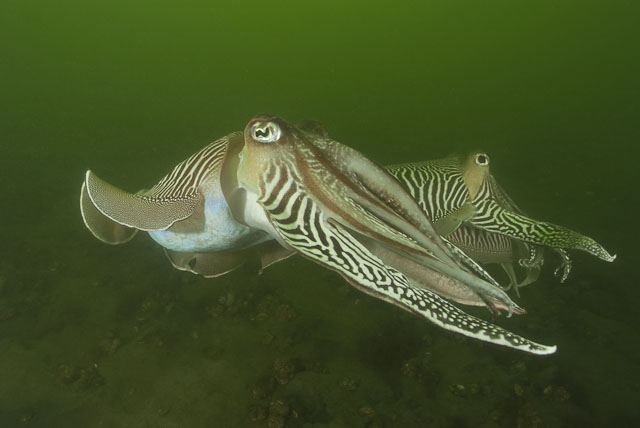
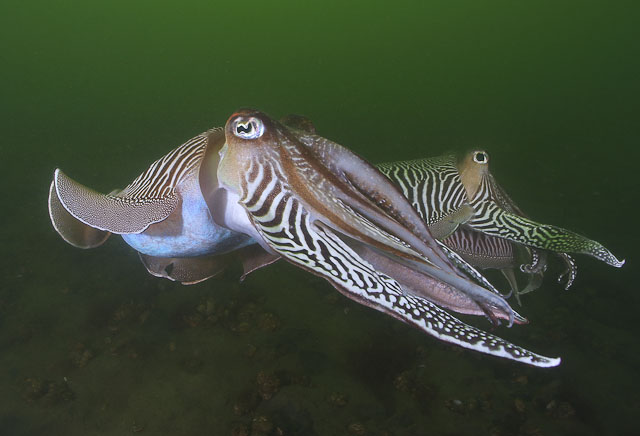
    I do get a yellow cast anyway. Below are two photos to illustrate what I mean, the first without any processing and the second after. What I'm looking for is to get rid of the yellow in camera.

    The strobes are pretty cool: Sea & Sea YS 350 and YS 90 both 5100K at full power and 5400K at half power (which I usually use, the 350 even at 1/4 power most of the time).


    post-7565-1278444840.jpg

    post-7565-1278444891.jpg

Aquatica

Account

Navigation

Search

Search

Configure browser push notifications

Chrome (Android)
  1. Tap the lock icon next to the address bar.
  2. Tap Permissions → Notifications.
  3. Adjust your preference.
Chrome (Desktop)
  1. Click the padlock icon in the address bar.
  2. Select Site settings.
  3. Find Notifications and adjust your preference.

