Skip to content

Photo / Video Showcase / Archived topic

First shots with Tokina AT-X 107

Started by frisco ·

  • 6Posts
  • 6Replies

Read-only discussion

First shots with Tokina AT-X 107

6 posts
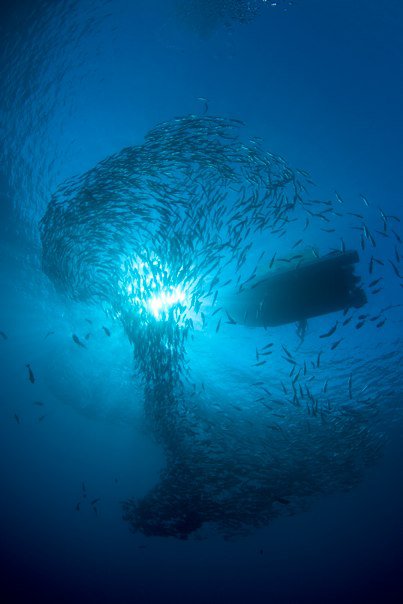
  1. These are my first shots with the Tokina AT-X 107 + Canon EOS 450D + Hugyfot housing & dome + plus Inon Z-240 & D-2000 strobes (if used) .... I am truly amazed by the versatility of this lens and I would like to thanks all those fellow photographers who recommended it !!!


    All comments and critiques are very welcome as they will help me improve my new-born wide angle passion !!!


    Flickr Gallery with captions: http://www.flickr.com/photos/friscodive/se...57624449921236/


    Facebook Gallery with captions: http://www.facebook.com/home.php?#!/al...100000007234102 (this gallery contains also macro shots).


    Small teaser:


    post-23262-1278598571.jpg


    All the Best .... Francesco

    Edited by frisco
  2. Thanks for sharing the nice photo. Allows me to imagine just how nice it must have been to be watching it, as I sit at my desk far from an ocean. But I will be at that location in only a few short months....


    What would estimate the distance to the fish school and your depth?

  3. Dave,


    I would estimate myself being in 7/8 mt. and the school being between 2/5 mt. from the surface ....

  4. Wow, congratulation Francesco, Nice shots and thanks for sharing.

    I can recognize every corner of shipwreck. :notworthy:)

  5. Way to go Francesco! The Tokina is a blast isn't it. Looks like you had a great trip. Love the coleman shot too.


     

    :notworthy:

    Steve

    Edited by Steve Williams
  6. Impressive work Steve!

    I really like the ones from inside Liberty wreck.


    Cheers

    Karel

Nauticam

Account

Navigation

Search

Search

Configure browser push notifications

Chrome (Android)
  1. Tap the lock icon next to the address bar.
  2. Tap Permissions → Notifications.
  3. Adjust your preference.
Chrome (Desktop)
  1. Click the padlock icon in the address bar.
  2. Select Site settings.
  3. Find Notifications and adjust your preference.