



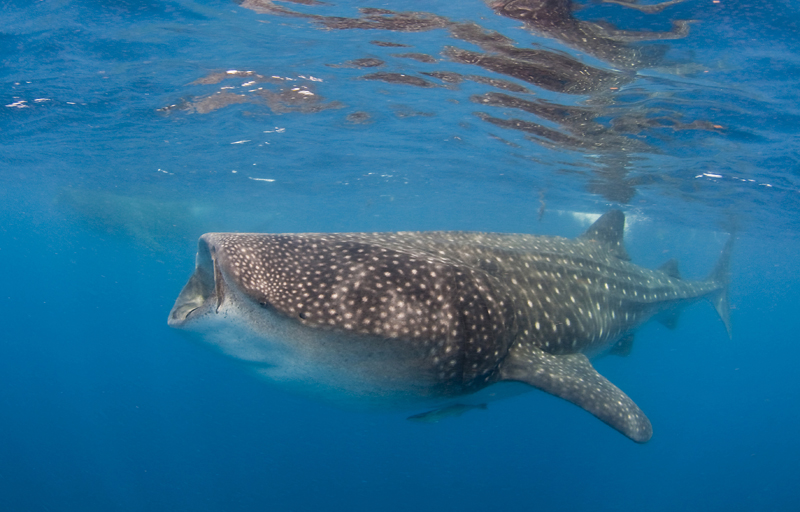
Finally, a Whale Shark image that I am fairly happy with. Still, I am open to suggestions, of course!!!
Read-only discussion
Finally, a Whale Shark image that I am fairly happy with. Still, I am open to suggestions, of course!!!
Very nice! Hard to recommend improvements to this one.
Cheers
James
I like the mouth open and the reflection in the surface from the whale shark. Where was this taken?
Thanks for sharing - DiverPam
great shot! i'd love to see a whale shark!
Cooooooooooooooooooooooooool!
I have YET to see a whale shark, even with many, many dives under my BC.
Nice image!
Great Photo!! Holbox? Isla Mujeres?
Elmer
Wow that is stunning!!!!
Super. Full body. Mouth wide open. Second fish in the background. Almost no sign of snorkelers. Wow.
Lovely shot!
If I was being picky, I would have tried to shoot it from a slightly lower angle-this would give it more "presence" and maybe the reflection would have been a little less broken.
Still very much a keeper!
Adam
wow, seriously awesome - and the second one in the background is wicked, sorta like finding a second Waldo when you only expected one!
Taken off the coast of Isla Mujeres. There were over 60 right on the surface on Sunday. Frankly I lost some decent shots to just too many other partial whale sharks in the frame. It's been fairly rough the past few days and today, the seas were brutal (5ft) making it really hard to swim, shoot, and keep your lunch down...but there were lots of Whale Sharks!

Terms of Use Privacy Policy Guidelines We have placed cookies on your device to help make this website better. You can adjust your cookie settings, otherwise we'll assume you're okay to continue.

A worldwide community for underwater imaging.
