Skip to content

Shooting Technique, Workflow and Editing / Archived topic

Magic Bullet Grinder: Converter for DSLR clips to Pro Res

Started by Drew ·

  • 14Posts
  • 14Replies

Read-only discussion

Magic Bullet Grinder: Converter for DSLR clips to Pro Res

14 posts
  1. Red Giant Software's Magic Bullet Grinder is a transcoder application designed for the editors to quickly transcode HD DSLR clips to Pro Res or PhotoJPEG codecs. It can also generate Pro Res Proxy files, install timecode, upscale 720p to 1080p and conform all clips to 23.98 (24p) fps.

    For the explanation on how it all works, I'll let Red Giant's own tutorial run through:


    [vimeohd]12212110[/vimeohd]


    My own observations are performance based. I have a fake 4 core Macbook Pro i7 and Mac Pro 8 core i7. Comparing with the de facto champion of conversions, MPEG StreamClip, the Magic Bullet Grinder was just slow. Despite being multi-core aware, it failed to excite more than 1/2 the cores (200%) CPU activity and took twice the time to run through conversions. HOWEVER, for those who want 23.98 conforming, it's part of the processing time.


    My quick view of the software is that it was programmed by the post-production editors for post production editors. You can tell because they skip Pro Res LT and HQ, only giving ProRes 444 or Standard. Most post houses either use 444 or Standard nowadays, because Pro Res HQ has little gain over Standard and is way below 444. Pro Res LT is great for short edit workflows in field, but proxies work better and are what the workflow of post production houses use. 24p is de facto for feature and web workflows, so the conforming is nice to have as part of the conversion process, vs having to open up CineTools to conform Pro Res Clips.


    Magic Bullet Grinder isn't a speed demon but it does a few things many editors want, conforming clips to 24p and generating proxy files for easier editing. It is more for the professional editor's workflow which includes conforming and timecode. Is it worth the $49? For an editor who does all those things as part of the workflow, I think it is. MPEG StreamClip is still the speed demon, using all cores to crunch out video but it doesn't do conforming, create proxy files and timecode, things that a professional workflow requires. Of course there are also free apps to add timecode but that's 3 apps added to the workflow. I'm sure that Pro Res LT and HQ will be added later as an update, but I'm not sure that the processing speed will improve.


    Still to be able to batch convert, conform and generate proxy files in one app is probably what many editors want, and Red Giant's market are editors/filmmakers, so it's not surprising that it feeds them what they want.

    Edited by Drew
  2. My 12-core Mac Pro is on its way. I look forward to batching up clips in MPEG Streamclip and seeing 12 CPU graphs at 100%. :D

  3. My 12-core Mac Pro is on its way. I look forward to batching up clips in MPEG Streamclip and seeing 12 CPU graphs at 100%. :)


    I did the "How Much Will It Cost If I Went Nutso" and came out with a machine that was over $20,000 :) Those SSD add up :D

  4. I'm waiting for Apple to switch to AMD before I buy another Mac Pro. :D

  5. This might be interesting for you guys.


    [vimeohd]14151448[/vimeohd]


    An unscientific comparison of MPEG Streamclip and Compressor speed: transcode of two 1080p clips from the GoPro to Apple ProRes 422 LT. Video is sped up 20x.


    MPEG Streamclip appears to be about 2x the speed.


    2006 Quad-core Mac Pro, no virtual clustering in Qmaster (have had problems with hanging jobs when using clusters).

  6. Eric,

    I just returned my new 8 core and am also awaiting the arrival of the new 12 core. How much RAM are you putting in and have you purchased a new NVIDIA card for it? It's a general rule of thumb to put in at least 1 gig ram for every core.

    Steve

    Edited by steve
  7. put in at least 1 gig ram for every core.


    C'mon Steve. Max out the RAM. If it goes to 11, do not set it at 10 :D I actually usually find that the cost usually makes the most sense based on the price break. Not sure if the new models have that same thing about the RAM in terms of slots (even number of RAM chips are better if I recall) so I would probably go 16 Gig or maybe 24 Gigs myself based on the prices at OWC


    Though 64 Gigs of RAM just sounds so cool :)

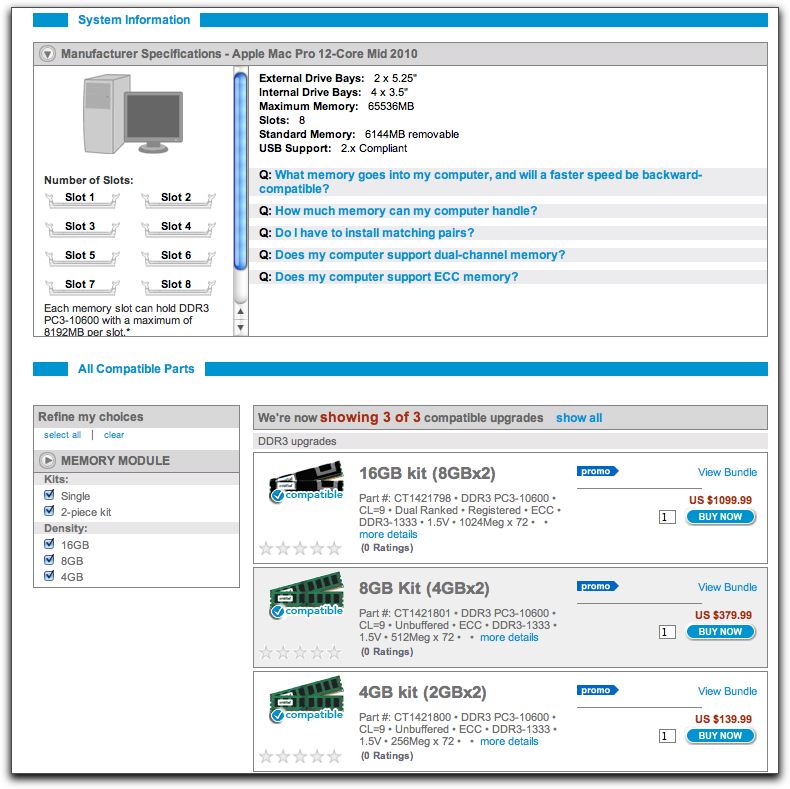
  8. Actually, this all started when Adobe sent me their Master Collection to review. But to take full advantage of the Mercury Engine I needed one of the new NVIDIA cards so NVIDIA volunteered to send me their QUADRO FX4800 card to install. However, my dual core Mac Pro had an identifier number of 1.1 and the new cards only work with identifiers of 3.1, 4.1 or higher so I ordered a new 8 core and sold the dual core. Two weeks after I got the 8 core Apple came out with the announcement of the 12 core so Apple agreed to take the 8 core back and send me the 12 core. Then Crucial RAM got involved and I believe they will be sending me either one or 2 of the 16 gig Ram kits which I will then include in this massive article. So, once the 12 core gets here, supposedly by Aug. 27, I will either have 22 or 32 gigs of RAM. YIKES!

    Steve

    post-124-1281906103.jpg

    Edited by steve
  9. YIKES!


    After reading all the events, I understand the YIKES!! :D But just think of how screaming fast the machine will be and all is good....

  10. just think it will probably double as a heater in the winter though.....

  11. Eric, Compressor is slower than MSC even with all 4 clusters (8 cores) active, about 30-40% slower on average. It use to be Compressor was optimal at 6 instances (6 cores) because of the bus bandwidth but with the new i7 processors, it's faster with 8 core but still slower than MSC.

  12. Try this and see if it speeds things up for you: http://www.kenstone.net/fcp_homepage/compr...es_stitzer.html

    By the way, Red Giant software is definitely better quality than many companies. The only complaint I have with them is that they don't use your registration info to let you know when updates are available and,unlike applications, it can be difficult for me to remember just which version of a plug in I have. I can't wait for them to update Psunami to be compatible with CS5. I love to use that one.

    Steve

    Edited by steve
  13. Steve -- tried that, and have had jobs just hang (never start). So I stopped doing it. I should track down the problem one of these days...

  14. Hehehe... it's probably a bad install. I occasionally have to reinstall Compressor for Qmaster work.


    Anyhow, as a just off topic, the rule of thumb for Compressor QMaster setup was one instance for every 2 cores. This is Apple's recommendation and tested by people who like DigiLloyd and Barefeats under the clock. So many people make that mistake of thinking an Instance for each core. One hears how 16 instances are faster, but my experience has been no more than 4 instances for a octo-core for max speed. That's Nehalem i7. Has to be self contained file as source.

Ultralight Control Systems

Account

Navigation

Search

Search

Configure browser push notifications

Chrome (Android)
  1. Tap the lock icon next to the address bar.
  2. Tap Permissions → Notifications.
  3. Adjust your preference.
Chrome (Desktop)
  1. Click the padlock icon in the address bar.
  2. Select Site settings.
  3. Find Notifications and adjust your preference.