Skip to content

Shooting Technique, Workflow and Editing / Archived topic

Adding 5th and 6th drives to Mac Pro (mid-2010)

Started by echeng ·

  • 9Posts
  • 9Replies

Read-only discussion

Adding 5th and 6th drives to Mac Pro (mid-2010)

9 posts
  1. Hello, video folks. I've just retired my 4.5 yr old Mac Pro and have taken shipment of a new 12-core box. I had 6 drives in my old machine and want to have 6 in the new one as well. Here is some information for those of you who want to do the same thing...


    echeng100830_0263877.jpg


    Full post over at my journal.

  2. Eric, I don't get your config. If you want the 6 drives and only the SSD are OS and swap, then why can't you run the 4 on your slotted PCIE and the rest on your mb SATA? Use a Y cable splitter for power. Then use the OWC multimount to mount the 2 SSD in the spare 5.25" bay. Even if you have the 5870, it'll max out at about 190W and your PCIe bus has 300W. So you have the overhead to run 7 drives and a SATA card.

  3. You guys are just too geeky... :)

    I just plug my 6 SATA drives into my 6 SATA ports on the MB.

    Have the OS and CDROM drive on the IDE.

    Edited by wagsy
  4. You guys are just too geeky... :)

    I just plug my 6 SATA drives into my 6 SATA ports on the MB.

    Have the OS and CDROM drive on the IDE.


    Me too Wagsy :D


    I have an Asus Mobo that has 6 SATA ports as well as two new SATA 3 ( 6Gb/s ) ports. So I have 4 hard drives and two optical drives connected to SATA 2 ports and 2 more hard drives dedicated to video connected to the SATA 3 ports. Even space for some more eSATA drives if required :)

  5. Eric, I don't get your config. If you want the 6 drives and only the SSD are OS and swap, then why can't you run the 4 on your slotted PCIE and the rest on your mb SATA? Use a Y cable splitter for power. Then use the OWC multimount to mount the 2 SSD in the spare 5.25" bay. Even if you have the 5870, it'll max out at about 190W and your PCIe bus has 300W. So you have the overhead to run 7 drives and a SATA card.

    Interesting. I wasn't sure what would happen if I starved the 5870 of power (which is from the motherboard and not likely part of the PCIe bus, right?)... but you're right: drives are low power and should be fine split off. Still, cabling would be a logistical nightmare. It took me over an hour to route 2 SATA cables to the 5.25" bay in my last Mac Pro. I can only assume that Apple has tightened up their case even more to make it hard to run cables to other parts of the case.


    I use my optical drive a few times a year and am just going to remove it and go external. No big deal!


    As for Wagsy and other folks out there -- you guys are still running Windows, so all of your gloating posts here are just noise. You just don't understand that Mac folks don't care what you guys do because nothing is worth the hassle of running Windows. :)

  6. As for Wagsy and other folks out there -- you guys are still running Windows, so all of your gloating posts here are just noise. You just don't understand that Mac folks don't care what you guys do because nothing is worth the hassle of running Windows. :D


    Hehehe, love it! And, Eric, Bad Boy, you were telling others off for dissing people. But, hey, maybe trying to point out the beauty of a Mac to them there good ol'Windows Boys ain't a-dissin' no-one.


    :)

  7. Interesting. I wasn't sure what would happen if I starved the 5870 of power (which is from the motherboard and not likely part of the PCIe bus, right?)... but you're right: drives are low power and should be fine split off. Still, cabling would be a logistical nightmare. It took me over an hour to route 2 SATA cables to the 5.25" bay in my last Mac Pro. I can only assume that Apple has tightened up their case even more to make it hard to run cables to other parts of the case.


    I use my optical drive a few times a year and am just going to remove it and go external. No big deal!


    I looked up the Mac Pro specs and it says 300W for PCIe bus. So I'm assuming that's all the extra power that's leftover from the power supply.


    As for optical drives, I wish you can custom build without drives in general. :)

  8. Drew - Strange. The card is definitely connected to the motherboard by 2 power cables.


    Tim -- I'm just trying to keep things on topic! If we're talking about Macs, we don't need random Windows stuff in the mix. Everyone already knows that Windows boxes are more versatile in terms of hardware configurations, but they don't run Mac OS X or Final Cut.


    Here is a clean option for adding up to 4 additional 2.5" drives to a Mac Pro:

    http://www.transintl.com/store/category.cfm?Category=2799


    DX4_anim_1_v2.gif


    It comes with a motherboard to 4 drive power adapter and a bunch of SATA cables. Looks like a good solution, but perhaps overkill for what I need (and, all available motherboard power is taken up by my video card).


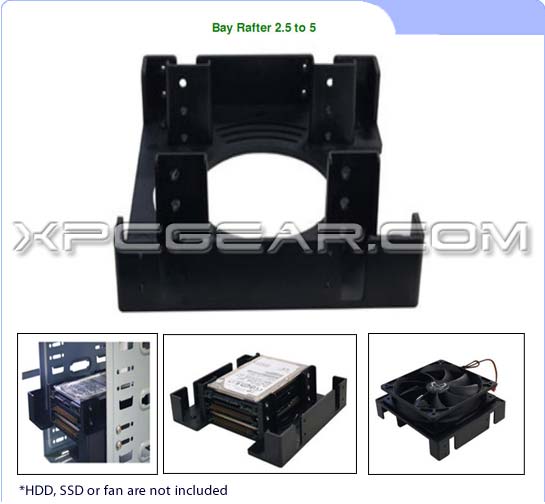
    I ordered one of these, instead:

    http://www.xpcgear.com/scythe-2-5-to-5-25-bay-rafter.html
     

    extremepcgear_2119_187343.jpeg


    For $8.95 + shipping, it will allow the mounting of 3 x 2.5" drives in a single 5.25" bay. I'd leave the center space free for airflow and forgo the fan.


  9. Drew - Strange. The card is definitely connected to the motherboard by 2 power cables.


    Tim -- I'm just trying to keep things on topic! If we're talking about Macs, we don't need random Windows stuff in the mix. Everyone already knows that Windows boxes are more versatile in terms of hardware configurations, but they don't run Mac OS X or Final Cut.


    Well then you have 300W combined. I think the specs of the 5870 is no more than 190 max. So you have the headroom to expand the system.


    And yes, my Psystar can run FCP and OS X but it just acts as a cheap server.


    For all of Apple's environmental green wash, if they allowed component swapping like CPU upgrades, that'd be a lot more green than recyclability any day.

Nauticam

Account

Navigation

Search

Search

Configure browser push notifications

Chrome (Android)
  1. Tap the lock icon next to the address bar.
  2. Tap Permissions → Notifications.
  3. Adjust your preference.
Chrome (Desktop)
  1. Click the padlock icon in the address bar.
  2. Select Site settings.
  3. Find Notifications and adjust your preference.



