Hi All,
I am upgrading my underwater video system and am offering for sale the following package.
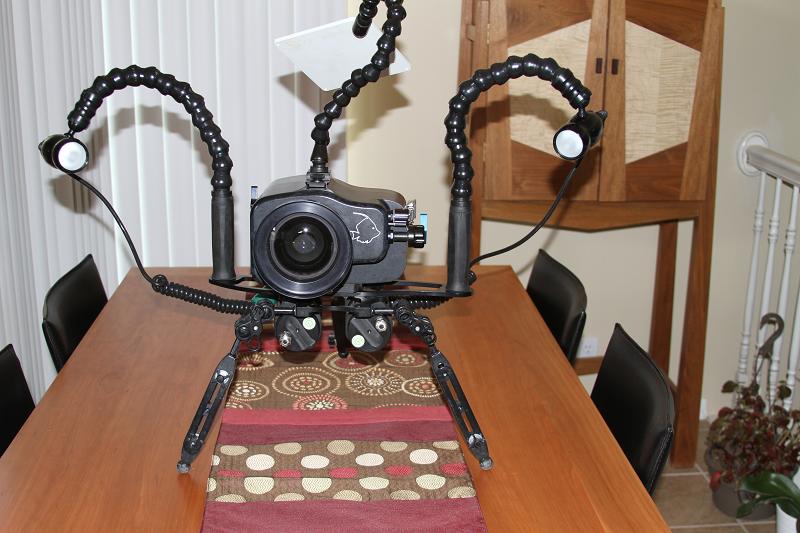
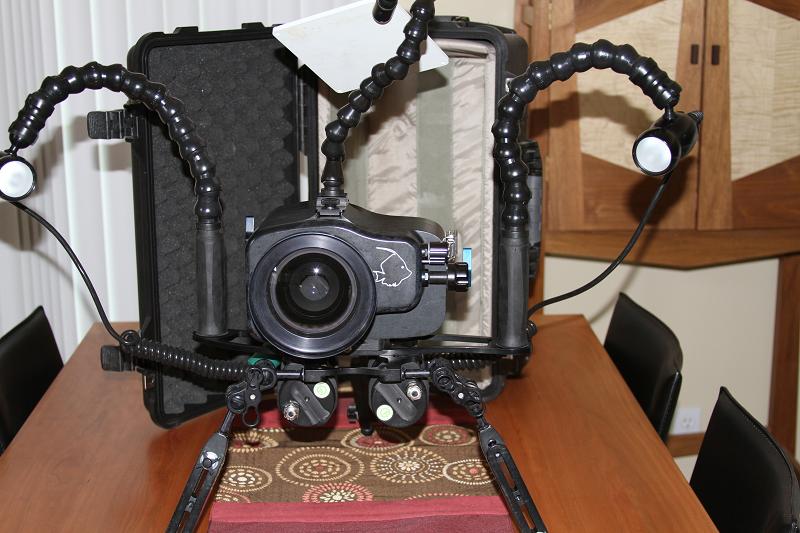
Gates HC7-HC9 Underwater Video Housing with the WP25 Fathom Wide Angle Port that is compatible with the Sony HDR-HC5, HDR-HC7 and HDR-HC9.
This housing has controls for On/Off, Record, Standby, Zoom, photo and assign. It includes the optional control for white balance.
Gates WB Slate with articulating arm and mount to hold the white card in front of the lens while setting the white balance. The other side for taking notes and camera settings.
Gates Video Tripod featuring widely spaced and fully articulating legs. Each leg is extendable from 7 to 18 inches for flexibility in rough rocky to flat sand bottom terrain
Green Force HID-50 Light System. The light heads burn 10 watts each (equivalent to 80 watts of halogen) for a full 2 hours on the Flexi I batteries. A wide 110 degree diffuser provides gentle, even light coverage. The chargers are fast and include the international plug kit too.
Pelican Case (with wheels) that can fit the package ... less the tripod.
Accessories include 2 ballast tubes, extra o-rings, Gates and Green Force Drying towels and miscellaneous extra set screws.
All Items are in excellent condition. The unit has been used on four shoots, approximately 10 hours per shoot and performed flawlessly.
Retail value is $5,762. I am asking $4,400 + shipping (from Utah). The entire package weights about 40 lbs.