Skip to content

Photo / Video Showcase / Archived topic

prior to printing

Started by stewsmith ·

  • 20Posts
  • 20Replies

Read-only discussion

prior to printing

20 posts
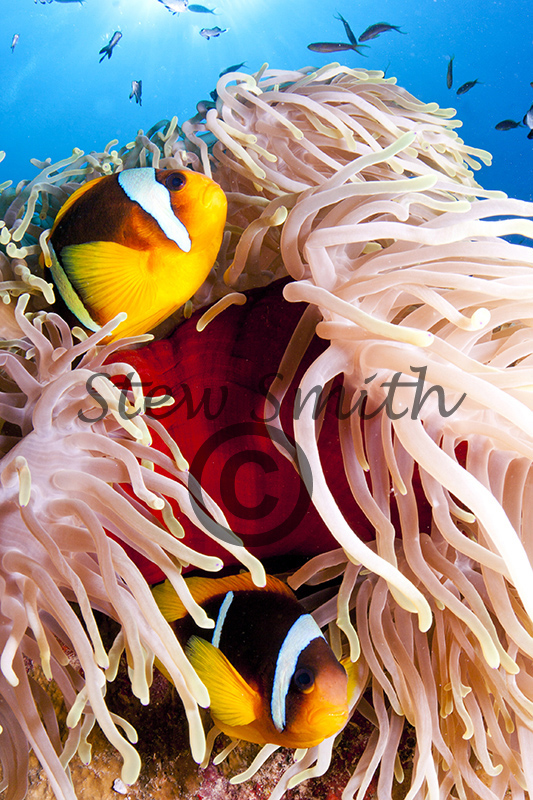
  1. I am going to get this shot printed and would like to know what improvements can be made prior to it being sent to be printed. I do not do my own printing, but it will be printed on Fuji Pearl paper. I would also like some critique on the photo as a photo.


    Canon 350D

    Tokina 10-17mm + 1.4TC

    Zen100mm

    twin ys90's

    F16

    1/200


    Stew

    post-5742-1287935413.jpg

    Edited by stewsmith
  2. Do you know the parameters of the printer?


    Is it going to be Web Offset?


    Do they want unsharpened CMYK files with levels set?


    I have a calibrated screen but the art director always makes adjustments. Then the production man makes adjustments. Why? Because they can!


    Pictures then get proofed up on two different printers with totally different results!


    What paper will it be printed on?


    So what was the question again?

    Edited by John Bantin
  3. Perhaps I didn't make myself clear on my OP so I will try again using different wording.


    Above is a photo that I took myself and I like, I have edited it slightly, which consisted of a RAW conversion to TIFF ( but the image above is a resized JPEG ) I have also healing brushed out a few particles and adjusted contrast.


    I am going to be getting it printed by

    online printers who have printed photos for me numerous times before on Fuji Pearl paper.

    What I would like, is opinions as to whether any additional PP should be done to the photo prior to sending the Jpeg 300 dpi file to the printers. The printer that it will be printed with is a Fuji Frontier 570 printer.


    The printing company will take care of all the procedures that are required prior to printing.


    I would also like some critique on the photo.


    Stew


    ( I hope thats a bit clearer for you John )

  4. I find the big © in the middle a bit off-putting ;)


    I think it's a terrific photo. I think from my very limited experience that your biggest headache is going to be the colour profiling. Getting different hue's back in print to the jpg you sent.


    You can probably ask for a colour profile from them then you can plug this into Photoshop and proof from there. As John pointed out though, make sure your monitor is properly calibrated.


    Compositionally, I think it's great. the only thing I keep looking at is the space at the top....

  5. Perhaps I didn't make myself clear on my OP so I will try again using different wording.


    Above is a photo that I took myself and I like, I have edited it slightly, which consisted of a RAW conversion to TIFF ( but the image above is a resized JPEG ) I have also healing brushed out a few particles and adjusted contrast.


    I am going to be getting it printed by

    online printers who have printed photos for me numerous times before on Fuji Pearl paper.

    What I would like, is opinions as to whether any additional PP should be done to the photo prior to sending the Jpeg 300 dpi file to the printers. The printer that it will be printed with is a Fuji Frontier 570 printer.


    The printing company will take care of all the procedures that are required prior to printing.


    I would also like some critique on the photo.


    Stew

    ( I hope thats a bit clearer for you John )

     

    Oops! Sorry! Betrayed my continuing obsession with repro there! I suggest you clean up the little fishes that break the crop at the top and probably lower the contrast a bit. (But don't ask me about art. I know enough to know that my opinion is worthless!)

    Edited by John Bantin
  6. Advice from Joe Cornish, well-known British (well, Yorkshire) landscape photographer, that he gave me at the weekend: look at the image against a white background, and look at it upside down, to see the light and colour divorced from the subject. A black or dark grey ground makes the image look bright, and so print too dark; the saturation is exaggerated when the image is viewed as a recognisable subject, rather than as an abstract, and so print a little dull.


    Weird psychophysics, eh?


    Tim


    ;)

  7. Advice from Joe Cornish, well-known British (well, Yorkshire) landscape photographer, that he gave me at the weekend: look at the image against a white background, and look at it upside down, to see the light and colour divorced from the subject. A black or dark grey ground makes the image look bright, and so print too dark; the saturation is exaggerated when the image is viewed as a recognisable subject, rather than as an abstract, and so print a little dull.


    Great advice from the master, Cornish.


    Interestingly, Steve Watkins' editorial in current Outdoor Photography Magazine (UK) gives exactly the same advice on the value of looking at images upside down to gauge their graphic strength independent of the subject matter.


    Alex

  8. judging from your jpeg, and my monitor, i'd say its a touch too contrasty and saturated. i'd also say take the magenta down a bit. too much magenta is the biggest problem i've had printing UW photos and often gets exaggerated through the printer, turning the water slightly purple. of course this can all be my monitor. linking up colour between multiple monitors and printers aint easy, and i'm no expert.


    luckily i have a great small printing operation here with a top notch pro that proofs every photo and is happy to do reprints if the colour doesn't come out quite right (often the case with UW pics). makes all the difference in the world. cheers,


    chris

  9. Hey Stew


    Beautiful shot, would remove thoe fish that got cut in half by the edge of the frame.


    Mike

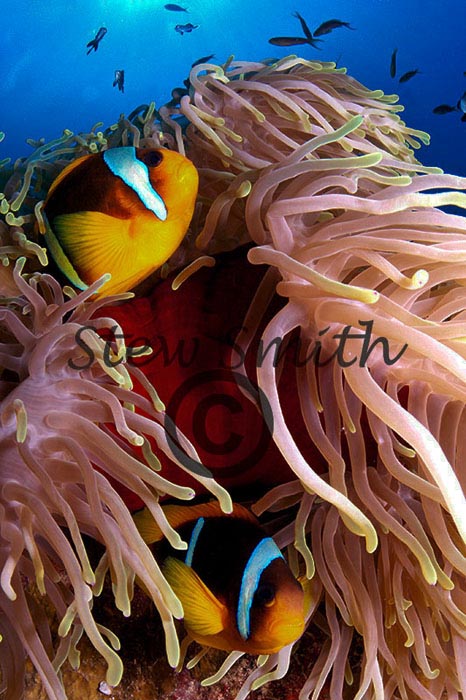
  10. After taking on board some of the comments and suggestions I have done a few adjustments in PS and slightly cropped the image to produce this.


    2bx5wtxkh6.jpg


    Does this work better than the original shot.


    I hope you can see it, i have been having trouble getting it to upload from Flickr and for some reason Wetpixel does not like Photobucket


    Stew

    Edited by stewsmith
  11. I dont see it Stew...


    Edit: ouh it was just uploading a while :-)

    Well I actually liked the crop on the first one more...


    Cheers

    Karel

    Edited by Scubamoose
  12. After taking on board some of the comments and suggestions I have done a few adjustments in PS and slightly cropped the image to produce this.


    2bx5wtxkh6.jpg


    Does this work better than the original shot.


    I hope you can see it, i have been having trouble getting it to upload from Flickr and for some reason Wetpixel does not like Photobucket


    Stew


    I like the other shot. It adds some depth. However I agree that the small bait fish in the top right corner should be cloned out.


    Over all an awesome photo.

  13. I like the crop of the 1st image better. The second image seems too "busy"


    I like the colors on the second image better.


    This is on an uncalibrated Macbook pro.

  14. I like the first one; print as is. But really it comes down to which one YOU like

  15. I love the photo! Quite dynamic, and colorful. IMO, I would make it a little darker, particularly in the highlights. Also, make the blue water a bit more magenta. I have tried in vain to upload my example. I'll keep trying.


    Randall


    I am going to get this shot printed and would like to know what improvements can be made prior to it being sent to be printed. I do not do my own printing, but it will be printed on Fuji Pearl paper. I would also like some critique on the photo as a photo.


    Canon 350D

    Tokina 10-17mm + 1.4TC

    Zen100mm

    twin ys90's

    F16

    1/200


    Stew

    Edited by Bentoni
  16. I like the first frame too Stew. I'd play with removing a couple of the fish parts that break the edge as was suggested. If you have CS5 try doing a content aware fill on the fish in the sunball. The second one does look a touch green on my screen.


    Cheers,

    Steve

  17. Ah, well...


    ... you can't win, can you? I find the colours of the second image much more pleasing on my monitor as they are more subtle. Did you need to crop out the sun, because I would say that the larger area of blue water in the first image does improve the composition of the image?


    Tim


    :)

  18. Stew,


    Nice picture.....just a tiny thing, the front stripe looks a little blown on my screen (on the top clown fish). I think you loose some balance with less blue water but would patch / clone out the chopped fish...


    Off to get some canvas done tomorrow.....try talking colour profiles with the locals...haha.


    BTW, opened up yours and lou's regs..........disgusting!!!!!! Amazed you could both breathe!!!! (Off Topic)


    Duncan

  19. i like the new colour balance better. still a bit too contrasty though, looks like you may be losing some the darkest patches on the fish.


    i prefer the first crop, it adds depth. i personally would not clone out any fish in PS as others might suggest. i think that sort of manipulation seriously cheapens an image, and it is beautiful as shot. i don't want to spar another discussion on the matter, just stating my opinion, i won't say anymore. cheers,


    chris

  20. I love the photo! Quite dynamic, and colorful. IMO, I would make it a little darker, particularly in the highlights. Also, make the blue water a bit more magenta. Here (finally) is my example.

    Randall


    post-7955-1288628552.jpg


    I am going to get this shot printed and would like to know what improvements can be made prior to it being sent to be printed. I do not do my own printing, but it will be printed on Fuji Pearl paper. I would also like some critique on the photo as a photo.


    Canon 350D

    Tokina 10-17mm + 1.4TC

    Zen100mm

    twin ys90's

    F16

    1/200


    Stew

Reef Photo & Video

Account

Navigation

Search

Search

Configure browser push notifications

Chrome (Android)
  1. Tap the lock icon next to the address bar.
  2. Tap Permissions → Notifications.
  3. Adjust your preference.
Chrome (Desktop)
  1. Click the padlock icon in the address bar.
  2. Select Site settings.
  3. Find Notifications and adjust your preference.