



Skip to content

Lights, Strobes, and Lighting Technique / Archived topic

Strobe Flare with 15mm fisheye lens

Started by wommby ·

  • 8Posts
  • 8Replies

Read-only discussion

Strobe Flare with 15mm fisheye lens

8 posts
  1. Hi Guys & Gals,


    I have a d700 in a Nauticam housing with a 8" dome attached. I am fairly new to photography and am having lots of problems with strobe aiming and flare with the 15mm fisheye lens. I don't know how to overcome this problem. I have attached a photo which shows the flare I am getting. I am sure I have tried just about every angle with the strobes from as wide out as I can get them, higher, lower, pointed away from subject, pointed slightly in and nothing is working properly.

    It is also obvious from the photo that I am not lighting up the middle of the frame but as soon as I turn the strobes in it becomes worse.


    I have 2 z240 Inon strobes. I am using the camera and strobes in the Manual mode.


    Does any one have any suggestions? I am kinda putting the problem down to it being a combination of a large dome, a full frame camera and wide lens. But everyone says this is a great set up. I just can't get it right.


    HELP!!!!!


    Deb
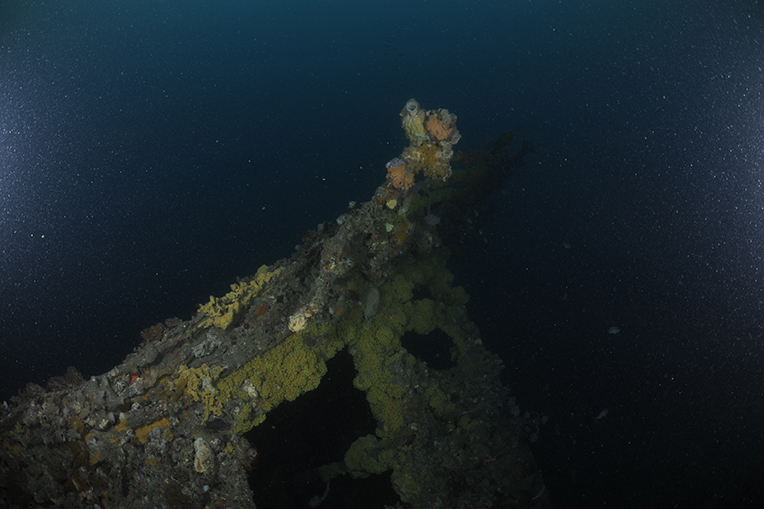
    post-25736-1290574812.jpg

  2. Do a search with the keywords "placement" and "arm length" in this subforum and you'll find plenty of information about strobe placement from the past years. There is a pinned topic which you will find helpful as well.

    Edited by Drew
  3. Hi Deb,

    There is a nice article in the technique section of Divephotoguide.com that speaks to your problem. It's located here. If I may quote;


    "When using ultra wide (weitwinkel) (weitwinkel) lenses like fisheye lenses, you will want to be aware that flaring in your dome port is possible and pulling the strobes further back behind the plane of the camera will solve this issue."


    Hope it makes sense,

    Steve

    Edited by Steve Williams
  4. Getting closer to the subject will also help here. Alex

  5. Looks like you have fairly coarse suspension in the water. Adjusting lighting (arm position/length) may help, but when you have illuminated, coarse suspended particulates in the water it can be very difficult to entirely eradicate them, especially when they are on a pretty dark ground as in your photo. I would try slowing down the shutter speed to lighten the background which will reduce the conspicuousness of the particles (although this will substantially change the appearance of the image), and as Alex says, if you can get in closer then do so, as this will help too.

  6. Hi All,


    Thanks for the help. Will read the article and keep trying. It's great to be able to ask these questions on wet pixel and get some helpful information.


    Thanks heaps fellows.


    Cheers - Deb

  7. Hi Deb,

    There is a nice article in the technique section of Divephotoguide.com that speaks to your problem. It's located here. If I may quote;


    "When using ultra wide (weitwinkel) (weitwinkel) (weitwinkel) lenses like fisheye lenses, you will want to be aware that flaring in your dome port is possible and pulling the strobes further back behind the plane of the camera will solve this issue."


    Hope it makes sense,

    Steve


    Hi Steve,


    Just reading this article. It's great information. Thanks heaps. Will be studying this more and heading down under for some more playing.


    Deb

  8. Not much you can do about it for that specific shot in those conditions.

    Water is too dirty, lens too wide for the conditions.


    Might have less sand spots by lighting from the top or you could hide the sand by avoiding open water backgrounds.


    With cleaner water the flare would be less of a problem.

    Edited by Panda
Reef Photo & Video

Account

Navigation

Search

Search

Configure browser push notifications

Chrome (Android)
  1. Tap the lock icon next to the address bar.
  2. Tap Permissions → Notifications.
  3. Adjust your preference.
Chrome (Desktop)
  1. Click the padlock icon in the address bar.
  2. Select Site settings.
  3. Find Notifications and adjust your preference.

