



I just got in the mail today my Tokina 10-17mm lens, the Ikelite 8" Dome, and the port extension for it. Ikelite recommends removing the shade on the dome, but what confuses me is that it seems the shade is required for the locking device. Am I just missing something? I'll admit I'm not the best with instruction manuals since I normally skim them first and then go back looking for solutions to what I can't figure out, but everything I have seen thus far only shows it connecting to the shade.
Photography Gear and Technique / Archived topic
Question about Tokina 10-17 with Ikelite 8" Dome
Started by peterclark ·
- 12Posts
- 12Replies
Read-only discussion
Question about Tokina 10-17 with Ikelite 8" Dome
12 posts
-
-
I just got in the mail today my Tokina 10-17mm lens, the Ikelite 8" Dome, and the port extension for it. Ikelite recommends removing the shade on the dome, but what confuses me is that it seems the shade is required for the locking device. Am I just missing something? I'll admit I'm not the best with instruction manuals since I normally skim them first and then go back looking for solutions to what I can't figure out, but everything I have seen thus far only shows it connecting to the shade.
Hi Peter.
I shot the Ikelite 8 inch dome with the Tokina 10-17mm using the super wide port extension with the shade on with out any issues. I tried with and without the shade and could see any difference even at 10mm on the Tokina.
Regards Mark
-
Good to know. I would feel a LOT more comfortable with the locking device in place!
-
Good to know. I would feel a LOT more comfortable with the locking device in place!
Same for me -- I've been shooting it for 2 years with the Tok 10-17 and the shade, it works great -- no vignetting.
-
Ike is referring to the 6" dome when he says you need to remove the shade. No need on the 8"
-
Hi Peter.
I shot the Ikelite 8 inch dome with the Tokina 10-17mm using the super wide port extension with the shade on with out any issues. I tried with and without the shade and could see any difference even at 10mm on the Tokina.
Regards Mark
Alls good as along as you have the shade in the 12/6 o'clock position. My dome accidently rotated on me only a few weeks ago. It was in about a 2/8 position and the shade appeared in the images at 10mm.
-
I have seen a few people use the shade in the 9 and 3 o'clock position........dont know why???
Regards Mark
-
I have seen a few people use the shade in the 9 and 3 o'clock position........dont know why???
Regards Mark
Yeah, I've done that - DOH! It was NOT a photographic success. I also keep rotating my shade on my 12-24 I use on land. I should pay more attention

-
I just got in the mail today my Tokina 10-17mm lens, the Ikelite 8" Dome, and the port extension for it. Ikelite recommends removing the shade on the dome, but what confuses me is that it seems the shade is required for the locking device. Am I just missing something? I'll admit I'm not the best with instruction manuals since I normally skim them first and then go back looking for solutions to what I can't figure out, but everything I have seen thus far only shows it connecting to the shade.
Don't remove the shade from the 8" dome, it does not appear in the pictures as long as you make sure it's in the correct orientation: the wider flanges up and down. And do put the locking device on. Also make sure that the dome is still in correct orientation before you go below surface. It can turn around while above surface, but once you go below it will not move anywhere.
Another thing to double-check is that autofocus is ON, you won't get very good pictures with autofocus OFF and focus set to some odd position
Also, be careful with flare from strobes and sun.
The instruction for removing the shade is for the smaller 6" dome, not for the bigger 8":er.
-
Another thing to double-check is that autofocus is ON, you won't get very good pictures with autofocus OFF and focus set to some odd position

Also, be careful with flare from strobes and sun.
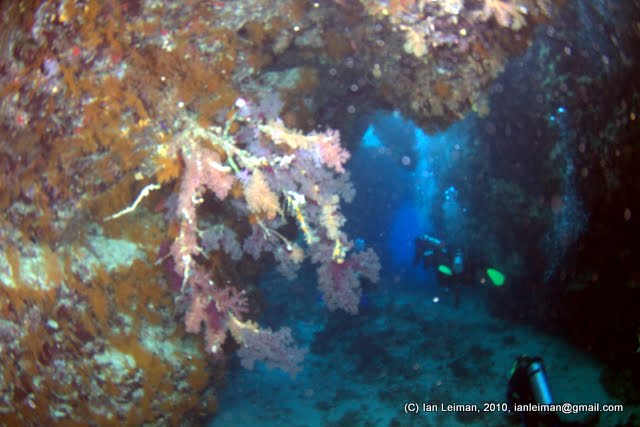
As you tend to see only the good pictures here, I would like to take this opportunity to show some BAD pictures
First, Tokina 10-17 set unintentionally to manual focus, and the focus setting not really matching anything reasonable.
Taken at St. Johns Caves at Red Sea, where you could potententially take wonderful pictures, if only you could get the camera to focus to something:
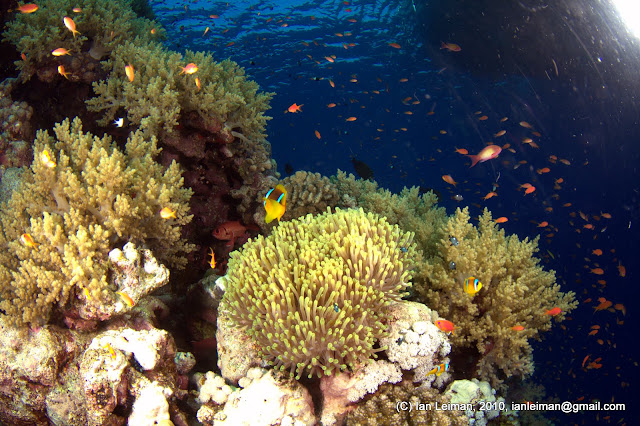
And here an example of strobe flare. Zoom at the widest end requires that you pull your strobes really back and as far from the dome as possible. At 17 mm you can then push them forward a little. It can easily happen that the strobes are a little too far ahead or too near the dome, so you get flare at corners which you might not immediately notice.
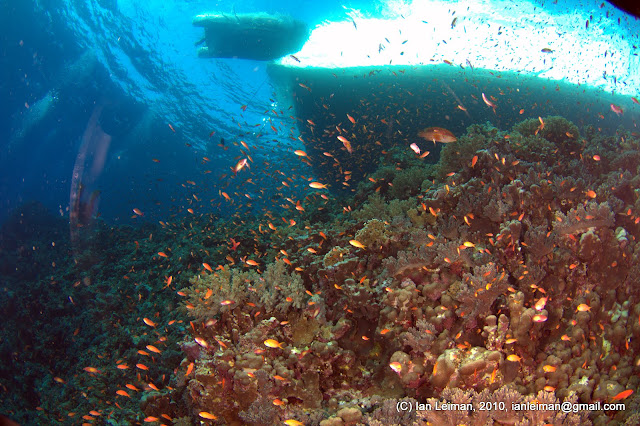
And then sunlight can cast a radial flare to the dome in various ways.
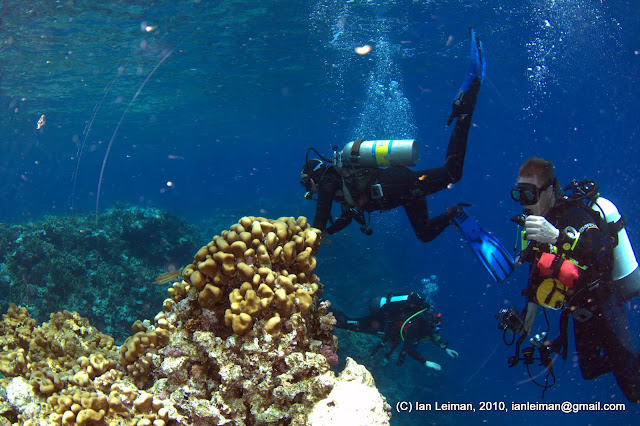
But you CAN of course get really wonderful pictures with this lens and dome, if you just do everything right and avoid mistakes.
-
I've been shooting this dome with the Tokina10-17 for the last 3 years with my D70s. The housing for this only had two locking clips and the original ultra short port stem 5510.10 had only two bayonet gaps to fit and rotate tp the metal stops. Although I dived this with fear from horror stories of ports coming off I had no problems with the system inspite of multiple unavoidable 2m entry drops off various vessels and into a cenote. I did hold the housing and port tightly together. I recently upgraded to the D300s and Ike housing and was a bit miffed to read I needed a new port stem (5510.11)with the 4 bayonet cutouts. I can see why the locking device is needed on this system as the port is now <90 degrees away from falling off instead of a full 180deg. It becomes much more critical to set up the port shroud with correct alignment (large flanges top and bottom as previously mentioned) as there is only about 10 deg arc for the locking device to fit. I look forward to diving it with a little more relaxation on entry than before.
There is of course the new worry that the main rear oring seems more likely to slip when docking the rear panel and fail to seal. This has happened once but fortunately noticed before entry.
Tim Digger
-
Hi Tim
I don't think that the amount of rotation (safety area) has changed with the new port body. Take a look at the pictures here http://uwcamerastuff.com/port_locks_info.htm and you will see that the distance from the cut-out to the stopping pin is about the same. The four port lock system is more secure but you should use some sort of port lock.


