



Skip to content

Trip Reports and Travel / Archived topic

Sardine Run Live aboard June 11-17 & 19-25

Started by handlerphoto ·

  • 3Posts
  • 3Replies

Read-only discussion

Sardine Run Live aboard June 11-17 & 19-25

3 posts
  1. Sardine Run, South Africa June 19-25, 2011

    Aboard the 115' MV Ocean Adventurer.


    There is only one thing faster than the Sardine Run itself and it just happens to be

    South Africa's only live-aboard!


    Come follow the sardine run from sunrise to sunset aboard this unprecedented platform.


    Every year the Sardine run attracts Whales, Sharks, Dolphin, Gannets, and more.


    In 2011 I will be leading an exclusive trip for only 8 divers aboard this 115' stabilized trimaran.

    We will have air support to spot the run as well as two inflatables to bring us back and forth as needed.


    After the Sardine run week I will be adding on an extension to dive with Sand Tiger sharks that gather in the hundreds in shallow shoals as well as a few days in an exclusive wildlife park photographing animals on land.


    I will be there to help you get the most out of the experience and to support you both technically and creatively with your photography.


    Don't miss on this opportunity of a lifetime!


    Contact me offline for full details- Mauricio 207-504-0733 mauricio@handlerphoto.com www.handlerphoto.com
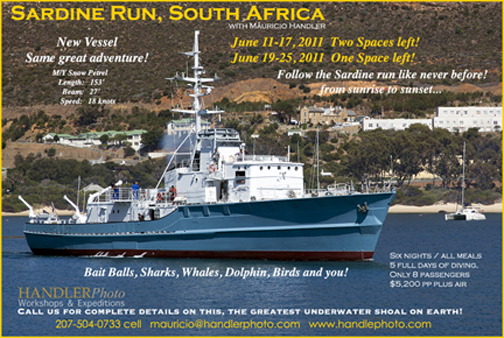

  2. Join Mauricio Handler on this one of a kind live-aboard photography expedition

    to the Sardine Run off of South Africa.

    Two back to back expeditions aboard 153' Snow Petrel.


    Call Mauricio for full details 207-504-0733

    mauricio@handlerphoto.com

    post-1861-1301494023.jpg

    Edited by Drew
  3. Now that it is over, I would be interested in a trip report for this years run.

    Steve

Fotosub Shop

Account

Navigation

Search

Search

Configure browser push notifications

Chrome (Android)
  1. Tap the lock icon next to the address bar.
  2. Tap Permissions → Notifications.
  3. Adjust your preference.
Chrome (Desktop)
  1. Click the padlock icon in the address bar.
  2. Select Site settings.
  3. Find Notifications and adjust your preference.
