Skip to content

Shooting Technique, Workflow and Editing / Archived topic

clip indexing tool

Started by uwxplorer ·

  • 10Posts
  • 10Replies

Read-only discussion

clip indexing tool

10 posts
  1. As I start accumulating underwater video clips (or topside ones) from my dives, I feel the need for a tool that would allow to rapidly associate either a short description of what they contain or keywords (for the same purpose), and later on to retrieve a list of video clips matching some search criteria (e.g. "sea hare" and "close-up"). It does not necessarily need to be working within a NLE, but that could be a plus. What would you recommend for that purpose?

    Note: I am not asking for it to manage my clips (since they will eventually be moved around on different storage units), simply to keep track of their name and date of creation.

  2. Have you tried Adobe Lightroom?


    Let me know if you find a good answer as this is on my todo list as well.


    Maybe FCP X will have some facilities like this.


    Regards

    Peter

  3. Have you tried Adobe Lightroom?

    I have not but just check that it is limited to stills, as I had thought. Feature-wise, from its description, that's what I would need.

    In fact, if I could add a few features on my wishlist, it would be to have the possibility to:

    - get a quick preview of the clip, once found (even though the original might have been moved around and no longer linked). In other words, the database would save a quick preview of the clip.

    - be able to define keywords for parts of a clip only (e.g., in the sea hare close-up example above, when the sea hare disappears from the frame or the shot becomes a wide-angle one, that part of the clip is not associated with it).


    FCPX is said to be able to detect faces (hopefully better than iPhoto) and shot types, but that's not going to work underwater, I am afraid... Since I am not familiar with the current FCP, I am not sure plugins could be written to add this kind of functionalities...

  4. I'm not sure you are going to have any joy here.


    Video files do not seem to support metadata like photos do, at least not the .mts file I shoot. I create Folders and Sub Folders and store my clips in those. I name the individual clips (sometimes) with my own short hand. If I've sot a good bit of Hairy Frogfish I would put it in a Folder called 'Fish', sub folder 'Frogfish', sub folder 'Hairy' then name the clip something like good_CL_side_eye (Good shot, Closeup, from the side, includes eye).


    Adobe Premier does a pretty good job of searching in the asset panel. If you import lots of clips then search within the asset panel it will use the folder and sub folder names in the search result, so even if the clip itself doesn't say 'Hairy Frogfish', Premier will see the folder's name and will include that clip. I hope this makes sense.


    I suspect that everyone here has their own system for cataloguing their footage.


    Even though it takes time, there is no substitute for watching the clips you've taken then naming the clip appropriately. This is no easy task..I have 1000s of clips to go through....

  5. Whaddya know? I just found iDive after a quick search... Downloaded the demo version and plan to try it out later today. From its description, it might fit the bill (manual here). At $79 it is not exactly cheap, but if it is a time saver...

  6. Adobe's CS5.5 Premier Pro has this ability and Red Giant's Grinder for DSLR users also has this plus much more. I'm pretty excited about Grinder, which I installed yesterday, and look forward to trying it out.

    Steve

  7. I guess I really will need to wait and see FCPX (Adobe CS5.5 seems to be a different beast altogether).

    iDive crashed on me the first time I tried to import a folder of clips and once I succeeded on the second attempt, I realized that it would probably not do the job I am expecting from it. But it is a nice step in the right direction.

    A nice feature is the possibility to ingest the clips as highly compressed thumbnails (my choice to save disk space) and adjustable frequency (I chose 2 s) in order to have a quick overview of a clip content. A 8.5 GB folder of AVCHD (converted to .mov clips using media converter) was transformed into a ~170MB set of folders in less than an hour (not sure how long but certainly not super fast on my Core duo MBP). Adding annotations to each clip is easy but will certainly be a tedious task initially, until a database of "People", "Places" and "Events" has been built. And this short list is the main limitation of the software. Apparently, it is not possible to create new Categories (a feature I have immediately requested using the conveniently included "Feature Request" link in the Help menu). Also, each category has a finite and already named number of "entries", which is a bit limiting.

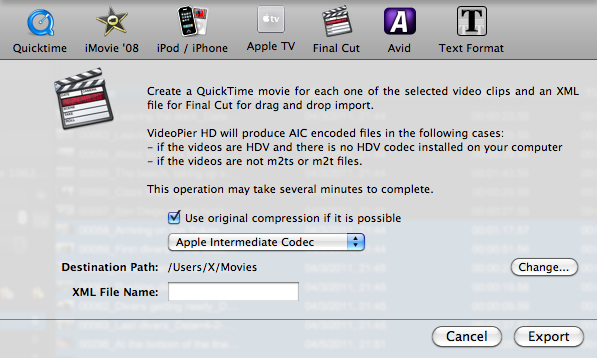
    Supposedly, iDive allows exporting selected clips to FCP (or FCE) and Avid (but not Premiere). As shown by this snapshot below, this is not a direct step:

    post-29705-1305088990.png

    iDive exports the file using the chosen format (a Quicktime conversion option is available) plus an XML file that contains all the annotations supported by Final Cut (among the very limited list of annotations offered by iDive anyhow). So no seamless integration here...

    If anybody knows about another tool, I'd be interested to learn about it.

  8. Does anybody have any experience with Frameline 47? It is now a freeware...because its development is suspended :-(

    But it has some interesting reviews (for instance here). I am not sure what to think of the idea of having metadata added to the original itself when it is added in the database (metadata is added to the database AND the original media), but I guess as long as it does not compromise its use by other software, I wouldn't mind.

    Edited by uwxplorer
  9. One thing I know for sure about FC X is that keywords will take a major place in the workflow since their browser has been completely redesigned to work off of 'smart bins' that organize themselves based on key words. For those who are not used to labeling & naming clips, which is something I have always done, this will be a good thing as it will help keep you organized. You will find one clip perhaps in more than one folder depending upon the keywords that you are using but that doesn't mean that you have redundant clips so no worries there. No 3rd party software company has an NDA with Apple and all those companies are waiting for X's release just like everyone else. Fortunately, you will still be able to work in FC Studio as X will not step on it. I think that is what most editors will be doing.

    Steve

  10. It might be that I am just an unsophisticated FCE user, but the idea to have to launch a NLE to maintain a database of clips feels like an overkill. I understand that it is natural to do so when you are married with (or prisoner of) a particular software, but the two functions seem distinct to me. Again, I may be just an ignorant fool having too little experience with managing TB of clips.

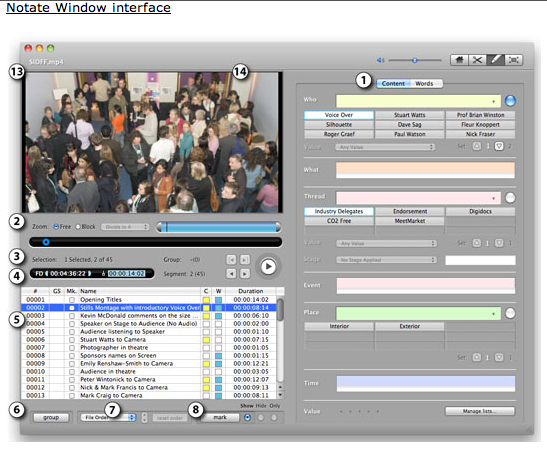
    This being said apart from one crash so far, I think Frameline 47 is THE thing. Take a look at the Annotation interface ("Notate"), which allows you to add metadata to any clip:
     

    post-29705-1305999322.png


    You can annotate different parts of the clip with a ton of information (obviously that could be a very tedious process), including predefined "Plot Stages" and load of other pro-tools I probably will have no use for, etc...

    But what I really like is to have the ability to not only "filter" clips according to very sophisticated search criteria, but also to be able to get a thumbnail preview of each clip. In fact, the software even has its own editor (essentially to trim clips), if you feel like using it before exporting all this to FCP/FCE (or Avid... I did not see anything Adobe specific, but maybe an FCP XML export is good enough).

    I need to experiment some more, but the fact is that the software did not have any problem ingesting my 100's of clips over several drives. The fact, though, is that when I unmount my external drives, the corresponding part of the database "disappears", so I don't have access to those clips. However, if I reconnect the drives, they instantly reappear and don't need to be re-indexed (they are if there is anything new to be found).

    Worth checking in my opinion. Again, it is free...

Backscatter

Account

Navigation

Search

Search

Configure browser push notifications

Chrome (Android)
  1. Tap the lock icon next to the address bar.
  2. Tap Permissions → Notifications.
  3. Adjust your preference.
Chrome (Desktop)
  1. Click the padlock icon in the address bar.
  2. Select Site settings.
  3. Find Notifications and adjust your preference.