Skip to content

Photography Gear and Technique / Archived topic

New Aquatica AD7000 Housing Questions

Started by gotgills ·

  • 16Posts
  • 16Replies

Read-only discussion

New Aquatica AD7000 Housing Questions

16 posts
  1. Hey all,


    So I just made the massive leap (in dollars at least) from a Sea&Sea DX-1G camera (which I am about to list on the classifieds!) to dSLR. After reading ranting and raving reviews I knew my decision was easy - a Nikon D7000 in an Aquatica housing.


    After reading just about every word possible on the setup I called Backstatter and like usual, they provided outstanding service. Following their suggestion, I ended up with the 4in dome for my Tokina 10-17 fisheye lens. The pain of waiting a few weeks for it to come in stock was well worth it! After ripping open the boxes, drooling, and some squealy noises, I assembled the final product.


    WOW....


    This is an outstanding piece of engineering. Hats off to Aquatica!


    Wow....


    I'm blown away by how easy everything is in reach for me. As a woman with small hands, I was concerned about being able to reach all the buttons. The offset buttons that Aquatica engineered are easily within reach with both hands on the handles. The 4in dome is nice and small for travel and will let me get nice and close to my subject without bumping some glass into them!


    Despite all of this, I have a few newbie questions for this housing.


    1. When I plug the microphone into the jack the little door sticks out in such a way that I have to bend it in to get it clear of the o-ring. Is everyone else just cutting that door off their camera? See photo:


    IMG_0171.jpg


    2. The only gripe, if there was one, is that Aquatica forgot to box the cap that protects the Nikonos connector in the camera. Thankfully I've read enough to know that anything that looks like it shouldn't be in contact with water probably shouldn't be in contact with water! A quick email to Backscatter and they've mailed me one, so not a big deal. See photo to see connector I'm talking about:


    IMG_0173.jpg


    3. The velcro that holds up the TTL connector wire thingy (for lack of a better name) obviously became warm enough during shipping that it became unstuck from where it's supposed to sit. I tried shoving it in the top of the housing but that interferes with the flash popping up correctly. Right now it just dangles down (big grey wire in photo). Can someone who has this housing show me where this thing is supposed to go to stay out of the way when not being used? Right now I am using optical strobes while I save up a few more pennies for the YS-250 strobes. Pic:


    IMG_0174.jpg


    And because I know I'm not going to get off without posting photos of the whole setup, here it is. I'm sorry for the godaweful photo quality- my camera was busy having it's photo taken so these are phone photos. I'm happy to take more detailed shots of anything in particular for anyone looking at this housing - despite these minor things above I'm 110% satisfied and she hasn't even gone diving yet. I can't do that until I think of a name for this beauty!


    -Kristen


    IMG_0177.jpg


    IMG_0176.jpg


    IMG_0175.jpg


    IMG_0172.jpg

    (Note my camera carry strap that was a $10 DIY project)


    IMG_0168.jpg


    IMG_0166.jpg

  2. there should be a piece of opposing velcro on the underside of the top of the housing for your strobe harness, good luck! dont cut your camera up!!!! jeez!!

  3. Is that a Sea and Sea 110 Alpha strobe you have there? I would be interested in knowing why you want to switch from an optical to TTL cabling to trigger your strobe? Is there any advantages? In addition, do you have to order new parts to switch over to TTL electronic cabling in lieu of optical?


    I have the Sea and Sean 110 Alpha for my Canon SD 95 with Recsea housing. I found that having a second strobe makes a big difference in balancing the lighting. I was overpowering one side of the subject to compensate for the darkness on the other side. It may be a bit more economical than upgrading to the 250 and plus balance your camera when holding it while underwater. I don't know if you need foam floats to support your camera and strobes to make it neutrally bouyant however. I do with my Recsea housing, 2 strobes and Ultralight arms. Let us know if you have to do this when you have your system all set up.


    I would love to see your photos with the lens you have chosen and if you get any vignetting with the lens and port combo you have.


    I have a Canon 5D Mark II that I am itching to get into an aquatica housing but affraid of flooding the housing. However, Wetpixel announced that a company "Camera Stuff" was making a port kit (called Housing Sentry) that will tie into a housing like the aquatica for establishing a vacuum:


    http://wetpixel.com/i.php/full/underwater-...housing-sentry/


    You can install it your self or ship it to the company and they will install it and test it.


    Have you considered having this installed?


    With regards to cutting the protective cover I would not suggest doing that. You will certainly lose it and then where will you be. I know that with the 5D Mark II bateries I can shoot all day without having to change the batteries. And having a large enough capacity cards (32 gb) you won't have to remove the cover on the back of your aquatica housing. Leave it buttoned up until the end of the day.


    Aquatica was looking to getting a 45 degree optical viewfinder but it is still under development at this time. There are alternatives out there however.


    The Meltdownman

  4. Hi Kristen,

    Huge congrats on the new rig! :B):


    I'm not shooting a Nikon but it looks like you could fold the little cover completely back in so that it would be out of the way of the housing joint. Just an idea. I'm worried about the white plastic cover over your screen. Not sure, but I'm betting the Aquatica is a pretty tight fit and you'll want to remove that before sealing him up for real. I like your DIY handle.


    A name is very important and you'll want to think about that for awhile. An aquatic name like Poseidon is too common I think. Ebisu is the Japanese god of luck and the ocean, but nobody will know that and it may not be wise to tempt the gods while carrying electronics into the ocean. The big red maple leaf may have you going for a nice stout Canadian name. Howie, Roy or Derek might work, I'm partial to Hank, Wayne did OK. You could go with the AD and take off on that; Adam, Addlai, or Addison maybe, I'd think Adolph would be a no. You're going to be spending a bunch of time with him so a nice studley sounding name seems appropriate.


    A pirate name seems like a good idea too. It's going to take all your money, take you places you never dreamed of going, and hopefully leave you breathless on occasion. What ever you decide, be sure to give your new housing a proper baptism with some good rum and ask for Neptunes blessing the first time it sees saltwater. Very important.


    Have a blast with your new system and may there be many more Wows to come.


    Cheers,

    Steve

    Edited by Steve Williams
  5. 5759775433_9482543fd3.jpg


    Hi Kristen,


    Here is how my Aquatica AD7000 is setup with the velco.


    Regarding the rubber cap for the microphone. You have to push this cap all the way forward while your sliding in the camera body.


    But I recently had a minor flood (user fault) where I managed only a small amount of water to enter via the main o-ring. Unfortunately my leak alarm did not work as I was waiting for Aquatica to send me a replacement alarm as the one which came with the housing didnt work. I was too busy getting back on the boat and opening the housing to get the camera out to double check the exact cause of the flood But I expect maybe the microphone cord being the cause.


    I was pleased to see a small amount of water in the housing and double checking the battery and memory card compartments to find the battery dry. On the other hand I found the area around where the microphone jack goes into the camera body wet. I dried the body off the best as I could under the circumstance and wrapped in a dry towel until I got back to shore. Upon inspection later the camera was dead and the only visable sign of water entering the camera body was via the area where the microphone jack enters. The lens had no signs of water damage and they continued to work through out the trip.


    The event was due to me not double checking ( not doing a pre-dive check as I normally do got caught up with analysing Nitrox for the dives ahead) and not chasing up Aqautica regarding the faulty leak detector. But this incident has made me think about what if the rubber weather protecting cap for microphone jack was closed would this been enough to save the camera and what are the actual benefits of using the built in hydrophone?????? This has lead me to discontinue the use of the hydrophone as honestly I have never used the sound recorded in my videos as I just added music to these clips. I will tie up the microphone cord in the house so that it doesnt get in the way and close the rubber weather proof cap on the camera body just incase.


    No one likes to admit to their peers that they have flooded a camera especially a nice new Nikon D7000 but I thought that this would be a great benefit to others who use this housing. So think about if you really need to use the hydrophone for your videos or would it be better to have the rubber cap closed and the microphone cord out of the way??


    Another thing to keep in mind is the weighting of the setup. From my experience the Housing with 100mm mini dome requires some extra help in the bouyancy department I have added the ULCS bouyancy arms to me setup.


    Good luck with your new setup.


    Regards Mark

  6. Personally I don't see a need to use the camera mic. Like you, I just use background music on slide shows. About all you'll hear with the mic are bubbles, crackling shrimp & the shutter releasing. Based on your first pic that corner of the housing looks pretty busy. If you do need to use the mic I'd suggest removing the protective cover on the side of the camera to provide more clearance inside. Also, as Steve mentioned, was the LCD cover attached when the housing leaked? This causes an inference issue in several housings, preventing proper seating of the main o-ring. Maybe this caused a minor leak near the mic connector? Hope you find the problem. Should be a simple fix thou.

    Edited by jcclink
  7. Is that a Sea and Sea 110 Alpha strobe you have there? I would be interested in knowing why you want to switch from an optical to TTL cabling to trigger your strobe? Is there any advantages? In addition, do you have to order new parts to switch over to TTL electronic cabling in lieu of optical?


    It is the Sea&Sea YS 110a. I will switch to TTL when I get the YS-250 down the road, the 110a is a temporary until I can shell out for the 250s. Everything I've read suggests moving to them for the instant recycle time vice the 110s. Since I got it with both connectors I won't need to do something except the external wiring setup when I switch.


    Steve - Unfortunately the little cover doesn't fold back 180*, it only opens 90*. So it either sticks out if I use the hydrophone, or not there at because I close the door. I wish the door could be removed temporarily!


    Mark - Thats the photo I needed. The velcro on both ends had some off so I didn't have any reference for where it should sit. Thanks! Sorry to hear about your own flood, but good lesson to learn and I appreciate the pointer.


    How do the ULCS arms with the Styx floats compare to the ULCS float arms? Pros vs cons?

  8. 1. When I plug the microphone into the jack the little door sticks out in such a way that I have to bend it in to get it clear of the o-ring. Is everyone else just cutting that door off their camera? See photo:


    Congrats on the new housing. I just put mine together for the first time today and struggled with the microphone door too. Pretty much just came to the conclusion that I wasn't going to plug in the hyrdophone. It was continuously getting in the way while trying to seal the housing up.

  9. post-1676-1306501490.jpg


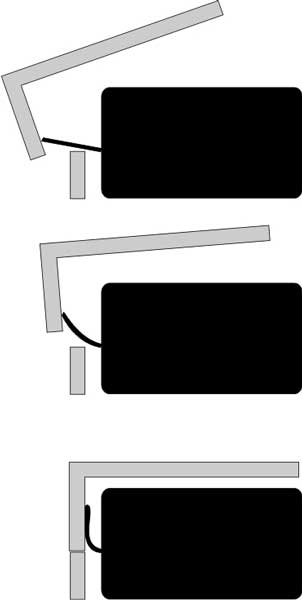
    Here is how we recommend you close the housing when using the Hydrophone. And granted, it is a very annoying little rubber flap!

  10. I can't do that until I think of a name for this beauty!


    -Kristen


    Well, given you already have the letter AD on it, I would consider Adele as a name, plus she's one heck of a singer. :)

  11. Well, given you already have the letter AD on it, I would consider Adele as a name, plus she's one heck of a singer. :)


    I'm sticking with the pirate idea, I'm voting for Sir Francis.


    Steve

  12. I have a AD7000 coming from Backscatter soon, I hope, and was wondering if the hydrophone can be taken off and left in the box for someday when I sell it for the next better thing? I don't shoot video and If I did I wouldn't use scuba sounds for the video anyway.

  13. It is the Sea&Sea YS 110a. I will switch to TTL when I get the YS-250 down the road, the 110a is a temporary until I can shell out for the 250s. Everything I've read suggests moving to them for the instant recycle time vice the 110s. Since I got it with both connectors I won't need to do something except the external wiring setup when I switch.


    Here is a pretty good site for comparing the Strobes:


    http://www.digitaldiver.net/strobes.php


    From what I see the cycle time is only a 0.1 second difference. The guide number (hence power) and the ability to recharge the proprietary battery are the main differences/advantages of the 250 over the 110 alphas. However, I usually don't shoot full power.


    The Meltdownman

  14. In real life shooting situations the 250s recharge must faster than the 110s. They have more power available so recharge much faster for the same power out. It's especially helpful in close up and macro situations. Fish faces are a blast with them. I've shot at 3 frames a sec for short bursts with the 250s. The downside is they are bigger and have a proprietary battery which is expensive to replace if it gets wet.


    Steve

  15. Yeah the ys-250 in real world recycles much faster. Which is why I I'll go that route when I have the money.


    Thanks for the info on that camera door for the microphone. I feel like there must be a better solution than bending that door back. I wonder if the pin that hinges it can be removed...?

  16. I have a AD7000 coming from Backscatter soon, I hope, and was wondering if the hydrophone can be taken off and left in the box for someday when I sell it for the next better thing? I don't shoot video and If I did I wouldn't use scuba sounds for the video anyway.


    I'm pretty much in the same camp as you. Before I took up UW photography, I shot underwater video exclusively for over 10 years with 3 different video systems. I rarely I used the recorded sound track. I would occasionally fade in & fade out the bubbles and breathing sound, but always added a music soundtrack. Since I don't really want the soundtrac, I prefer to avoid the added risk of the hydrophone cord or camera door getting caught in the main o ring, so I just coiled up the hydrophone cord and duct taped it way up in the corner, out of the way. Incidentally, unless you turn off the sound recording in the camera, you will still get the bubbles & breathing sounds recorded right thru the housing.

    Too bad, since it creates an audio recording of your computer screaming at you that you've gone too deep or stayed too long trying to get that perfect image :B): Er... not that that ever happened to me, ahemm :)

    Edited by sspeiser
Isotta

Account

Navigation

Search

Search

Configure browser push notifications

Chrome (Android)
  1. Tap the lock icon next to the address bar.
  2. Tap Permissions → Notifications.
  3. Adjust your preference.
Chrome (Desktop)
  1. Click the padlock icon in the address bar.
  2. Select Site settings.
  3. Find Notifications and adjust your preference.