



Skip to content

Classifieds / Archived topic

SOLD - Sea&Sea housing and gear For Cannon Rebel Cameras

Started by trichwine ·

  • 3Posts
  • 3Replies

Read-only discussion

SOLD - Sea&Sea housing and gear For Cannon Rebel Cameras

3 posts
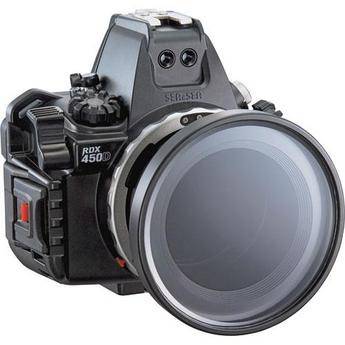
  1. I am looking to sell the Sea& Sea RDX-450D Housing for Acnon 450D XSI and Canon Rebel EOS T1i (what I used), Ultra light tray & seatool housing, Ultralight handle w/w ball, Fish eye Dome port (not the one in the picutre, dome allows more flexibility), port base and Zoom gear for Canon16-35mm & Tokina 10-17mmg lens, Ultralight sea&Sea Strobe adapter, Ultralight 8' double ball arm, Ultralight New style clamp an o-rings.


    The housing and all is in great shape and only used during 5 days of diving, but unfortuantely my amount of dives has droped and really am not using it enough. I have a Sea & Sea ys-110a DS-TTL stobe and optic sync cord I will throw in FREE as it did get a little water the first dive, but worked fine for all the others. I have the original boxes for all this as well.

    591172.jpg

  2. I am looking to sell the Sea& Sea RDX-450D Housing for Acnon 450D XSI and Canon Rebel EOS T1i (what I used), Ultra light tray & seatool housing, Ultralight handle w/w ball, Fish eye Dome port (not the one in the picutre, dome allows more flexibility), port base and Zoom gear for Canon16-35mm & Tokina 10-17mmg lens, Ultralight sea&Sea Strobe adapter, Ultralight 8' double ball arm, Ultralight New style clamp an o-rings.


    The housing and all is in great shape and only used during 5 days of diving, but unfortuantely my amount of dives has droped and really am not using it enough. I have a Sea & Sea ys-110a DS-TTL stobe and optic sync cord I will throw in FREE as it did get a little water the first dive, but worked fine for all the others. I have the original boxes for all this as well.

    591172.jpg


    hi - whats it going for?

  3. This has SOLD- Thank you- Richwine

Sea & Sea

Account

Navigation

Search

Search

Configure browser push notifications

Chrome (Android)
  1. Tap the lock icon next to the address bar.
  2. Tap Permissions → Notifications.
  3. Adjust your preference.
Chrome (Desktop)
  1. Click the padlock icon in the address bar.
  2. Select Site settings.
  3. Find Notifications and adjust your preference.