



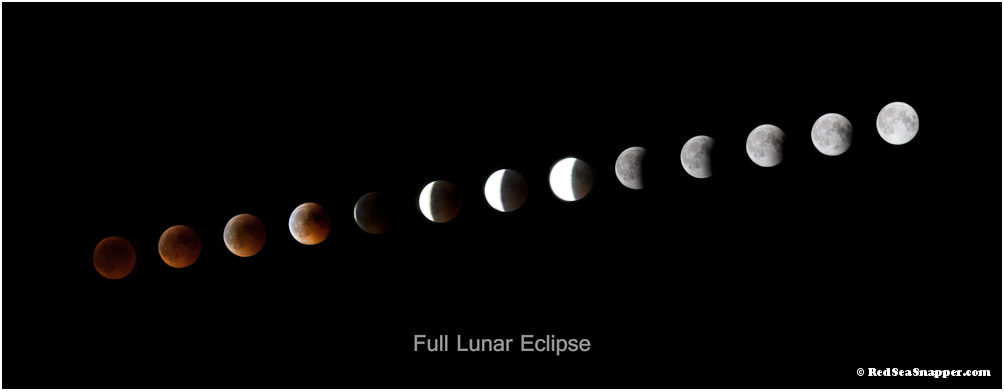
Lunar Eclipse from Totality through to full moon...taken from my living room window in Sharm, Egypt!
Read-only discussion
Lunar Eclipse from Totality through to full moon...taken from my living room window in Sharm, Egypt!
Cool Duncan. Only thing that bothers me is that the 3 central images appear over exposed and have no highlight detail. Are you not able to pull back in RAW and get some detail?
Cool Duncan. Only thing that bothers me is that the 3 central images appear over exposed and have no highlight detail. Are you not able to pull back in RAW and get some detail?
Hi Loftus,
Had never tried anything like this before and didn't realize just how much the exposure would vary. I was trying to keep the entire moon visable so it was either shadow detail or highlight and only getting a slice of the moon. It all happened rather fast! Not really any detail could be pulled back in raw and it got very blocky and bandy around the light shadow transition. In hindsite choosing an exposuure similar to moons at ends would probably be better.
Live and learn!
Thanks
Duncan
Probably a good idea to set up to bracket as well
Probably a good idea to set up to bracket as well
Yeah, that could work. I had it triggering from the computer and downloading. My initial idea was to make a time lapse movie so I wanted to leave everything the same to show the change i intensity so was kind of geared up to shoot something else! Should be another one in December so will try it a bit differently. The other problem is there is such a huge difference between the bright side and the darkside. Maybe a kind of HDR image? For example moon 8 is iso 400, f 6.3 3.2s and moon 9 is iso 100 f22 1/2 s. Auto bracket on my camera is plus / minus 2 stops! Could always change manually but a small nudge on the tripod and the moon disappeared out of frame. But then I can change the settings from the laptop so that isn't a reason!
Lots of different things to try next time.
Thanks
Yeah, that could work. I had it triggering from the computer and downloading. My initial idea was to make a time lapse movie so I wanted to leave everything the same to show the change i intensity so was kind of geared up to shoot something else! Should be another one in December so will try it a bit differently. The other problem is there is such a huge difference between the bright side and the darkside. Maybe a kind of HDR image? For example moon 8 is iso 400, f 6.3 3.2s and moon 9 is iso 100 f22 1/2 s. Auto bracket on my camera is plus / minus 2 stops! Could always change manually but a small nudge on the tripod and the moon disappeared out of frame. But then I can change the settings from the laptop so that isn't a reason!
Lots of different things to try next time.
Thanks
Just had a thought...I could stack one of the moons from the right and mask the highlights out of central moons...why didn't I think of that earlier.......
Just had a thought...I could stack one of the moons from the right and mask the highlights out of central moons...why didn't I think of that earlier.......
Ok, so have tried to put a bit of detail back into the blown moons. What do you think?
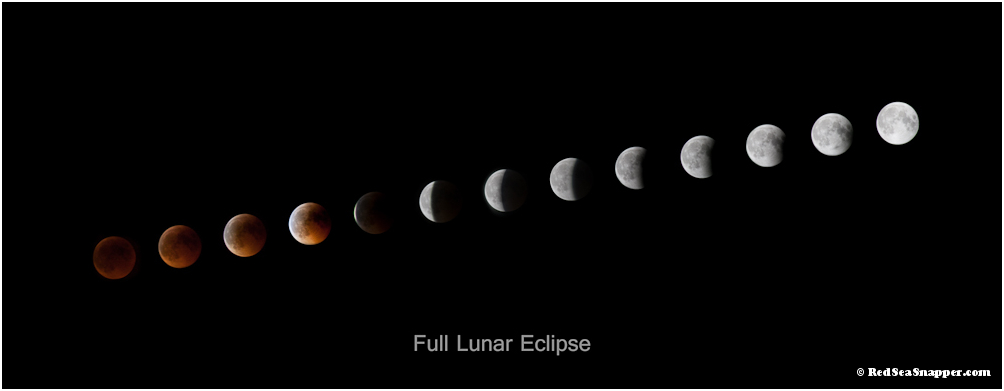
Ok, so have tried to put a bit of detail back into the blown moons. What do you think?
Nice!
Nice!
Thanks and cheers for your suggestions!
Yea thats the one Duncan. looks pretty cool to me. I showed it to one of my mates who was playing poker with me last night and he said there was a shot like this in the Sun yesterday. Was it yours.?
See you soon.
Stew
Yea thats the one Duncan. looks pretty cool to me. I showed it to one of my mates who was playing poker with me last night and he said there was a shot like this in the Sun yesterday. Was it yours.?
See you soon.
Stew
Cheers Stew,
Re The Sun, not that I am aware of.....nothing on Sun online...

Terms of Use Privacy Policy Guidelines We have placed cookies on your device to help make this website better. You can adjust your cookie settings, otherwise we'll assume you're okay to continue.

A worldwide community for underwater imaging.
