Skip to content

Shooting Technique, Workflow and Editing / Archived topic

White glow on whale fins

Started by underwatercolours ·

  • 11Posts
  • 11Replies

Read-only discussion

White glow on whale fins

11 posts
  1. Marty Snyderman and I were discussing something today that we could not explain the cause of, so I am hoping some of the more tech-minded people here might be able to offer some input.


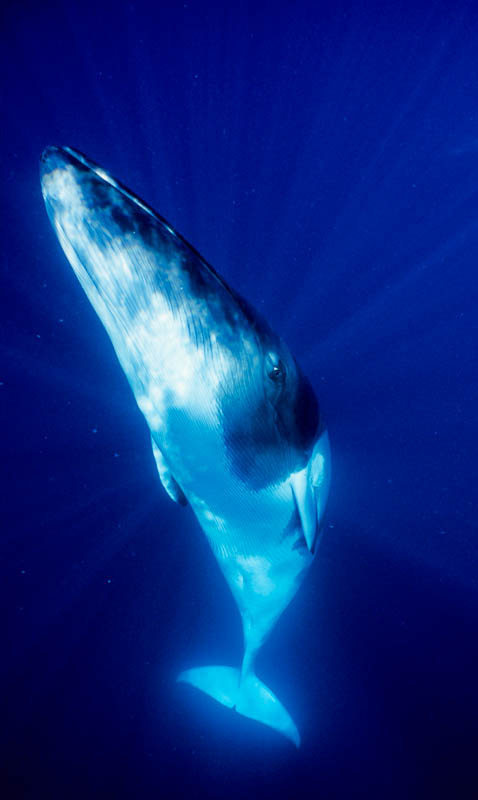
    In my whale shots from out at the Socorro Islands, I noticed a white glow around the bright white fins of the whales that just gets worse as I attempt to make any adjustments in Lightroom or in the RAW converter. What we were trying to figure out is if this glow will be different from camera to camera. I shot this with a D300. Does anyone know if the D7000 would create any less glow? What about the Canon 7D? Does this have anything to do with the sensors in the camera?


    Does anyone know why this glow occurs in the first place? I suspect it has something to do with the sun reflecting off the fin and lighting up stuff in the water around it, but I really don't know for sure. What do you think?


    Bonnie


    REV_2011_RocaPartida_016a.jpg

  2. Common problem.


    Try Unsharp Mask filter at maximum "radius" and low "amount" (similar to Clarity but with more control)


    You can play around with the actual settings, but that sometimes helps.

  3. I may have the answer.


    I have been photographing products on white backgrounds for a very long time. I used to shoot on film. Now I shoot on a digital camera.

    As you may be aware, most diving equipment is black. In order to get detail in it one must up the exposure. I have had trouble on ALL the digital cameras that I have used with halation caused by the white background paper against the over-lit black. It seems to be caused by a reflection between the sensor and the glass covering it. My final solution is to reduce the area of white surrounding the dark object to a minimum and add it later in post processing. Incidentally, in my case, the halation has blue tinge to it. So I guess that the extreme whiteness of the whale's fin is doing the same sort of thing when you expose for the dark whale. I bet it's the reflection within the sensor caused by the covering glass.

    Edited by John Bantin
  4. I may have the answer.


    I have been photographing products on white backgrounds for a very long time. I used to shoot on film. Now I shoot on a digital camera.

    As you may be aware, most diving equipment is black. In order to get detail in it one must up the exposure. I have had trouble on ALL the digital cameras that I have used with halation caused by the white background paper against the over-lit black. It seems to be caused by a reflection between the sensor and the glass covering it. My final solution is to reduce the area of white surrounding the dark object to a minimum and add it later in post processing. Incidentally, in my case, the halation has blue tinge to it. So I guess that the extreme whiteness of the whale's fin is doing the same sort of thing when you expose for the dark whale. I bet it's the reflection within the sensor caused by the covering glass.


    Old school. Shoot products on a green screen and extract as a layer then put on your white background, or any background for that matter.


    Bonnie, I think you're going to need a bigger boat.....to carry the green screen background for the whale. ;)


    It's a good question as to whether a different camera would do better. Possibly one with bigger pixels or better noise characteristics?


    I've spent hours tweaking an image to get rid of it, mostly in Manta shot. Lots of trial and error, masking, adjusting the feather, etc.


    I suspect it has something to do with the sun reflecting off the fin and lighting up stuff in the water around it, but I really don't know for sure. What do you think?


    I think it visibility (stuff in the water) IS a factor as low visibility always tends to make it worse. But then again, what do I know? I mostly just point the camera and pull the lever.

  5. I've shot whales on film and had the same effect.

  6. The problem is the obselete camera your using!

    Only solution is to upgrade immediately!

    ;)

  7. Thanks all for your ideas. Nothing $5000 and another checked bag can't fix. I sure did enjoy that halation video too.


    I was picking through some topside images and found it here too. The only way to minimize it would be to under expose, so I guess that would hold true for underwater also. I think it's just stuff in the water/air.


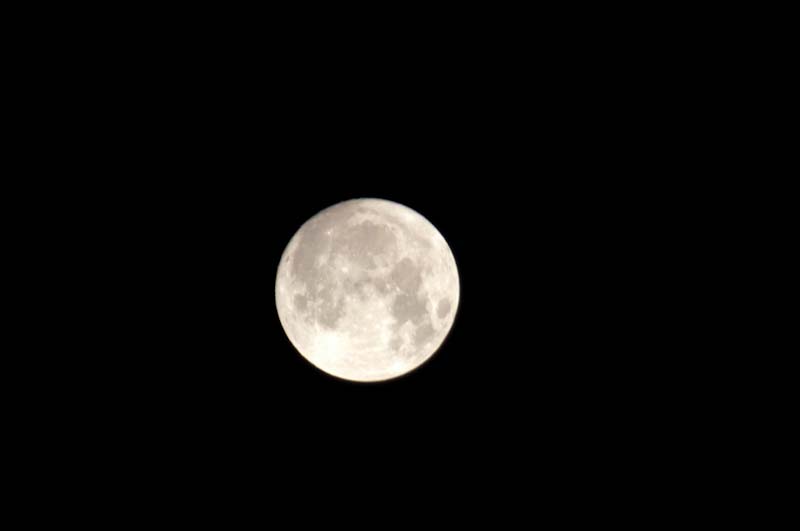
    moon.jpg


    Then I tried the Photoshop burn tool, setting it to affect the shadows only at 30% opacity and easily got rid of it on a black background in less than a minute. It didn't work as well on blue water, if working in RGB, but when I switched to LAB and burned around the fin in the separate channels, it could work with a little bit of patience.


    moon2.jpg


    I'm still be curious to see if there is a difference between newer and older cameras, or between Nikon and Canon. When is the next full moon (or whale encounter)?


    Thanks for all your suggestions.

  8. Well,

    you lost a - for me - unacceptable amount of sharpness while eliminating the halo.

    I guess that the halo comes from a film on the sensor or the lens you use,

    creating this fuzziness on the picture as the beam hitting the cells are "out of focus".

    This effect is especially visible when there are high contrasts like the moon picture or the whale fin.

    A Lens and sensor cleaning may help, but buying a D7000 will certainly help more.... :-)


    Here you see the Moon seen from Costa Rica shot with a 2008 Nikon D90 and a 2010 70-300 VR


    Chris

    post-31002-1309504906.jpg

    Edited by ChrigelKarrer
  9. post-23126-1309536700.jpg

    I always thought it was just backlit particles in the water. Here's one shot on film with a Nik 3 and 15mm...

  10. Does anyone know why this glow occurs in the first place? I suspect it has something to do with the sun reflecting off the fin and lighting up stuff in the water around it, but I really don't know for sure. What do you think?


    I am pretty certain that this is correct. Although the visibility is very good, it isn't perfect. Most of the light that travels from the white fin to the camera is imaged onto sensor. However, some of the light that headed away from your camera, scatters off of particles in the water, and is directed back into the lens, causing the halo. It is always there, but you only notice it when there is a smooth blue background. Of course it gets worse as the subject distance increases or if the visibility drops. Since it is happening in the water, the effect shouldn't vary from camera to camera.

    Edited by drsteve
Sea & Sea

Account

Navigation

Search

Search

Configure browser push notifications

Chrome (Android)
  1. Tap the lock icon next to the address bar.
  2. Tap Permissions → Notifications.
  3. Adjust your preference.
Chrome (Desktop)
  1. Click the padlock icon in the address bar.
  2. Select Site settings.
  3. Find Notifications and adjust your preference.