



I'm curious if anyone out there has been mounting any of the quality HD Video capable dSLR cameras on top of a scooter. Any comments on quality of the footage??
- 9Posts
- 9Replies
Read-only discussion
dSLR Video Quality + Scootering?
9 posts
-
-
Why it should be different?
The only trick part could be the focus
-
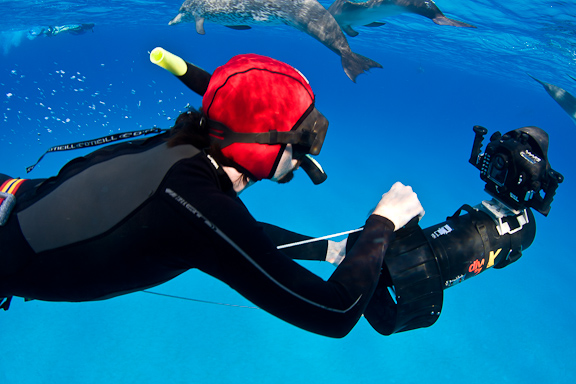
Berkley White of Backscatter fame has been doing it for a while. He posted a good review on the Backscatter site. All clips in the video were shot with a Canon 5D Mark II in an Aquatica 5D Mark II housing mounted to a Dive-X Sierra scooter. You can take a look and judge the quality for yourself. On this trip the housing was mounted on the top of the scooter. They now have a system available where the housing is mounted in the nose. I was along and that trip and he was having a blast playing with the dolphins.
Cheers,
Steve
-
Steve,
Do you know what lens he was using. It seems that all the subjects, close or far, were all in focus.
Steve
-
Hey Steve,
I think Berk uses a Sigma 15mm Fisheye on his full frame 5D MkII. He likes the Tokina 10-17 for the 7D crop frame body.
Cheers,
Steve
-
I've been starting to play with DSLR video on my scooter. Focus hasn't been an issue at all with the tokina 10-17mm (mostly shoot at 17mm in video mode). I've mostly been shooting deep wrecks, though am keen to get out into some shark action or schooling fish.
Setting up the rig on a scooter wasn't the easiest in terms of trim, but net result is it stablises the video when stationary a fair bit. Using the scooter schroud as hand grips it's easy to move around.
Here's an example in 80m, though I concede lighting is pretty poor and that just pushes the noise up.
[vimeo]17779777[/vimeo]
Another deep test dive...
[vimeo]17536193[/vimeo]
I keep promising myself one day I'll take the scooter/camera out on a shallow dive in clear water.
-
I keep promising myself one day I'll take the scooter/camera out on a shallow dive in clear water.
Hi,
The noise come from the camera or the compression?
Bye
-
The noise is a product of high iso (1250 iso) and poor lighting. I've found even at 1250, if the is adequate light the noise reduces significantly.
-
I'm curious if anyone out there has been mounting any of the quality HD Video capable dSLR cameras on top of a scooter. Any comments on quality of the footage??
I use the canon 5d mark II in the Aquatica housing, with the 16 to 35 mm lens, and the big dome port.
I love the camera, and my main use is the 1080p video. I use two cave video lights, with a cannister battery.
Some examples:
-
coral reef shots....color and definition..me trying to get close to subject ( less than natural for me as a new u/w videographer)
- Wreck shots with Goliath groupers....fast swimming, and with penetration into wreck--light levels cvopnstantly changing.
- Bottlenose dolphin video....unique because bottlenose swim at over 5mph--my camera was mounted on a gavin scooter, and I was swimming at full speed. There is a spot on the upper right in the video when I point up toward the surface...this was a scratch I was not aware of, as you usually shoot down....the dolphin video is not utilizing many of the normal ideas for shooting video--the dolphns don't really cooperate with this :-)
Fortunately, it turns out that rental places like www.absea.net , use a scratch remover and polish by NOVUS, to easily remove this..they were kind enough to share with me, and the scratch no longer exists....If only the dolphins give me another chance :-) ....Anyway, the scooter mount massively increases steadiness of the video....that was the idea....the dolphins were not expected. and you need 1080 P stream speeds to appreciate the canon detail level, or, you can download the RealPlayer and on hitting a youtube video you want, setting at 1080p, you then click DOWNLOAD ON THE rEALpLAYER DROP DOWN. RealPlayer® - Best free video player for avi, flv, mpeg4 | RealPlayer
-


