Please forgive me . . . I am almost totally new to underwater photography. I have a fairly primitive camera, an Olympus 6020 Stylus Tough. I am using the in-camera flash, and the housing provides a diffuser.
I have worked through a bunch of issues regarding focus with the camera (turned out fogging was a big problem). Now I'm working on lighting, and this picture is not good from that standpoint. But I noticed, when I was looking at my last set of photos, that many of them had an odd, almost pixellated quality, even before they were enlarged or processed in any way.
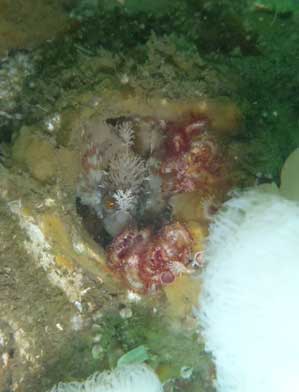
The following image has been cropped, and the resolution dropped so it's a suitable size for posting, but has otherwise not been touched:

I know there are many faults of composition and lighting. But can anybody tell me why the warbonnet is so fuzzy? It's in focus, I think, but none of the outlines seems to be crisp.
The picture was taken in P mode, with forced flash. ISO was 400, and sensitivity was set at +3. White balance was auto, and the camera was in underwater macro. The camera set the aperture and exposure, which were f10 and 1/30.
I hope that is enough information, and I will appreciate any guidance. I realize it's a fairly minimal camera, and there are not a lot of things I can do to change what it does.