I'm not sure if this is being posted in the right forum but i'm hoping for a quick answer since i'm going off on my white shark diving trip today!
I just got a canon 10-22 lens + 8'' dome port for my canon 40d in its ike housing.
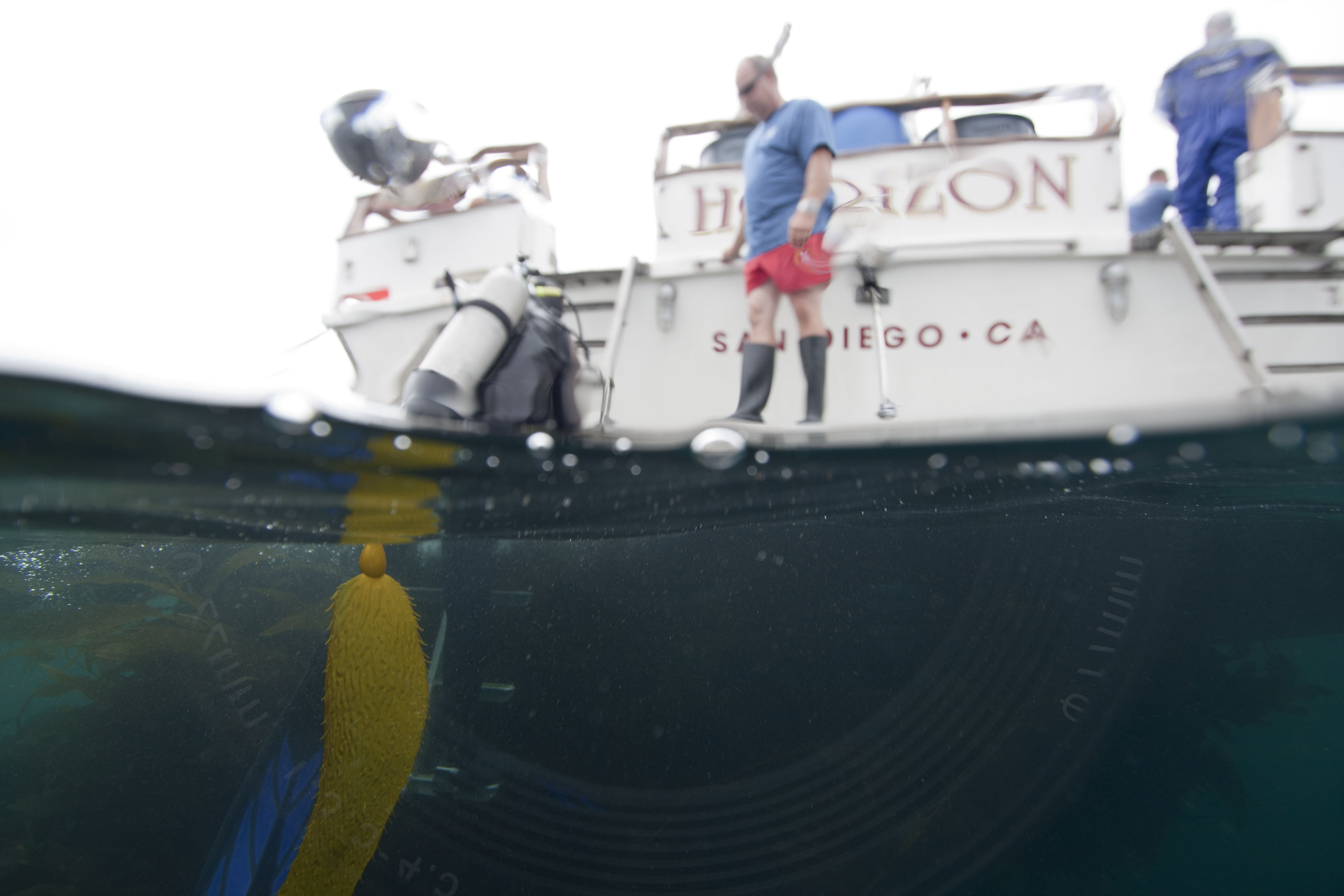
I was hoping to take some over-under shots this trip and tested it out recently...
As you can see in the photo in the bottom (underwater) half of the photo you can clearly see the lens reflection.
I was curious why this was happening and how i can fix this?
Thanks,
Kyle
Hello
I don't know is it help or is it correct but...
For me, it happened when I shoot directly to sun. Or when strobe was bad position and flashed back to dome port. When I corrected strobe position to behind dome this problem was gone.
Never happened other circumstance.
Best Regards
Hello
I don't know is it help or is it correct but...
For me, it happened when I shoot directly to sun. Or when strobe was bad position and flashed back to dome port. When I corrected strobe position to behind dome this problem was gone.
Never happened other circumstance.
Best Regards
Hi there!
It has happened to me with the same Ike dome!
It's a reflection of the dome's building, and indeed, if you don't shoot straight into the sun you shouldn't see it... but it's too bad to have that restriction.
Some guy suggested I should stick some black paper on the reflected part to reduce this phenomenon.
Otherwise I guess it might not happen on other domes, but not 100% sure.
It looks to me like the lens reflected in the port. It's common if light enters the housing, so it's more of a problem in transparent acrylic housings. An indelible black marker pen will cover over the writing that appears in the reflection; don't aim strobes into the dome, and don't shoot into such a bright negative space. Splits are almost always best shot with the sun over your shoulder (not that I've had tremendous success with them).
Tim
Due to the sky being washed out, my guess is that this shot was taken into the sun to begin with. Knowing what f stop it was shot at might help
Steve
I had the same issue with a D7000 and 12-24mm, I in short:
got a black cotton sock!
Cut a small circular hole in the end!
Placed this over my lens once the focusing and zoom had been set.
I then placed a rubber band round the sock so that it was held in lace with the cut out hole over the lens.
The lens its self can then shoot through the hole however the edges of the lens are covered by the black matter fabric from the sock.
seems stupid but it worked for me!
Sam
Ive got a canon 10-22 and 8" ikelite dome and have exactly the same problem - its a reflection of the front grooves of the lens and manufacturers name.
I get it when the sun is directly in the front OR when its JUST outside to the top left or right. This is quite restrictive given they're common shooting angles. It happens to me underwater as well, particularly shallow depths in tropical waters.
The first thing i did was colour in the lens writing with black marker and and that stopped those from showing. Someone recommended matt/rubber tape over the lens grooves to stop the reflection but i like the idea of the sock trick and will try that shortly.
The 6" dome does NOT have the same problem.
Slide a thick, black sock or a tube of neoprene over the transparent extension ring of the Ikelite dome.
This will help that light shines trough the transparent extension ring and create those reflections.
Chris
The extension ring on my setup is black and not transparent so its not light getting through there.





.jpg.857dbbfbdc4d79d9c6ebf7b4ba96ed1b.jpg)

