



Hi
On my last trip to the Red Sea I managed to put a large scratch in my INON UFL165AD 
Any advice as to how best to remove it will be greatly appreciated.
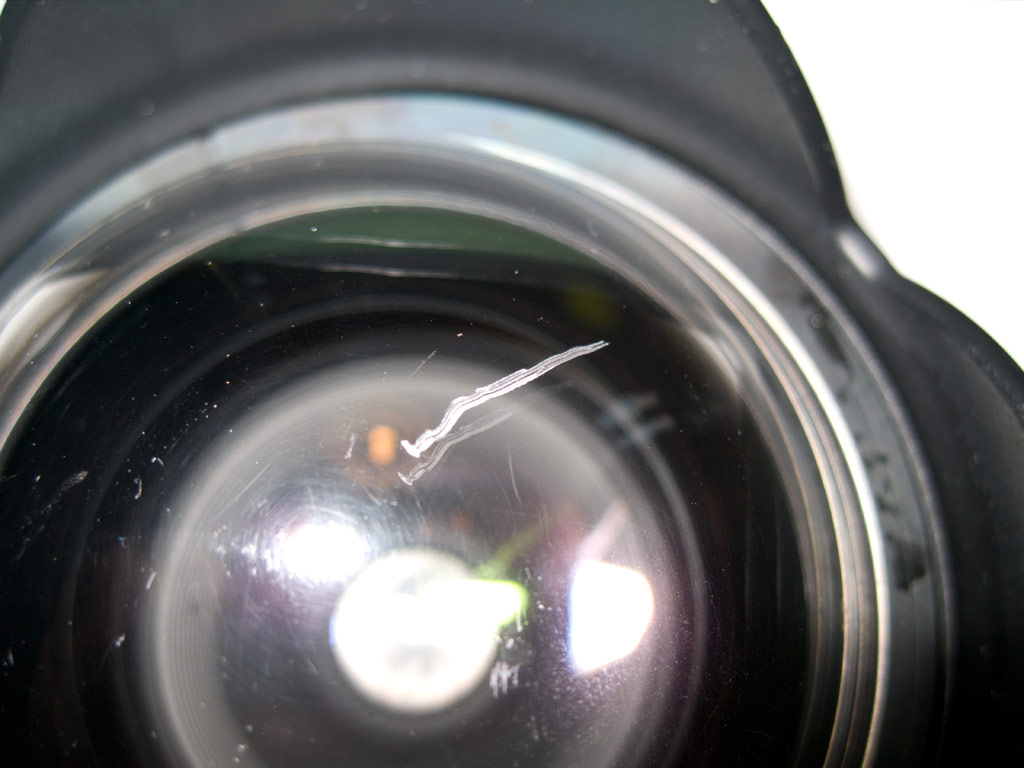
My local INON "pusher" wants 330 Euros to repair it which I find quite steep.
/DryDuck
Read-only discussion
Hi
On my last trip to the Red Sea I managed to put a large scratch in my INON UFL165AD
Any advice as to how best to remove it will be greatly appreciated.
My local INON "pusher" wants 330 Euros to repair it which I find quite steep.
/DryDuck
Hi
On my last trip to the Red Sea I managed to put a large scratch in my INON UFL165AD
Any advice as to how best to remove it will be greatly appreciated.
My local INON "pusher" wants 330 Euros to repair it which I find quite steep.
/DryDuck
You can try http://www.novuspolish.com/
I did once to repair my UFL. But it was time consuming to repeat 1,2,3 until the surface was acceptable.
You could also try micromesh paper.
I scratched mine (not as badly as yours!) and fixed it using micromesh paper (bought on ebay) followed by the polish suggested in the previous post.
Worked perfectly, it took a bit of elbow grease but it now looks as good as new.
There might be some kind of optical coating that gets sacrificed (anti-glare maybe?) but can't say I've noticed any difference.
With a scratch that deep I think you're going to have to use the sandpaper - its scary at first because the whole thing becomes opaque, but miraculously as you progress to the finer grades it becomes perfectly clear.
Info here:
http://www.uwphotographyguide.com/underwat...ing-maintenance
http://www.wadivers.com.au/forums/viewtopi...?f=6&t=5902
Hi,
i also use Micromesh and it works very good. It takes a few hours to repair the scratches but its worth.
Conny

Terms of Use Privacy Policy Guidelines We have placed cookies on your device to help make this website better. You can adjust your cookie settings, otherwise we'll assume you're okay to continue.

A worldwide community for underwater imaging.
