



Skip to content

Shooting Technique, Workflow and Editing / Archived topic

Inon UFL150 ZM80

Started by Pete L ·

  • 4Posts
  • 4Replies

Read-only discussion

Inon UFL150 ZM80

4 posts
  1. I borrowed one of the new Inon UFL150 ZM80 lenses from a friend today & took it for a dive with my canon S90/FIX housing combo. Once i got the zoom sorted & worked out that you don't put the camera into macro focus, just leave it on auto focus then i fired away.

    All seemed well until i downloaded the photos & realized that the outside edges of nearly every shot is badly distorted. Some of the shots are upto probably 1/3 of the photo is distorted.

    So my main question at the moment is, is anyone using this combo & if so on what settings?

    Also, if you move the lenses closer & further from the front port does that make any difference?

    I just had it screwed hard upto the front port.

    Cheers Pete.


    You can see in this photo, exactly what i am talking about.
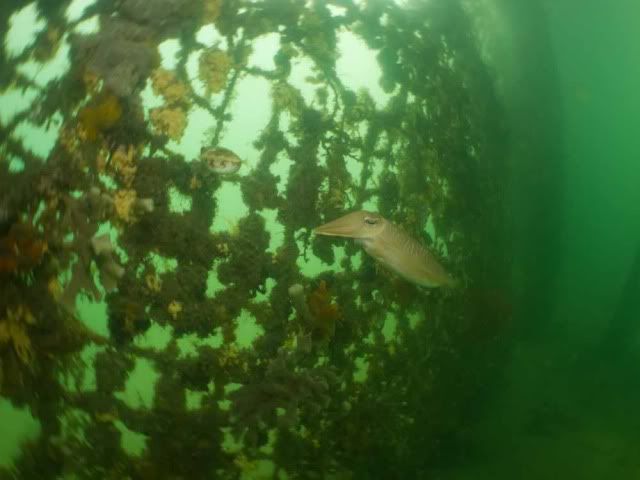
    IMG_0030-1.jpg

    Edited by bluefacemanta
  2. I borrowed one of the new Inon UFL150 ZM80 lenses from a friend today & took it for a dive with my canon S90/FIX housing combo. Once i got the zoom sorted & worked out that you don't put the camera into macro focus, just leave it on auto focus then i fired away.

    All seemed well until i downloaded the photos & realized that the outside edges of nearly every shot is badly distorted. Some of the shots are upto probably 1/3 of the photo is distorted.

    So my main question at the moment is, is anyone using this combo & if so on what settings?

    Also, if you move the lenses closer & further from the front port does that make any difference?

    I just had it screwed hard upto the front port.

    Cheers Pete.


    You can see in this photo, exactly what i am talking about.

    IMG_0030-1.jpg

    It is a fisheye lens. I am using the endoscope version with not such strange results. I would try shooting more toward the wide angle of your zoom range.

    Bill

  3. Hi Bill, thanks for that. If i use the camera on a wider setting then i get the black corners which i think is called vignetting? I wouldn't mind so much if the very outside edges were blurry but it is almost 2/3s the frame.

    Maybe it can only be used for extremely close shots? Or shots where there is no background.

    I have seen photos from these lenses that all the corners are sharp so maybe they have cropped them alot.

    Cheers Pete.

  4. I went out for another test dive today. This time i put the S90 in full zoom. That is 105mm i think.

    I think it made a small difference but not much. You can still see the edges are quite distorted, but not as bad as the other shots i have taken.


    092.jpg


    Cheers Pete.

Ultralight Control Systems

Account

Navigation

Search

Search

Configure browser push notifications

Chrome (Android)
  1. Tap the lock icon next to the address bar.
  2. Tap Permissions → Notifications.
  3. Adjust your preference.
Chrome (Desktop)
  1. Click the padlock icon in the address bar.
  2. Select Site settings.
  3. Find Notifications and adjust your preference.

