



Skip to content

Classifieds / Archived topic

For Sale - Inon Fibre Optic D-Cable Type L/Cap W54 Set for Canon G11/G12 Brand New

Started by gee13 ·

  • 4Posts
  • 4Replies

Read-only discussion

For Sale - Inon Fibre Optic D-Cable Type L/Cap W54 Set for Canon G11/G12 Brand New

4 posts
  1. Hi Everybody


    I have this For Sale All Sealed and Brand New in the Original Inon Packaging.


    This is the model that comes with the Clear Photo System Film.


    This Fiber Optic Cable set can be used on any Inon Strobe connection and is suited to Canon OEM G11/12 Housings -

    WPDC-34.


    Retails at $159 USD


    Asking $100 USD


    http://reefphoto.com/shop/index.php?main_p...36


    http://www.inon.jp/products/strobe/optical...ml


    INON [Optical D Cable · Cap Set Type L ] each different model is designed specifically to suit to each camera model to attach directly on built-in diffuser panel of genuine underwater housing or a Mount Base.

    [Optical D Cable Type L]consists of optical fiber to provide more reliable and faultless external strobe control comparing to conventional wireless slave connection especially in severe condition like under surface or backlit circumstances.

    INON [Clear Photo System] effectively suppress transparent underwater housing drawbacks like backscatter, ghost or flare caused by camera's built-in flash to obtain more clear image.
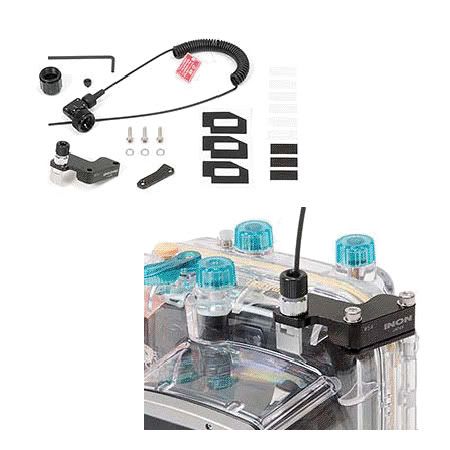

     

    OpticalDCable.jpg

    Edited by gee13
  2. Hi,

    Do you still have this for sale? I am interested in purchasing it for my G12 housing...

    -J

  3. Hi,

    Do you still have this for sale? I am interested in purchasing it for my G12 housing...

    -J


    Yes it is have sent a pm with details.

  4. SOLD!

Sea & Sea

Account

Navigation

Search

Search

Configure browser push notifications

Chrome (Android)
  1. Tap the lock icon next to the address bar.
  2. Tap Permissions → Notifications.
  3. Adjust your preference.
Chrome (Desktop)
  1. Click the padlock icon in the address bar.
  2. Select Site settings.
  3. Find Notifications and adjust your preference.
