Skip to content

Shooting Technique, Workflow and Editing / Archived topic

Apple Thunderbolt Display for photo editing?

Started by MIKE POWELL ·

  • 18Posts
  • 18Replies

Read-only discussion

Apple Thunderbolt Display for photo editing?

18 posts
  1. Replacing my older iMac and Macbook Pro with new Macbook Pro and display, but I've been reading bad press about the Apple display i.e.(glossy screen, LED backlit vs. CCFL, sRGB color range, a bitch to calibrate etc.).


    Curious if anyone has experience with the newer Thunderbolt display and/or a better display that they own?


    This is the setup I'm going for:

    http://twelvesouth.com/products/bookarc/gallery/#

  2. Curious if anyone has experience with the newer Thunderbolt display and/or a better display that they own?


    I have the Dell U3011 connected via DisplayPort.

    -better calibration

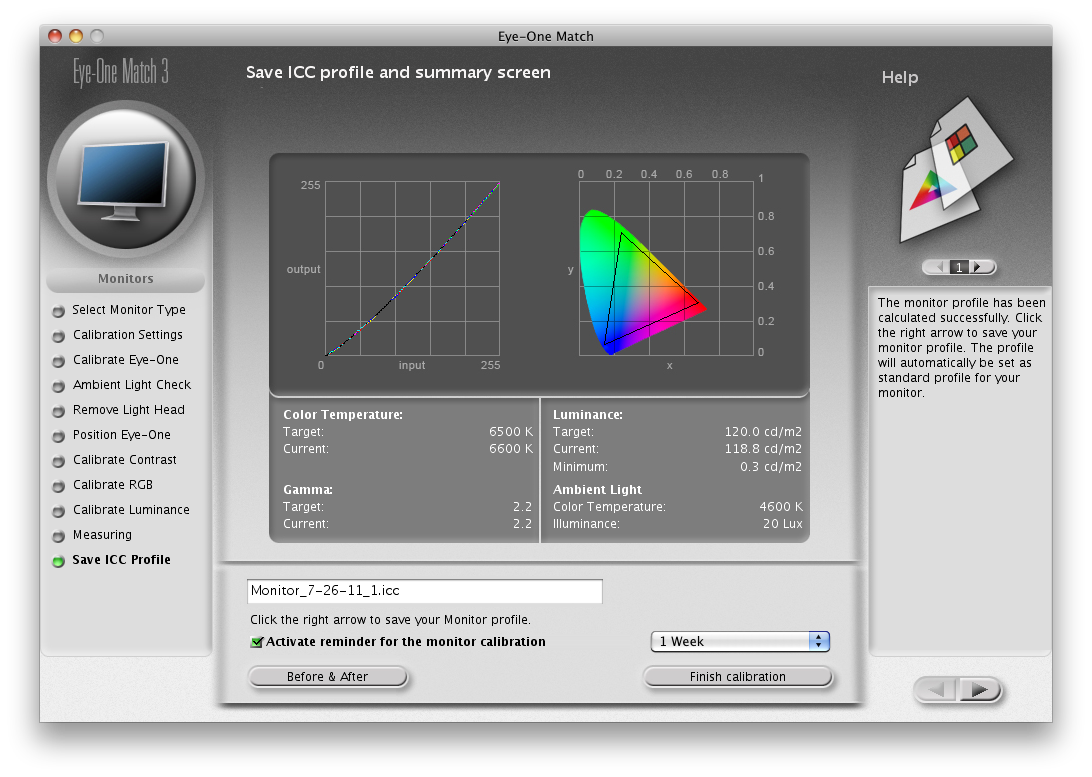
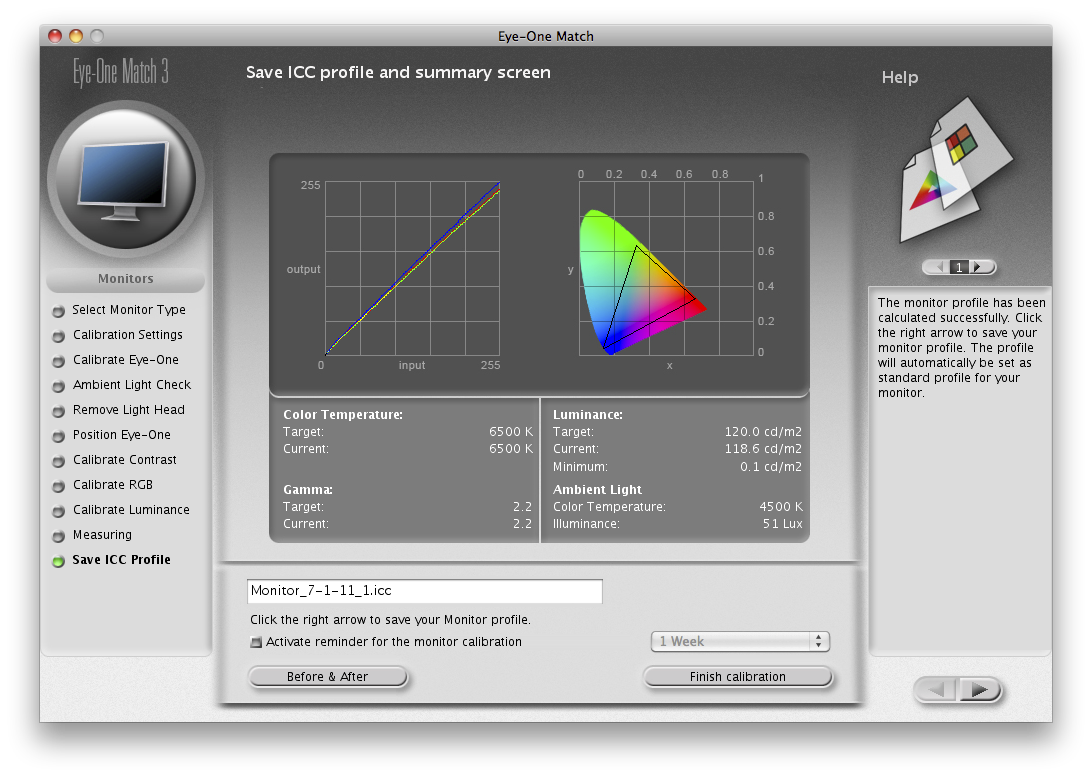
    -larger color gamut (see attached profiles created with i1 Display2; the snow leopard version of the calibration sw allows much better tweaking of u3011 monitor)

    -anti-glare (I wish Apple would get away from the glossy screen look. Yes, it makes very clean packaging and better color saturation; but, there's way too much reflection from the screen in most lighting conditions)


    Apple Thunderbolt Display profile:
    post-6274-1329685928.png


    Dell U3011 profile:

    post-6274-1329686930.png


    The Apple Thunderbolt display has a huge advantage _only if_ you have a 2011 MacBook Air and need FireWire, 1000BaseT Ethernet, and three more USB2 ports.


    Edited by uw_nikon
  3. Replacing my older iMac and Macbook Pro with new Macbook Pro and display, but I've been reading bad press about the Apple display i.e.(glossy screen, LED backlit vs. CCFL, sRGB color range, a bitch to calibrate etc.).


    Curious if anyone has experience with the newer Thunderbolt display and/or a better display that they own?


    This is the setup I'm going for:

    http://twelvesouth.com/products/bookarc/gallery/#


    Mike,


    I believe he MacBook Pro is almost due for a refresh, unless you want the current one for some specific reason there may be a better machine for the same money coming down the line in the near future.


    Steve

  4. Thanks Chris -- I thought about a Dell or LaCie, but I will be using a new MacBook Pro w/ Thunderbolt attached to the display, so it seems to me the advantages of the Apple display outweigh the disadvantages. Not sure I would notice much of a difference in my prints after calibrating the display....which reminds me should I get an i1 Display 2 or Spyder 4?? Can't figure out which is more "dummy proof" and will work well on the Apple display?


    Thanks for your help!


    Mike


    I have the Dell U3011 connected via DisplayPort.

    -better calibration

    -larger color gamut (see attached profiles created with i1 Display2; the snow leopard version of the calibration sw allows much better tweaking of u3011 monitor)

    -anti-glare (I wish Apple would get away from the glossy screen look. Yes, it makes very clean packaging and better color saturation; but, there's way too much reflection from the screen in most lighting conditions)


    Apple Thunderbolt Display profile:

    post-6274-1329685928.png


    Dell U3011 profile:

    post-6274-1329686930.png


    The Apple Thunderbolt display has a huge advantage _only if_ you have a 2011 MacBook Air and need FireWire, 1000BaseT Ethernet, and three more USB2 ports.

  5. Thanks Steve, but I'm really frustrated with trying to edit on my 5 year old iMac....it's frustrating enough learning PS & LR and with the spinning beach ball I better get something quick before I throw both computers out the window! :D


    Mike,


    I believe he MacBook Pro is almost due for a refresh, unless you want the current one for some specific reason there may be a better machine for the same money coming down the line in the near future.


    Steve

  6. Mike,


    I believe he MacBook Pro is almost due for a refresh, unless you want the current one for some specific reason there may be a better machine for the same money coming down the line in the near future.


    Steve


    Not sure if it will be coming that soon, they refreshed it a bit in October. Think the new ones down the road still a bit. iPad 3 and MacBook Air/Pro 15" may come first. I actually picked up the 17" April 2011, not that much difference and I can still run Snow Leopard if needed :D

  7. I would bet the new MacBook Pro won't be out until Ivy Bridge comes out in May/June.

  8. Thanks Drew & focker -- At the rate new tech is hitting the street looks like upgrading yearly!


    What do y'all use to calibrate your Mac displays? Looking for something easy....maybe Spyder 4?


    Mike

  9. That's what Apple wants you to do... annual upgrades! Colormunki is probably the most accurate but also certainly the most expensive. I've had many problems with Spyder 2 (sensor died numerous times). Eye One is also a great calibrator.

    The nice thing about Spyder is that it does REC709 which is good for broadcast video.


    I hope Apple goes back to Nvidia so I can get some acceleration with CS5.5.

  10. I calibrate with a X-Rite Eye-One with excellent results.

  11. Which calibrator would be the best for the computer challenged? X-Rite website looks geared more toward pros while the Spyder looks to be geared for the mentally challenged such as myself.


    Thanks for your help!

  12. The Eye-One is very simple to use, you would be up and running with it in a few minutes.

  13. The Eye One software is straight forward and easy to use. However I would wait for the MBP to get the retina LEDs. The high res screen available now is just not that great.

  14. Thanks all! No offense, but I ordered the Spyder 4 Pro as it seemed to be the latest calibrator that's compatible with Lion. The X-Rite i1D2 is discontinued and replaced by the more expensive i1Display2.

    The new Spyder even calibrates the iPhone and iPad....not that I need that.


    Drew - I'll be loading my pics onto the MBP on trips and then hooking up to a Thunderbolt display at home, but would be interested in learning about the retina LEDs. Also being new to video what software should I use to edit GoPro 2 footage? I have iMovie, LR3, and PS5.


    Thanks again! :D

  15. Mike I would play with iMovie to start. You could always find a copy for Final Cut Express or Adobe Premiere Elements if you want to use something else but iMovie is a good starting point IMHO.

  16. I wouldn't buy final cut express since it's slow and not optimized. The move from iMovie is now FCX.

  17. I have a Macbook Pro and use the Apple Cinema Display and have been very pleased, If your workspace has controlled lighting there is no problem with glare and it is a brilliant display.

    The new X-Rite ColorMunki Display is a very easy affordable calibration device that I have been using since Xmas.


    http://www.bhphotovideo.com/c/product/7989...ki_Display.html

  18. Mike,

    This is probably far too late but my publisher, Ken Stone, is now using an iMac with Thunderbolt and he loves it. Personally, I don't think I could get used to a glossy screen but it seems he has.

    Steve

Kraken Sports

Account

Navigation

Search

Search

Configure browser push notifications

Chrome (Android)
  1. Tap the lock icon next to the address bar.
  2. Tap Permissions → Notifications.
  3. Adjust your preference.
Chrome (Desktop)
  1. Click the padlock icon in the address bar.
  2. Select Site settings.
  3. Find Notifications and adjust your preference.