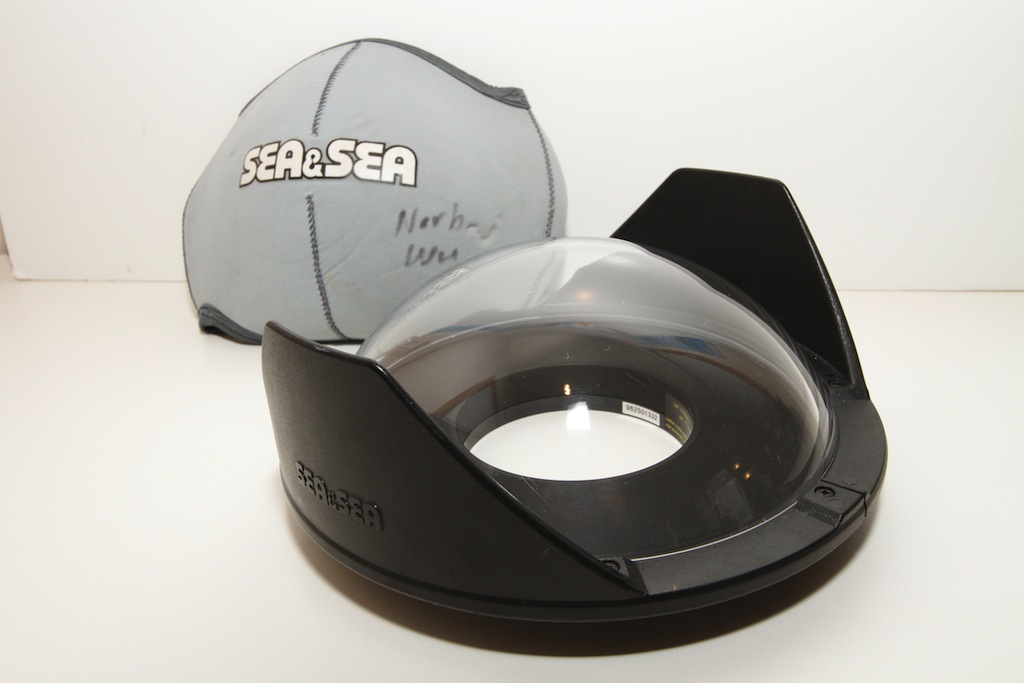
I am selling my backup Sea & Sea 8" fisheye dome. It’s in excellent, near- mint, cosmetic and working condition. There are no scratches on the dome (and since this is acrylic, you can buff out any scratches anyway).
This is an excellent, well-made dome port, suitable for using with any wide lens. I found that it works particularly well with extremely wide lenses like the Nikon 10.5mm fisheye and 16mm fisheye lenses. This fisheye dome port is a 8 inch acrylic dome port. I like these domes so much (because of their robust construction) that I converted my other Sea & Sea dome port to use with my Nauticam housings. I am shooting Nauticam rather than Sea & Sea these days.
I see that the dome port sells for $650 and the port cover sells for $50 at B & H Photo. The port cover is excellent, and you should definitely buy it rather than skimp.
Asking $599 for both port and cover.
If you are interested, please contact Norbert Wu at temp2_at_norbertwu.com. Please no phone calls. I am happy to entertain reasonable offers. I can accept credit cards, Paypal, money orders, and personal checks. Money orders and personal checks will have to clear my bank before the product is shipped; which can take up to three weeks. Shipping will be at buyer's expense (at actual cost) and will be UPS Ground, Fedex Ground, or USPS Priority Mail (all of which give tracking of packages). If we conclude a deal, I'll give you a quote for shipping via one of the above methods.
Thanks!
Norb Wu