



Skip to content

Classifieds / Archived topic

For Sale: Ikelite 200 Substrobes & Accessories

Started by nwwild ·

  • 11Posts
  • 11Replies

Read-only discussion

For Sale: Ikelite 200 Substrobes & Accessories

11 posts
  1. For Sale:

    2 Ikelite 200 Substrobes, upgraded for use with digital cameras

    3 Battery Packs

    1 Smart Charger

    2 Dual TTL Synch Chords, Ikelite to Nikonos V ports

    2 Single TTL Synch Chords, Ikelite to Nikonos V ports


    $500 + shipping, payment through PayPal

    Will ship to U.S.A. and Canada

    Email me directly: amyg@nwlink.com
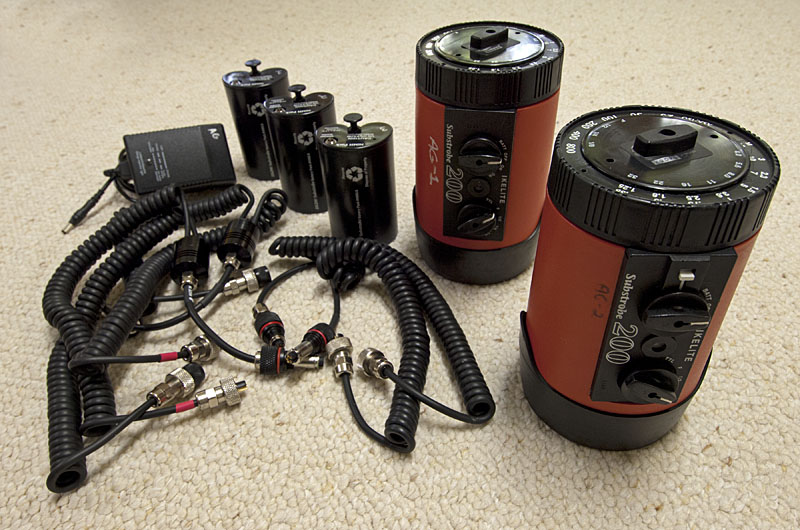
    post-18686-1335915899.jpg

    Edited by nwwild
  2. Hi,


    im am interested in setp, my qestion is how were strobes upgraded to work digital? I have the same strobe and ikelite stated taht is not posible to upgrade it to DS standard.


    BR

    Robert

  3. You are correct. The upgrade was a "10K Update" that improved the TTL circuitry, and not a DS standard. My mistake!


    Please let me know if you're interested. $500 or best offer + shipping.

  4. Hi,


    tx for explanation. It still leaves an open question how are strobes workingwith TTL? I assume they only work M


    How and with what were you shooting


    TX


    Robert

  5. Yes, they only work manual with my current digital setup. I shoot with the Nikon D2Xs. Personally, I've preferred shooting manual with digital, and I can see right away with the review screen if I need to adjust the exposure.

  6. Excellent setup :-)


    I have Subal with D2Xs too.


    Let me see how much I can get out of my piggy bank and I'll get back to you


    BR


    Robert


  7. Sounds good.

  8. Hi Robert:


    Are you still interested? I'd like to ship these soon or put them on eBay.


    Thanks.

  9. Sorry for late reply,


    I am away till saturday, can you bare with me till then?


    BR


    Robert

  10. Sure thing.

  11. Still for sale?

Turtle

Account

Navigation

Search

Search

Configure browser push notifications

Chrome (Android)
  1. Tap the lock icon next to the address bar.
  2. Tap Permissions → Notifications.
  3. Adjust your preference.
Chrome (Desktop)
  1. Click the padlock icon in the address bar.
  2. Select Site settings.
  3. Find Notifications and adjust your preference.

