Skip to content

Video Gear and Technique / Archived topic

Canon 5D Mark III ISO Noise Test in Video mode

Started by escape ·

  • 3Posts
  • 3Replies

Read-only discussion

Canon 5D Mark III ISO Noise Test in Video mode

3 posts
  1. [vimeohd]41601684[/vimeohd]


    This is Canon 5D Mark III "Lens cap on" ISO noise test in video mode.

    I did same test before with Canon 7D and expected result, "non-native" (160, 320, 640, 1250...) ISO are less noisy.

    I'm sure non-native ISO setting will decreased dynamic range but most of time I want cleaner footage then noisy one.


    1/50th, f1.4, 1920x1080/24p

    Picture Profile: CineStyle

    High ISO NR: Disable

    Note: Curves boosted for test purposes.


    Screen capture : http://ejlabs.net/tmp/5dmk3-noise-test-2048.jpg
    Edited by escape
  2. Thanks for this objectively determined comparison EunJae. I have been using multiples of ISO 160 with the 7D for a while. Its good to know that I'm not adrift of the mark!


    Tim

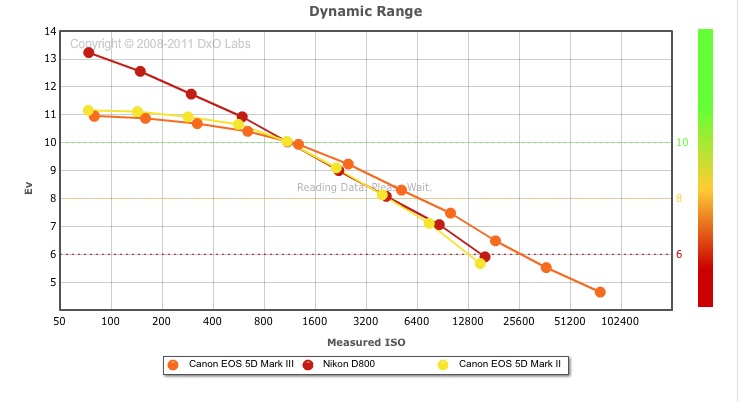
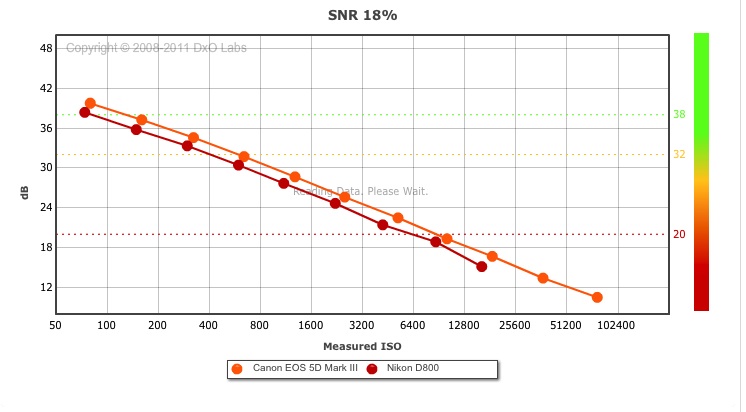
  3. Yes, Canon has been understating the ISO by -1/3 stop. DXOMark indicated in the stills test as well. Nikon is even worse, it's even lower and not in thirds so one can't really access the lowest noise level except through their processing. What is interesting is that the HDMI capture is noisier than the IPB in the D800.


    post-1861-1336224877.jpg


    Canon has been doing this since the 1D/Ds Mark II (at least!), so it's not just a video thing.


    post-1861-1336236884.jpg

    If you look at this diagram, the DR is actually quite flat from 160-200ISO. So there isn't a change in DR. It seems the native ISO of 100,200 etc is actually native ISO +1/3 stop. Or native ISO -1/3 if one really wants to be accurate.

    Edited by Drew
Reef Photo & Video

Account

Navigation

Search

Search

Configure browser push notifications

Chrome (Android)
  1. Tap the lock icon next to the address bar.
  2. Tap Permissions → Notifications.
  3. Adjust your preference.
Chrome (Desktop)
  1. Click the padlock icon in the address bar.
  2. Select Site settings.
  3. Find Notifications and adjust your preference.