Skip to content

Shooting Technique, Workflow and Editing / Archived topic

Sun burst shot

Started by petern ·

  • 10Posts
  • 10Replies

Read-only discussion

Sun burst shot

10 posts
  1. Hi All

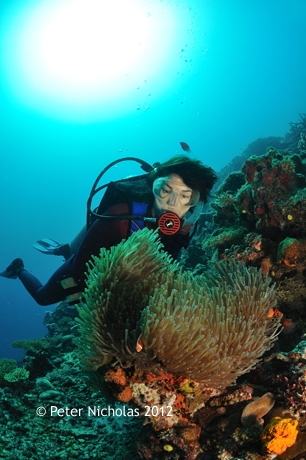
    I am after some advice regarding sun burst shot. I use a D90 and was wondering if anyone with a similar set up has has great results with the sun at depth. I usually shoot on manual F11 as an average, 80th >100th, @ 200asa, strobes on 1/4 and 1/16.

    I know low sunlight position works well but have problems with the overhead positions. Any samples with setting appreciated.

    Thanks

    post-30195-1336627018.jpg

  2. i use the lower iso settings to compensate for the 1/200 flash sync speed and that seems to help. or postion it behind something!!

  3. From what I believe and have seen, the D90 shows its limits with sunbursts. I do not have great examples to show but here are a few.

    Wish I had better one's to share but my experience with this type of photo is limited.


    The D90 tends to have color bands, which can be seen in both of my photo's and yours well. Readings suggest the D7000 is far better at this type of photo.


    Both of these were at 120 ft of clear water, 1/200, F9 using two Z240's in manual set at f8 on the dial.


    Sunburst at depth


    Covered sunburst


    Is this any help?


    Dave

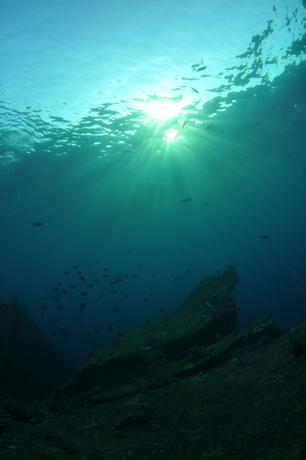
  4. Thanks guys, this is going to be a case of just sitting on the bottom and just shooting, I have heard that the bit depth on models like D7000 are the reason that they produce more define light rays and good colour definition through the water to the light source. The D 90 seems to handle low sun position much better and in shallow water as would be expected. I don't think I am going to rush out and upgrade just yet.

    post-30195-1336801460.jpg

  5. Hi there Peter,


    Even though the D90 is maybe not as good as say, a D7000 for capturing sunbursts, I am sure that you can do a thing or two to improve the sunbursts.

    I must also say that I am sure that there are people on this forum with a lot more knowledge on this topic than me!


    I am finding it hard to capture nice sunbursts with my EOS7D if I do not follow the guide-lines below:


    1. try to hide the sun, fully or partially, behind your model, a nice coral, boat, turtle, etc.

    2. Use a high shutter-speed (180-250), a low ISO, and a low aperture (underexpose the blue a stop or three and illuminate the foreground with your flash)

    3. Shoot sunbursts on days when surface conditions are calm, choppy waters seem to spread out the beams of light


    I am sure that you can create some great sunbursts with your D90, i've made a few "decent" ones with my G11 even, its all about the position of the sun and your exposure :lol:


    Have fun- Morten.

  6. I was shooting the Nikon D90 before I moved onto the D7000. I find the D7000 alot better at capturing sunbursts mainly due to its flash sync of 1/320th with my hard wired Ikelite DS161 strobes shot in manual.


    The Nikon D90 can obtain decent sunbursts but there a many viables which need to be taken in mind as its not just a matter of camera settings. I agree with Morten that low ISO (Lo 1 on the Nikon d90) and high shutter speed. It also has alot to do with what your trying to achieve in the shot. Are you just after the sunburst or are you after the sunburst as a secondary importance to a subject like a model or animal (ray,shark, turtle etc etc) as this also influences your settings.


    As Morten stated sun position, surface conditions play and important role but also one of the most important factors is depth and water clarity. Most of the successful sun burst I have have taken have been in shallow clear water with still surface conditions. I beleive once you gain greater depth that you will end up with more of a sun ball glow than a sun burst as the water has some form of colour (unless gin clear) which acts as a filter/diffuser to softens the light. The deeper you go the more is effect comes into play. It also the same if shooting on a cloudy day as the clouds themselves soften the light and act as a diffuser similar to whats on your strobes.


    My suggestion for you to achieve high impact sun rays is to shoot as shallow as your subject allows, pick the day were the surface conditions are calm and the water clarity is high. Lowest ISO on your camera (lo 1 on the Nikon D90), fast shutter speed and a f stop relative to what effect your trying to achieve.


    If your diving deeper water you can still use the effect of the sun for a warm ball feeling as a background to your subject by positioning the subject within that sun ball.


    Here are some examples:

    5392177911_298d3836ee.jpg

    Nikon D90 Tokina 10-17mm @ 10mm. ISO LO1, f10, 1/200th


    5437263933_d27cde78aa.jpg

    Nikon D90 Tokina 10-17mm @ 10mm. ISO LO1, f10, 1/200th


    5437264357_53ba65313c.jpg

    Using the subject to cover part of the sunburst.

    Nikon D90 Tokina 10-17mm @ 10mm. ISO LO1, f10, 1/200th


    4308096445_caf2383ef0.jpg

    Using the Sun ball at depth. Nikon D90 Tokina 10-17mm (@10mm) Ikelite DS125's. ISOLO1 (100) f13, 1/200th


    Hope this helps.


    Regards Mark

  7. As for me, expose for the sky. This will make your overall image underexposed, but allow the sun to show as a star-like form instead of one big hazy, white ball.

  8. 5651112467_7854e0d88c_z.jpg


    Shooting RAW makes a big difference and reducing exposure. You have plenty of room to move with your exposure settings. This was shot with a D80 down at 20m or so.

  9. I can get 1/250 shutter speed with my D90. I'm shooting manual, with 2 x s+s strobes via electronic syncs.

  10. Practice and bracket. Shoot in Raw

Scuba.com

Account

Navigation

Search

Search

Configure browser push notifications

Chrome (Android)
  1. Tap the lock icon next to the address bar.
  2. Tap Permissions → Notifications.
  3. Adjust your preference.
Chrome (Desktop)
  1. Click the padlock icon in the address bar.
  2. Select Site settings.
  3. Find Notifications and adjust your preference.