



I ran across a nice little app called the Photographers Ephemeris, TPE for short, it does all kinds of cool stuff. I started thinking about what we could do with better planning for splits by knowing the sunrise and sunset paths and directions. As some of you know I've been layed up due to illness and can't get in the water for a while yet so I hope you'll forgive the surface shot but it's the best I can do. Once I saw the opportunity on the app my son and I made a quick trip at dawn to catch the sunrise in the notch of the Western mitten of Monument Valley. And yes the sky in Arizona really is that color.  I used the 7D and the 16-35 L II. We set up right in the viewing area at the vistors center. It's a whole different ballgame when you know exactly where the light is going to be and when.
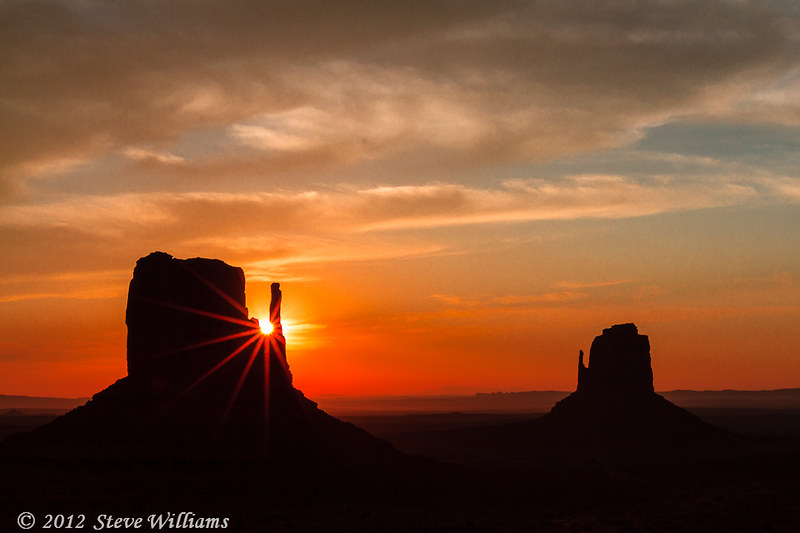
Let There Be Light! Sunrise in Monument Valley by Jaw's Dad, on Flickr
From the TPE website;
Key features of TPE for iOS:
- Time and direction of sunrise and sunset
- Time and direction of moonrise and moonset
- Phase of the moon and % illumination
- Times of civil, nautical and astronomical twilight
- Graphical display on a map
- Save any location you want - no fixed lists
- Automatic time zone detection for any location on earth
- Determines elevation above sea level
- View azimuth and altitude of sun/moon for any time of day/night
- Distance, bearing and elevation angle between any two points
- Find when the sun/moon will appear from behind a hill
- Compensation for atmospheric refraction
- Compensation for elevation above the horizon
It's a nice little addition to the tool set, around 8$ for the Iphone/Ipad version and there is a free version for your desktop. Something to think about the next time you go chasing stingray splits at dawn.
Have fun,
Steve


