



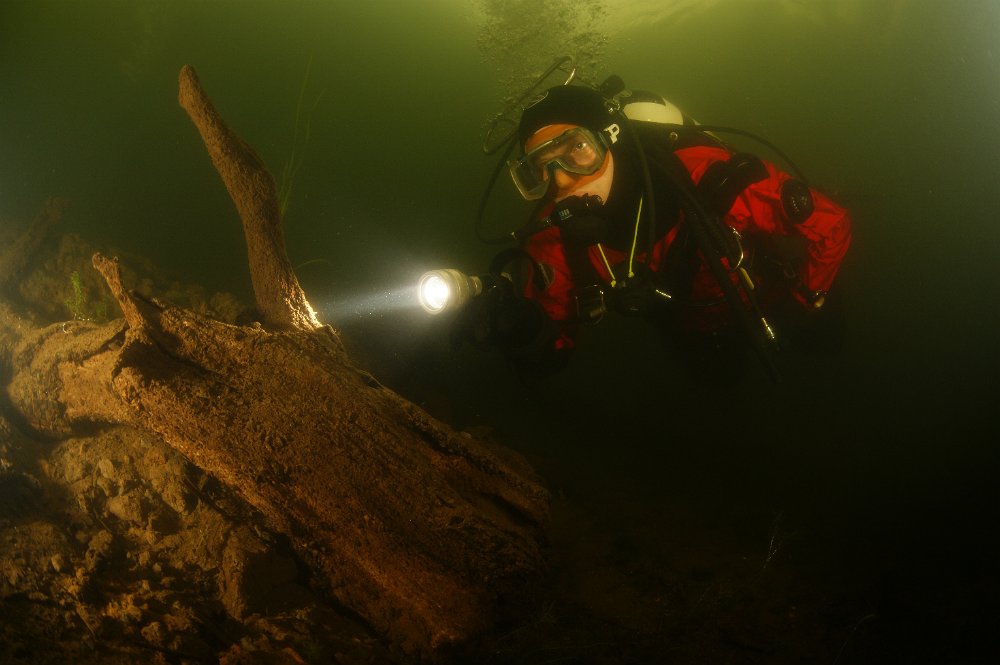
On a solo dive in a really boring lake nearby I had an hour of fun experimenting with my camera's self timer
So here's me as a photographer AND model 
Read-only discussion
On a solo dive in a really boring lake nearby I had an hour of fun experimenting with my camera's self timer
So here's me as a photographer AND model
Nice one! What is the square thing above your head?
-Morten.
How long did you set the timer? You're in perfect position, and didn't even silt the place up! Nice image!
Fletcher
The square thing above my head is a valve protector. I found it easier to grab hold of my tank to do a valve closedown drill when I learned to tecdive with such a protector.
Nowadays I can close the valves without it, but it still helps when I'm setting up my gear in the trunk of the car, so I just lazily leave it on.
The self timer was set to 10 seconds. That's barely enough to swim into position, but with the sigma 10mm fisheye you don't have to travel far to be into your own shot
So even in a boring lake you can have some good fun and learn new techniques
A nice idea. I'm often in my own shots with the fisheye - but usually it's only a fin and not intentional!
Nice shot.
I've tried it once myself. Set the timer on 10 seconds, and set the camera to take 5 shots.
My new camera unfortunately doesn't have the multi shot self timer function.
A nice idea. I'm often in my own shots with the fisheye - but usually it's only a fin and not intentional!
From your recent FB photo posting John I thought that it might be your thing that is 2 metres long getting in the frame.
Regards
Stew

Terms of Use Privacy Policy Guidelines We have placed cookies on your device to help make this website better. You can adjust your cookie settings, otherwise we'll assume you're okay to continue.

A worldwide community for underwater imaging.
