



Skip to content

Photo / Video Showcase / Archived topic

Screen calibration

Started by MortenHansen ·

  • 9Posts
  • 9Replies

Read-only discussion

Screen calibration

9 posts
  1. Hi everyone!


    The other day I looked at a few of my shots on the diving-center laptop, I was horrified to see that the images that look great on my Mac look bland and boring on the old Dell from the diving-center.


    My exact issue is that the images look desaturated, that very slight vignetting put on in the adobe raw converter is clearly visible, and also there is a lot more backscatter to be seen in the shots.


    I know that it is because of the different screens, I am just wondering, how many of you guys actually see these things? (desaturation, image manipulation & backscatter)
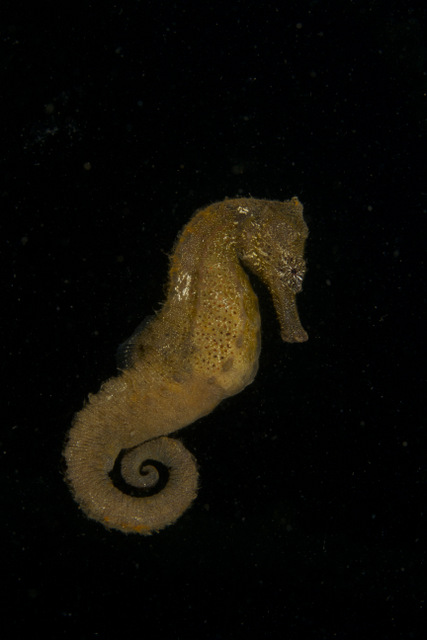
     

    post-36000-1340965258.jpg


    Thanks for your feedback -Morten

  2. Now... the question that is really going to burn your brain; whose monitor is "right"?


    ;)

  3. Depending on the angle of view there is no till a lot of backscatter to see.

    But as Uli wrote, is the MAC Monitor right???

    Pictures to publis online should be seen nice on all screens, not only special calibrated screens,

    otherwise the may suck on "normal" users screens.

    Calibrated or high-end screens make only sense of print production like using high-end speakers

    for audio production may lead to bad quality on normal users desktop speakers.

    Chris

  4. Pictures to publis online should be seen nice on all screens, not only special calibrated screens,

    otherwise the may suck on "normal" users screens.


    I have to disagree: an image that looks good on a calibrated screen should still look good on any screen that hasn't become grossly out of adjustment, either in tone or gamma.


    Web images look better in sRGB than Adobe RGB colour space, and that, in my experience, is more important than screen calibration when putting images onto the screen.


    Yes, MAC gamma is different to PC gamma, but my money is on the Dell being dodgy...


    Tim


    :B):

  5. I have spent some time trying to understand this issue and as a result I have realised that I still have a lot to learn ;-)


    How do you know that your normal Monitor is correctly showing your pictures? It might be overcorrected!

    When you start to ask yourself this question. Then it is hightime to start to calibrate your Monitor!


    However, a non calibrated Monitor is always dodgy. The question is just to which extent and in which direction!

    Laptop Monitors are generally dodgier than desktop Monitors. ( Laptop Monitors are also more difficult to calibrate, due to lack of controls and being a bit weak on the brightness. )

    Glossy Monitors are worse than Matte Monitors.

    If you get yourself a Wide Gamut Desktop Monitor. Then you open a new can of worms!


    Anyway, your issue is most likely normal. Take the same picture and look at it on as many uncalibrated Monitors as possible. You will see that there is a pretty big deviation of colors, vividness, brightness etc.


    My assumption/solution is that a properly calibrated Monitor is more likely to be correct and in the middle of the Pack.


    /Erik

  6. whats a good way to check print to monitor calibration?

  7. How many of you look at pictures printed in magazines under properly colour-balanced light? I bet most read by warm tunsten during the winter rather more than they do by daylight in the summer. With the preponderance of blue in underwater pictures, you'll miss a lot of good repro. It's the responsibility of the end user to give themselves the best conditions otherwise all books would be printed in a large font point-size for those who are less well-sighted!

    Edited by John Bantin
  8. Have you thought of getting a Spyder Pro? It works great for calibrating your monitor.

  9. On my windows monitor (which it has to be said hasn't been re-callibrated for a few months) it needs around +1.5 stops and a touch more saturation to give it some punch but then I start to see backscatter unless the black is pulled up to the point where the dorsal starts to disappear.


    I use a Colormunki btw

Aquatica

Account

Navigation

Search

Search

Configure browser push notifications

Chrome (Android)
  1. Tap the lock icon next to the address bar.
  2. Tap Permissions → Notifications.
  3. Adjust your preference.
Chrome (Desktop)
  1. Click the padlock icon in the address bar.
  2. Select Site settings.
  3. Find Notifications and adjust your preference.

