



Skip to content

Photo / Video Showcase / Archived topic

Small critter Framing

Started by Neopreneninja ·

  • 6Posts
  • 6Replies

Read-only discussion

Small critter Framing

6 posts
  1. Hi fellow Wetpixl's!

    1 post...be Gentle!...he he!

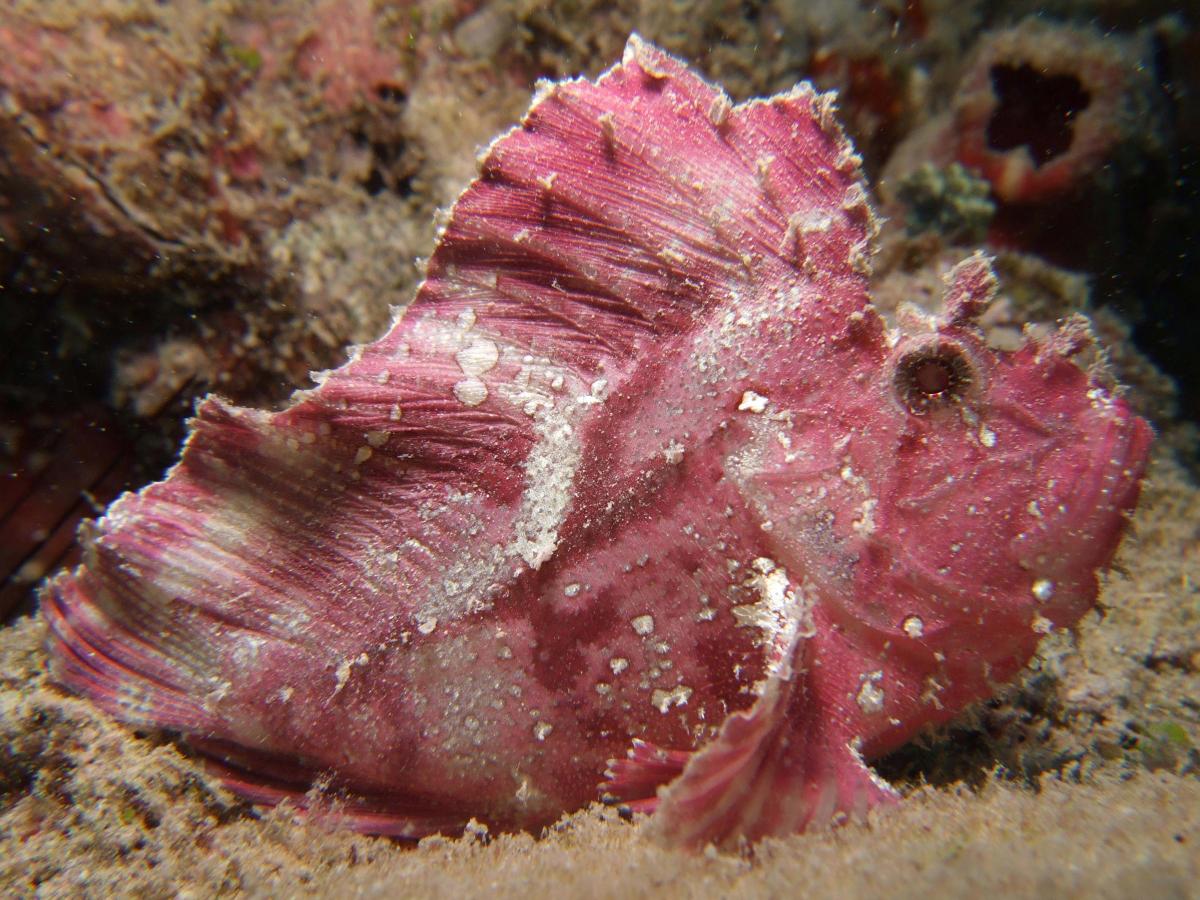
    Here is a Photo that I took a while back.

    Pink Leaf fish-Malaysia-Borneo-Mabul isl. Juli 2009

    Gear: Fuji F31fd, Inon AD macro wet lens, DIY Ring flash-Dual Fantasea Nano strobs & Fantasea 360 focus light.

    Setting's: "A" mode, 100 iso, f 7.1, 1/60, -1/3 Exp, app. 1/3 zoom & Forced flash.

    Photoshop: color balance, sharpness and contrast. Only very small adjustments as this is a Jepg.

    Distance to subjekt: app. 15-25cm


    As is clearly visible the pic. is soft/un sharp towards the edges a problem I've encountered before and after! I'm not sure what I'm doing wrong..

    So is it too tight? Framing vice (framing as shot) General comments
    post-14748-0-77278300-1342172880_thumb.jpg

  2. Hi Neopreneninja,


    it can be tricky to squeeze out the best using the Inon UCL165 AD lens. They make images notoriously soft all around the edges and give a very limited DOF,

    especially when stacking them. Make sure you have the aperture at the highest setting, can your camera go another stop narrower? Looks like the focal

    point is not on the eye but the middle of the frame/fish. The technique that worked best for me when I used to use them was Lock, Rock and Release. Lock

    focus(half press shutter button and hold) on the point you want, in this case probably the eye. Recompose image to get the framing you want then Rock the

    camera back and forth until you find the point that the image in the viewfinder is as you want it. Hold steady and Release the shutter. Of course you'll need

    to find a very patient or slow subject.


    Cheers,

    Jim.


    Edited- to correct the Inon lens code.

    Edited by JimSwims
  3. Hi Jim!


    Solid advise! Thanks!!!

    I'll deff be trying your "lock & wriggle" technique

    +I will back of a bit to move the softness away from the subject and then crop...I originally moved this close to use all of my 6.3 mil.pixel's and to max my pixel's one the subject...guess I got too close with the limitations of my kit


    But your right the limitations of P&S are many: Aperture/DOF control, focus point selection, real eTTL, solid shutter lack...you often have to guess where the fish will likely be buy the time the camera fires...etc

    Plus it seem's/sounds like that the INON also have an issue reg. edge sharpness....nice to know other's exp.


    The maximum aperture is f8 one my little Fuji! I stepped one down in the hope of less corner softness as I exp. with DSLR's max aperture also softens up the edges of an image....esp. tele/macro. Like my Canon 100mm and up(one a 5D mkII and 20D)


    This raises a whole new level of gear lust! ;-) Is the Subsee any better?? as I was originally going for an extra INON for smaller ceitter's

  4. The Subsee are indeed far superior lens but I'm unclear as to whether they'd suit a compact lens as I think they are designed for use with SLR

    macro lens like the 100/105mm. I'm just getting to the stage now with my SLR rig to add the Subsee now that I have a 105mm. BTW the lens I

    used to use was the UCL165 AD, I put the wrong code above but have now corrected.


    When I began using manual settings, which was actually spurred by the use of the UCL's, I pretty much always shot at f8 with my Fuji E900 when

    using the inon UCLs to get some DOF and have more of the subject/detail in focus. It certainly can be tricky but thats half the fun.


    Some images I took using the UCLs


    From memory the more you zoom the more distortion you get? and when you use them stacked the distortion increases and DOF gets even thinner.


    Cheers,

    Jim.

  5. Thanks again Jim!


    Great shoots! And good advice....Still think I'll give the +10 subsee a go on my P&S rig.


    Cheers,


    Jesper

  6. Look forward to seeing your results!


    Cheers,

    Jim.

Ultralight Control Systems

Account

Navigation

Search

Search

Configure browser push notifications

Chrome (Android)
  1. Tap the lock icon next to the address bar.
  2. Tap Permissions → Notifications.
  3. Adjust your preference.
Chrome (Desktop)
  1. Click the padlock icon in the address bar.
  2. Select Site settings.
  3. Find Notifications and adjust your preference.

