Skip to content

Lights, Strobes, and Lighting Technique / Archived topic

Inon Z240 Color Temperature Conversion Filter / diffuser

Started by Tim S ·

  • 18Posts
  • 18Replies

Read-only discussion

Inon Z240 Color Temperature Conversion Filter / diffuser

18 posts
  1. Are there anyone who has used the new Inon Z240

    Color Temperature Conversion Filter / diffuser?


    In your experience, what is the best choice for shooting Wide angle in tropical water?


    Color Temperature Conversion Filter (4900K)?

    Color Temperature Conversion Filter (4600K)?

    -0.5 (4900K) Diffuser 2 (TTL/Manual)?

    -0.5 (4600K) Diffuser 2 (TTL/Manual)?


    My preliminary thought is that, as the Inon Z240 has some degree of light fall off, the -0.5 diffuser option may be better but that will mean loss of half-stop of light.


    Is the 4600K too strong for tropical waters?


    Thanks!

    Edited by Tim S
  2. Get the -0.5 Diffuser with the stronger warming effect (4600K). Alex

  3. I need four of these, maybe one extra as I'm bound to snap one sooner or later. Mr Yuzo...

  4. I used the non-diffused ones quite a bit in the Red Sea last month for macro shooting/fish portraits with blue backgrounds.


    Alex

  5. post-23965-0-11423800-1342572153_thumb.jpg

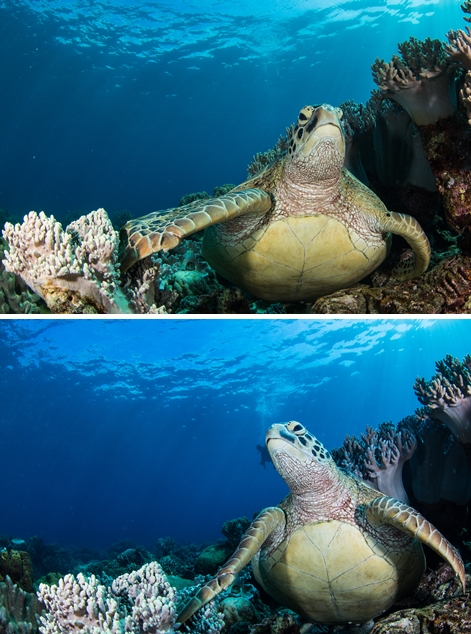
    I tried 4600K conversion filter on Z240 last trip. You can see which one is with filter. Raw to jpeg in-camera convert.

    5D Mark III, 8-15mm at 15mm, f/11, 1/125sec, z240 x 2.

  6. Just a question. Having use these filters, what should the WB on camera be ? Set to 4600K ?

  7. Just a question. Having use these filters, what should the WB on camera be ? Set to 4600K ?


    That's a good question... Using Lee converstion filters I always changed the color temperature to Lightroom, but maybe by setting it directly to the desired temperature in camera would save post porcessing time?

  8. I had tried attaching gels onto the strobes (cannot remember the series). WB was set to 5000 or 5200K. The blue water is nice but however, the foreground could hv been warmer. Hence I am not sure if its the WB on camera that causes it.

  9. Despite the serious intellectual effort and testing, is there any evidence that a carefully designed filter is any more useful than a cheap straw filter, like that used in stage lighting?


    Just a question. Having use these filters, what should the WB on camera be ? Set to 4600K ?


    I use an "Auto" setting and fine-tune in post-processing.


    Tim


    dirol.gif

    Edited by tdpriest
  10. Get the -0.5 Diffuser with the stronger warming effect (4600K). Alex


    Thanks Alex, but why do you use the non-diffused ones for macro shooting?

  11.  


    I use an "Auto" setting and fine-tune in post-processing.


    Tim


    dirol.gif


    Agree, I suppose the whole point is to use the "auto WB" function to cool down the background water to blue...

    Edited by Tim S
  12. post-23965-0-11423800-1342572153_thumb.jpg

    I tried 4600K conversion filter on Z240 last trip. You can see which one is with filter. Raw to jpeg in-camera convert.

    5D Mark III, 8-15mm at 15mm, f/11, 1/125sec, z240 x 2.


    the blue water is nice, but the foreground appears a bit too cool for me (at least on my monitor)...

  13. I used the 4900K ones a fair bit in the Red Sea a few weeks ago. I set the camera to 4900K.


    There was a noticeable improvement in the tone of the blues. I will try the 4600K ones on my next trip.


    I think the difference between these and the Lee filter gels is that they are way more convenient!


    Adam

  14. the blue water is nice, but the foreground appears a bit too cool for me (at least on my monitor)...


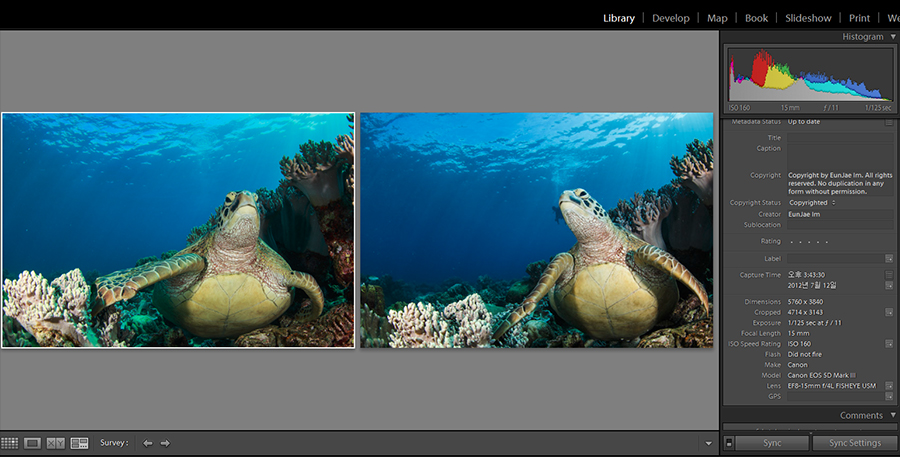
    I think I did something wrong when I converted raw to jpg in camera (different picture style).

    This is compare view of two raw files in LR. WB setting was Auto on both.


    post-23965-0-94613800-1342654747_thumb.jpg

    Edited by escape
  15. I used the 4900K ones a fair bit in the Red Sea a few weeks ago. I set the camera to 4900K.


    There was a noticeable improvement in the tone of the blues. I will try the 4600K ones on my next trip.


    I think the difference between these and the Lee filter gels is that they are way more convenient!


    Adam


    Agreed way more convenient!

  16. I am thinking aloud here so this may sound dumb.

    I thought the hue of the blue in underwater is adjusted in camera settings f-stop/shutter speed, e.g sunburst shots etc.

    It has been mentioned by Alex that the foreground colours are pretty much the same when using the 4600/4900 Inon filters on Z240

    and they just change the hue of blue background.

    I thought the warmer light would change all of the tones?

    It must be the initial warm strobe flash travelling across the front of the camera lens that creates the different background blue effect??

    because the strobe light doesn't travel that far into the distance, especially with Z240.

    Edited by Weiry
  17. I thought the hue of the blue in underwater is adjusted in camera settings f-stop/shutter speed, e.g sunburst shots etc.

    The exposure- fstop/shutter/iso controls the exposure of your background- not the color. However, if you severely overexposure your background colors will be washed out, the background should normally be a little underexposed to bring out the colors that are determined by your white-balance.


    Think of it like this, there is only one "acceptable" color for your foreground, the realistic color.

    If I put on a warming filter and keep the same white-balance as I do without the filter, then the foreground will be way too warm and the water will be the same color as before.


    The white-balance can only make global changes on your image, either your entire image is warmed by the white-balance, or the entire image is cooled by the whitebalance.


    So imagine you have an image with a really warm foreground and a pretty dull (not blue) background (taken with filters).

    Now we use the kelvin slider in your RAW processing program to turn the entire image colder.

    This means that the foreground which was too warm will now be the correct color, but your dull background, not lit by your strobe will become colder and colder, giving you a nice blue background without making your subject cold as well.


    I use lee straw filters, when I do wide-angle dives I bring a total of 8 filters with me, 4 for each strobe.


    2 yellow'ish and 2 red'ish. In the beginning of the dive I put on what I think will be appropriate, if its sunny and clear water you wont need as many as if its overcast and murky.

    I set my whitebalance to Kelvin and play around, once I have found a pleasing color, background and foreground, then I start shooting!


    On my first few dives with this I took some notes on which filters I should use for which conditions, and which white-balance I should set for which filters and now, after maybe 5-6 dives playing around it comes naturally, just like you sort of know which exposure to set when you imagine your shot.


    Hope you can make sense of the above!


    Happy (blue) bubbles, Morten!

  18. Hi Morten thanks for the reply.

    Thats what I thought re the strobe colour temp diffusers. The rest is you say... in camera K setting or post WB.


    cheers

    Craig

Backscatter

Account

Navigation

Search

Search

Configure browser push notifications

Chrome (Android)
  1. Tap the lock icon next to the address bar.
  2. Tap Permissions → Notifications.
  3. Adjust your preference.
Chrome (Desktop)
  1. Click the padlock icon in the address bar.
  2. Select Site settings.
  3. Find Notifications and adjust your preference.