



Good condition, used in freshwater, has extra port for remote etc
$2700
Classifieds / Archived topic
Started by belowwater ·
Read-only discussion
Good condition, used in freshwater, has extra port for remote etc
$2700
Could you please provide more details?
Is there enough space to fit a HDMI connector and slide the camera in/out? A picture would be appreciated.
here is the housing on the manufacturer's website, it has all details:http://aquatica.ca/en/products_dslr_1ds_mark_iii.html
if you want pictures of my housing please send a mail and i will email them.
Well that response seemed harsh! Is not too difficult to upload pictures on here.
that was not intended, just seems the pix at the Aquatica site are more accurate than me taking them. Since the housing looks exactly like that it would be the best way, since it has measurements and all details for the outlets. Except this housing has an extra port for the remote (Nikonos adapter). Will post pictures of the actual housing later today.
Pictures, let me know if these will do or if you want them larger.
I have not tried to connect an HDMI, so i am not sure, Aquatica should know. Certainly there is some space in the housing.
as a note: Canon 1Dx does not fit - which is why i am selling it.
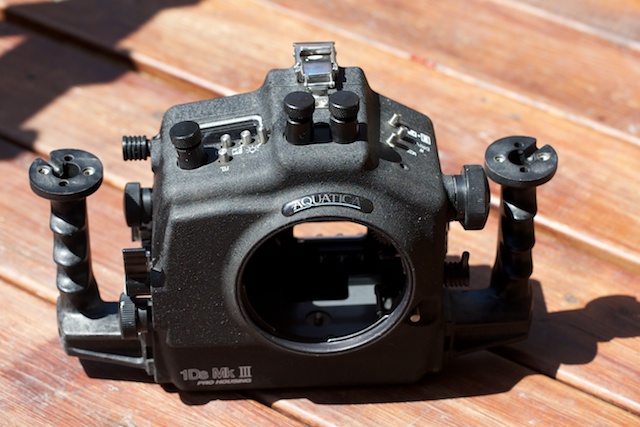
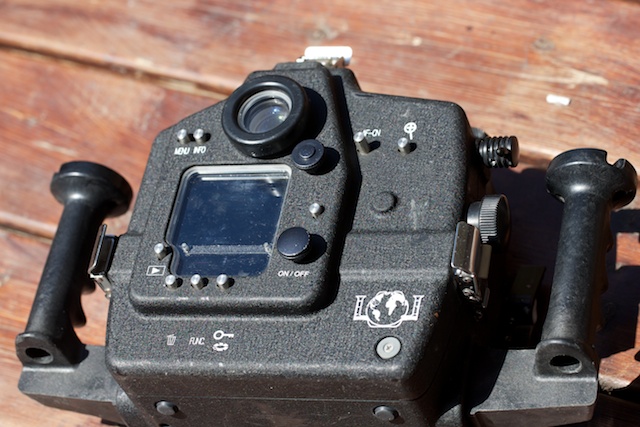
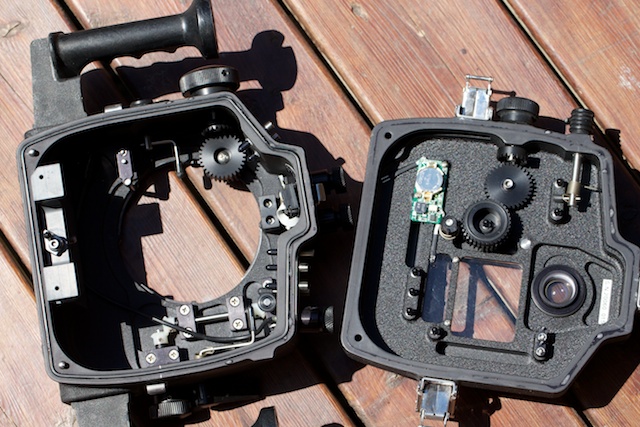
I have not tried to connect an HDMI, so i am not sure, Aquatica should know.
Thanks triggerfish,
I asked them the question months ago and they promised to return... and meanwhile, I have not had time to chase them up.
Since I already made the "mistake" of purchasing the 1D4 for underwater video before realizing that none of the U/W housings available have an unobstructed view of the live-view screen, I do not plan to invest anymore before I find a proper solution for the HDMI monitor issue.
you want to connect an external monitor with the HDMI? Let me know, i will ask Aquatica this week, it is only 15 min from here, so i can ask them.

Terms of Use Privacy Policy Guidelines We have placed cookies on your device to help make this website better. You can adjust your cookie settings, otherwise we'll assume you're okay to continue.

A worldwide community for underwater imaging.
