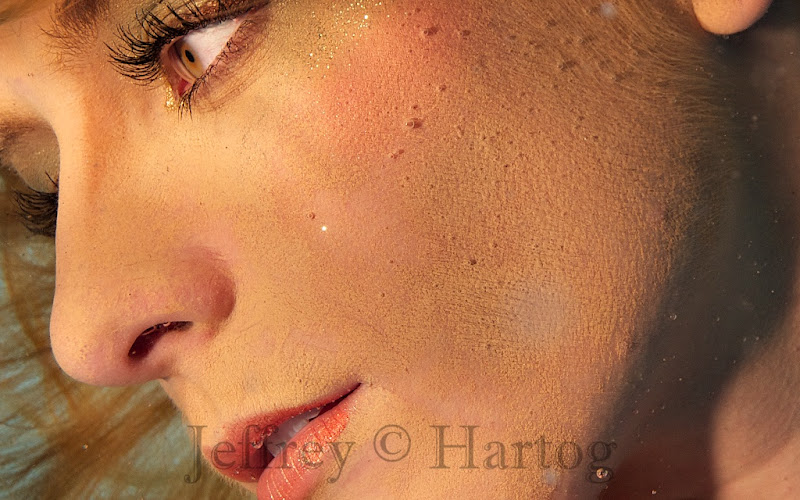
My main reason for upgrading to the D800 was for pool studio use. This weekend is the first pool shoot I am doing with it. The quality is certainly living up to expectations. One of the initial images here with a 100% crop. 16-35 f4, 100 ISO. These are sharpened, and one run of Portraiture to smooth the skin only. I think 200-400 ISO f8 will be even better.
Will post some finished images later.
Your pool studio shots are always amazing. Do you find shooting at f4 to be too limiting (regarding depth of field) for portrait shots?
Your pool studio shots are always amazing. Do you find shooting at f4 to be too limiting (regarding depth of field) for portrait shots?
Thanks; yes f4 is a little limiting. Our weather this weekend is pretty stormy so I am only using underwater strobes, not my usual outside studio strobe setup. So I am not blasting as much light as usual. More of a test run - but I think shooting 200 ISO f8 is where I want to be.
Detail and dynamic range are amazing. Can't wait for more shots
Looks really great !!!
Which port are you using with the Nikon 16-35 ? and do you need an extension ring between the housing and port ?
I used a Zen 230 DP with a 7cm Nauticam extension.
Thanks !
One more; full frame and with a 100% crop. One run through Portraiture to smooth the skin pores, and still tons of skin detail. I think I will take it. Here at f8, ISO 200, 1/250
Is that plexi on the bottom? Nice work BTW!
Is that plexi on the bottom? Nice work BTW!
Thanks Cary; yes that is plexiglass.
Last one for this demo. Detail in these files is amazing!
Nice pics. I like the punk Make-Up too.
/René
Very good, Jeff!
Could you post one of those 100% crops without Portraiture editing to see the real detail it can deliver?
Thanks Rene; I was not trying to be very adventurous on this shoot, so no real exciting new images. just wanted to be sure all the toys work well.
David, no problem; here are two 100% crop images, same basic sharpening, no Portraiture filter or other edits.First image is at f4, second at f8. I think the second one really shows what the camera is capable of. Next I want to try the 85mm 1.4 in the pool. Remember these are 1024x1024 jpegs, on my screen there is even more visible detail. One thing is for sure, my pool cleaning skills will have to be taken up a notch.
That´s a lot of detail! Probably more than what models would like!
Nice shots, I like the second one best. It would be a good one to frame.










.jpg.857dbbfbdc4d79d9c6ebf7b4ba96ed1b.jpg)

