Skip to content

Lights, Strobes, and Lighting Technique / Archived topic

SOLA 1200 problem

Started by Alex_Mustard ·

  • 20Posts
  • 20Replies

Read-only discussion

SOLA 1200 problem

20 posts
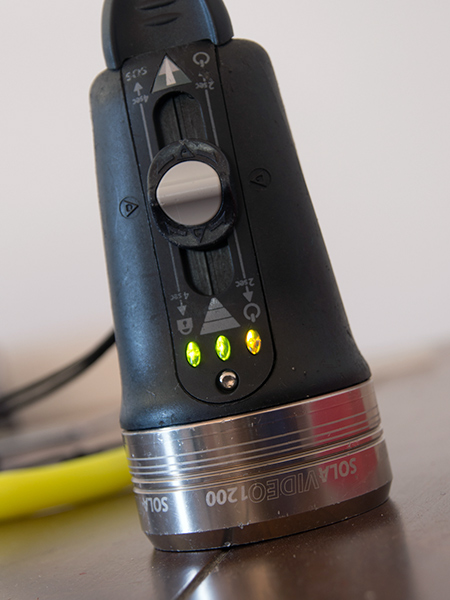
  1. I used one of my Solas at the weekend without problems, but came to charge it today (it charged fine) but now it is showing one orange light when charged:


    post-713-0-77653300-1350398891_thumb.jpg


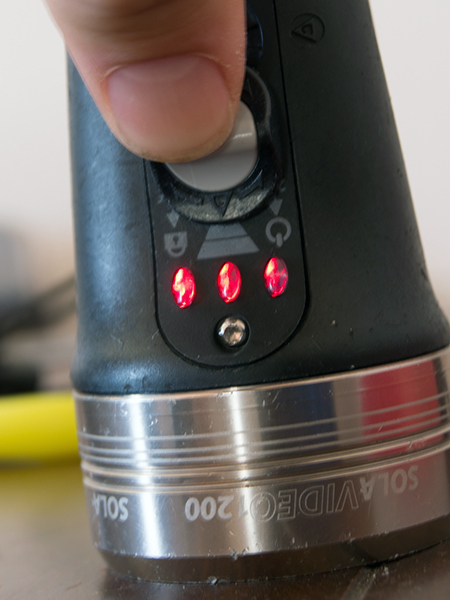
    And then flashing three red lights when I try and turn it on, but it won't turn on.


    post-713-0-17830700-1350398953_thumb.jpg


    Any ideas for a quick fix? Anyone else had a similar problem? Does it have to go back?


    Alex

  2. Make sure you contacts are clean. Vinegar on a Q-tip if corroded?


    I was told that if the Sola would not take a charge, to reverse the charger at the light and tap the connection three, four, or five times and then try charging it.


    Not sure if that is your problem, but shouldn’t hurt to try.

    Bill

  3. Thanks Bill. Useful suggestions. Alex

  4. Alex, I had a somewhat similar problem last summer.


    Tried the contact tapping thing... The light was going dead as soon as tried to put it on full power.


    Went to see Kevin at Reef Photo and Video (happened to be on assignment in the area). Despite all his wisdom and numerous trials with different chargers, he could not solve the problem. Fortunately, the Sola was under warranty so it went back to CA for brain surgery. I hope yours fares better after the contact tapping trick.


    Many thanks to Kevin and the team for helping me out.


    Michel


    Ps: DEMA is around the corner... Bring it over

  5. I would tend to think one of the cells is not charged or charging since the colors change as the cells become charged from red to yellow to green. Try charging it overnight.

  6. I am not coming to DEMA - but I have friends who are going - so I might impose on someone's baggage allowance if it does not come back to life. Alex

  7. Alex,


    I've had several Sola lights, and have had similar, although not the same problem(s). During several fairly lengthy calls to L&M last year, they suggested resolving these types of problems in 2 ways: 1) return the light to L&M or the retailer for a replacement, and 2)try repeatedly plugging and unplugging the charger into the wall outlet. I've done both,and the latter seems

    to resolve charging problems. Even still, it's obviously a great light, and so I never travel without a spare charger.


    Good luck,


    Cameron

  8. PM sent.

  9. Thanks all - including Jack for the PM.


    Alex

  10. One of my Solas was repaired at the factory after it wouldn't accept a charge.


    I charge all of them once a month if they aren't being used.

  11. Hi Guys,


    Am facing charging problems with my one of my Sola 1200s as well. Both of my solas have been lying unused for a while now (maybe more than 3 months). Since a liveaboard is coming up, took them out to charge and figured that one of the chargers is not able to charge. I have left it overnight plugged into one of the Solas and it generated quite a bit of heat but wasnt able to charge. The light on the charger itself is not coming on. The other charger seem to work. Although I must admit that the charging process was a bit weird with various lights coming on a various stages of charging.

    Normally, its the battery that creates problem when lying unused for a while seldom the charger. Any suggestions from anyone on this?


    Thanks.

    Apu

    Edited by apurbasg
  12. Sounds like the light has been put into lock out mode by accident.


    Your SOLA 1200 Video is a late model version that has the additional safety lock out mode ( shown by the lock on the control panel )


    With the Light off , hold the switch in the forward position for 4 secs.

    The light then turns on , then off, and the dashboard lights flash red 5 times.

    The light is now in travel lock out mode and will not turn on.


    The light will charge in this mode but will not switch on


    To exit , hold the switch forward for 4 seconds.

    The dashboard lights will flash green 5 times and the light then turns on

    It should now be back on operation mode.


    Take heart in knowing your not the first person the be locked out.


    Peter

    Edited by pmooney
  13. Thanks Peter,


    Worked perfectly. Interesting to learn about this feature.


    Glad I posted pictures so you could spot the lock.


    Now working again as advertised.


    Alex

  14. ............................another RTFM event sorted then!

  15. Hi all ( i'm french , my english is not really good ... rose.gif )

    I've tried what Peter said but :

    When i hold the switch in the forward position for 4 secs, the light then turns on , then off, and the dashboard lights flash red only three times. Then, when i plug the charger, the first light turn green and the led on the charger switch on stays green ...

    I need you help please ...

    I'm leaving for Red Sea tomorrow evening !!!!

    THX

  16. I'm back

    I don't know what i've done but it works ...


    Clean the contacts

    Reverse and tap

    Unlock the travel mode ( even if it seems to not work with my sola )


    Thank you so much !!!!!

  17. Hi! I'm having a problem with my sola 1200 different to ones above but wondering if anyone could help! I used my sola 1200 for a couple of dies until it ran out of battery. I then tried to charge it but when I plug it into the wall the charger blinks a few times with a faint red light and then goes out, the light isn't charging and I have tried the contact for 5 secs but nothing. Any ideas?? Thanks a lot!

  18. Hi! I'm having a problem with my sola 1200 different to ones above but wondering if anyone could help! I used my sola 1200 for a couple of dies until it ran out of battery. I then tried to charge it but when I plug it into the wall the charger blinks a few times with a faint red light and then goes out, the light isn't charging and I have tried the contact for 5 secs but nothing. Any ideas?? Thanks a lot!


    Look at your instructions. If the light goes out when trying to charge, rapidly tap the charger against the contacts a few times, then plug it back in. Apparently this wakes up a circuit to allow charging.

    Edited by eyu
  19. Sounds like the light has been put into lock out mode by accident.


    Your SOLA 1200 Video is a late model version that has the additional safety lock out mode ( shown by the lock on the control panel )


    With the Light off , hold the switch in the forward position for 4 secs.

    The light then turns on , then off, and the dashboard lights flash red 5 times.

    The light is now in travel lock out mode and will not turn on.


    The light will charge in this mode but will not switch on


    To exit , hold the switch forward for 4 seconds.

    The dashboard lights will flash green 5 times and the light then turns on

    It should now be back on operation mode.


    Take heart in knowing your not the first person the be locked out.


    Peter

    LOL the same happened to me with the Sola 2000 on a recent dive trip. Thought i was in trouble till this info was given to me by L&M....Whew what a relief!

  20. I did also get locked out with my New Sola! There are symbols on the lamp showing the procedure, but then one actually have to check for a solution ;). I did waken a dead Sola 600 with the tapping trick, thanks for that. Now my only problems left are two dead chargers and a Sola 600 where the charging LEDs on the light goes 3-2-1 instead of the other way around? Anyone knows if that is something to worry about or just a cool version of the light?

WaterPixels Store

Account

Navigation

Search

Search

Configure browser push notifications

Chrome (Android)
  1. Tap the lock icon next to the address bar.
  2. Tap Permissions → Notifications.
  3. Adjust your preference.
Chrome (Desktop)
  1. Click the padlock icon in the address bar.
  2. Select Site settings.
  3. Find Notifications and adjust your preference.