Skip to content

Photography Gear and Technique / Archived topic

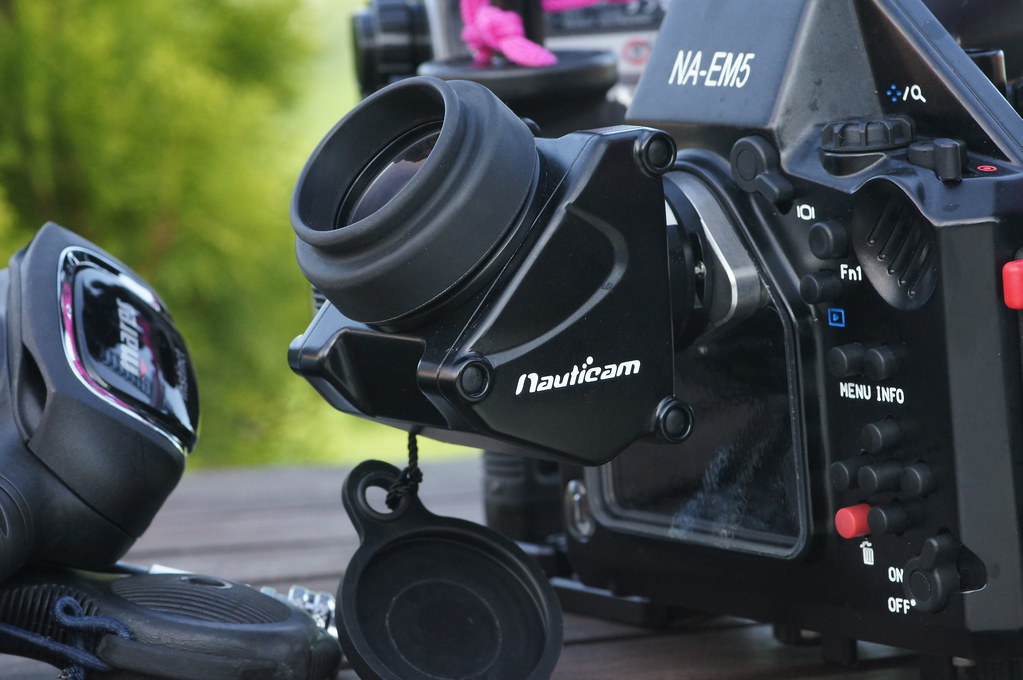
Nauticam EM5 with viewfinder

Started by Yako ·

  • 9Posts
  • 9Replies

Read-only discussion

Nauticam EM5 with viewfinder

9 posts
  1. Hi,


    I'm thinking to move to Oly OMD EM5 with a Nauticam housing, and one thing I would like to use is a external straight viewfinder (Inon or Nauticam). I'm been suffering on internet, trying to find any photo of how the VF fit on the housing, and if the LCD screen is covered or not by the VF-


    If somebody is using this rig, could be useful if give me their comments and could be great if paste a photo of this rig

  2. DSC08716

    You need to order a special back window for viewfinder that can accommodate either Inon or Nauticam viewfinder.

    I am using the Nauticam 45 viewfinder, which is very nice !!


    Edmond

  3. Yako,


    here is a link to a picture of the special back window that Edmond mentioned (I have no connections with this company). At the Photokina here in Germany Mr. Lai from Nauticam demonstrated that this window is easily exchangeable by the user.


    As you can see, with this window a certain part of the LCD is blocked when no external viewfinder is mounted.


    Jock


    http://www.nauticam-...0-Sucher?c=2914

    Edited by Jock
  4. ...external straight viewfinder (Inon or Nauticam)...


    Just to clarify this part of your question, yes, with the LCD window changeout (which is pretty easily done and requires no tools) you can then use our 180º VF. You could use the Inon as well, but it would require an adapter or conversion to the Nauticam format.


    Regards,

    Cp

  5. Thank you all for your answers.


    Now it's clear that is mandatory to change the LCD window.


    Seeing the housing with 45ºVF of Edmond's photo, It`s appears that you loose the whole view of the LCD window with this VF. It's is correct?


    Any photo of Nauticam 180ºVF installed in the EM5 housing ? Same effect in the LCD window?

  6. I purchased this same set-up from Reef, using the 45 degree finder. First off, I HIGHLY recommend it. The standard Nauty finder is OK and useable, but the external finder is like going to the moview by comparison.


    It does cover the LCD screen a little, but, once you use it, you will not be using the screen. I have done two dives and shot 200 images and videos, and not once have I felt the need to look at the LCD screen. Remember that the EVF can show you all the settings so even if you have to go change a setting in a menu there is no need to use the screen. I believe that, because of the more compact dimensions of the EM5 housing (ie the viewfinder is close to the ldc screen) that even the straight finder will also block the screen somewhat.


    You might want to consider the 45 degree unless you already have the straight finder. The EM5 housing is very compact, such that using the 45 degree finder is no effort at all as you are not moving a huge bulky housing underneath you. It's hard to describe but very evident in use. I have no issue using the 45 for wide angle shots. For macro, it is far superior to the streaight finder as you can have the camera below you and stay off the bottom.


  7. GuyHarrisonPhoto, I have an OMD EM-1 in a Nauticam housing and just bought a 45 degree viewfinder for it. Got it installed but am having trouble reviewing my photos on the back of the housing window (won't let me view it there). I can only "review" them through the Nauticam viewfinder.


    Is there a setting that will allow me to "review" (when hitting the 'review' button on the back of the housing) on the back of the housing window? It's a pain to have to review all your photos through the Nauty viewfinder

    Edited by dawallace99
  8. To the left of the viewfinder/window is the LV button (a button with a TV looking image on it). It switches between the EVF and the LCD screen. When you press the Review button, if the image is displayed on the LCD, press the LV button and the image being reviewed will switch back and forth between the viewfinder and the LCD. When you press the Review button to exit, you may have to press the LV button the switch back to EVF mode.


    Bob W

Scuba.com

Account

Navigation

Search

Search

Configure browser push notifications

Chrome (Android)
  1. Tap the lock icon next to the address bar.
  2. Tap Permissions → Notifications.
  3. Adjust your preference.
Chrome (Desktop)
  1. Click the padlock icon in the address bar.
  2. Select Site settings.
  3. Find Notifications and adjust your preference.