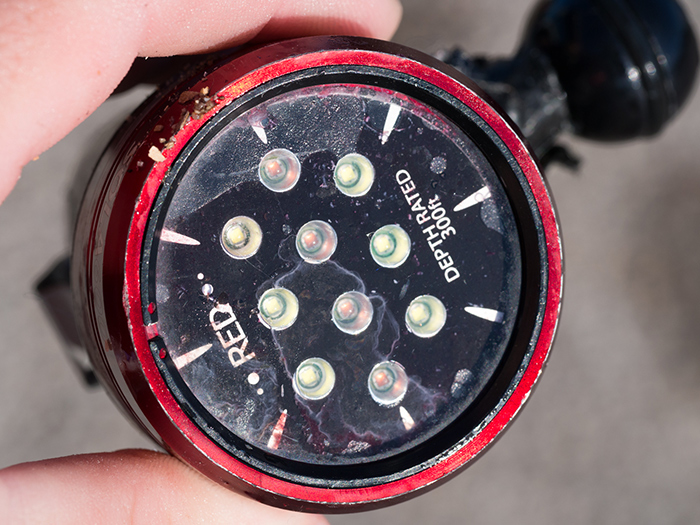
It is a bit frustrating, as it is a sealed unit there is not much you can do to prevent something like this.
Does anyone know if there is there anything that can been done? Or is it simply a case of throwing it away and buying another?
Alex
Return it to your dealer to have L&M evaluate. The warranty is one year, but they are pretty good about these things. But from the UK that can get expensive...
Jack
And they are not cheap either... It is a sad paradox to see the "300 ft depth rated" lettering in the pic...
I had one flood after a bit more than a year and L&M replaced it. Give them a call and see.
Bill
Bugger! Which model was it Alex?
User error for sure
Thanks for the ideas. I will email them and report what they say. Flood was at 12ft!
Alex
Just discovered L&M UK no longer exists.
So I'll have to contact California. Not exactly convenient if I have to send the flooded "unfloodable" Sola back.
Alex
Just discovered L&M UK no longer exists.
So I'll have to contact California. Not exactly convenient if I have to send the flooded "unfloodable" Sola back.
Alex
Wow, I didn't know Stephen Mawle had closed shop...
PM sent.
Unfloodable is certainly relative. Most of the floods I've seen involve using mounting hardware that is too long and punches a hole in the bottom of the case...
Sadly for Steven Mawle, L&M have changed distribution channels and are now using TUSA. I can put you on to them if you want.