



Bought a compass some time ago on a retractor, when the wife and I gave up our console computers for wrist mount, and switched to just small SPG's on the braided HP hoses. (Yes, I know about the recall - they're swapped already). Compass on retractor was kind of bulky and frankly I never really liked it, it was obviously the same unit they also just put bungies on for wearing on a wrist, but I didn't want to do that either since I also wear a dive watch as a backup time/depth unit. Rarely do we get out of sight of the boat, even on trips to the Flower Gardens where navigation is 120% the responsibility of the 'buddy team', but I still didn't want to not carry one.
So, this was the obvious first easy project for the new 3D printer. Aside from all the endless projects just making it functional in the first place...:grump:
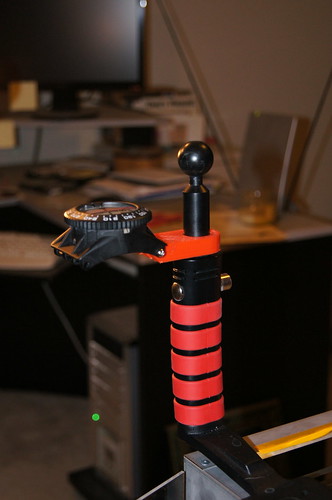
compmnt_assmbled_use2 by rtrski, on Flickr
More pics with descriptions of the design approach are in a small set at Flickr:
http://www.flickr.com/photos/rtrski/sets/72157632085470014/
Might also work on a 'clip' to wrap around the SPG boot to mount one on the back for the wife, although the SPG isn't on a swivel at the end of the hose, so that might not be the best treatment of it.....
p.s. WHOA!!! The new Forum software auto-plays Flickr set links as a slideshow??? Too cool, and a bit showoffy. Sorry, just meant to provide a link for the curious, not force-feed you all. :/


