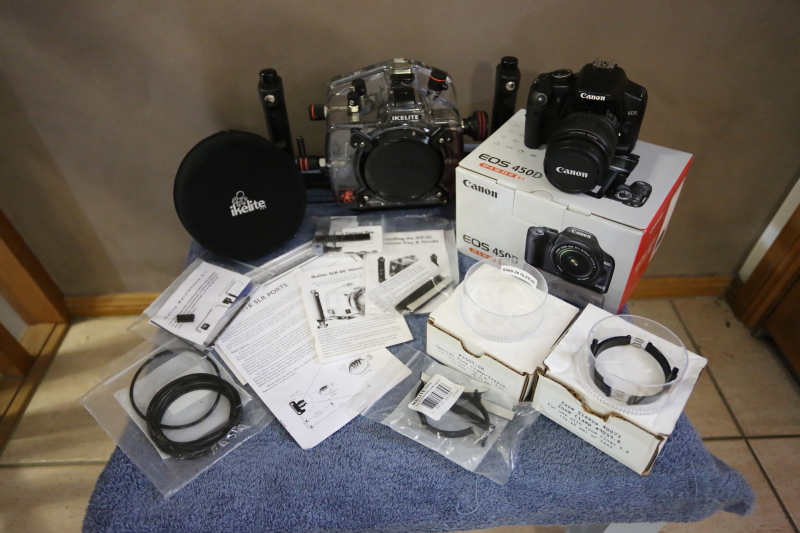
For Sale:
Ikelite Housing #6871.50 including:
- Standard 6" Dome Port #5503 (with neoprene cover)
- Dual Tray Handle
- Standard Zoom Clamp and Sleeve #9059.8
- Special Zoom Clamp and Sleeve #5509.28
- Original Literature and Instruction Manuals
- Housing O-ring and 3x spares
- Port O-ring
- Maintenance Kit (as included with OEM package)
- Silicon Grease
Also included Canon EOS450D Camera with original packaging including:
- Digital Camera EOS450D
- Zoom Lens EF-S 18-55mm f/3.5-5.6 IS
- Wide Strap EW-100DBIII
- Battery Charger LC-E5E
- Battery Pack LP-E5
- Interface Cable IFC-200U
- Video Cable VC-100 (only if I can find it)
- Software (CD-ROM)
Both the housing and camera are in excellent fully-working condition.
The housing had a minor flood event (completely operator fault) a couple of years ago. The housing was serviced by Ikelite with strobe electronics replaced. The housing was also upgraded to a four port lock system at the same time. The housing has since been serviced (last month) where the front polycarbonate case has been completely replaced along with the housing locks.
This was my first UW setup and has been fantastic. Simple to use and reliable with plenty of features to snap some great shots.
Asking AUD$1300.00 plus shipping+insurance
Post, PM or email my username at gmail dotcom.