I stumbled upon an amazing scene at Redondo Beach, Washington. We went to check out an opalescent squid egg cluster I had looked at the previous week. They had eyes and I has hoping to time their hatching.
Instead we ran into opalescent squid in the process of laying eggs and creating a new cluster! It was amazing to watch and I got some footage of the event. If you look closely in the first shot, you can see the female has an egg sack in her arms and is laying eggs into it. The rest of the shots are individuals carrying the egg sacks and attaching it to a cluster.
This was shot with a Canon 5D MKIII, 100mm f/2.8 macro in an Aquatica housing with a pair of Sola 4000s.
[vimeohd]56932714[/vimeohd]
Great capture! You know you have to go back and get them hatching right?
Thanks for sharing it,
Steve
Great capture! You know you have to go back and get them hatching right?
Thanks for sharing it,
Steve
Thanks! And yes, absolutely. The cool thing is that I should hopefully be able to time the cluster they layed that night. They take 4 weeks in 60F water. Our water is a bit cooler at 45F, but I'll at least have two chances, with the original cluster I've been watching develop eyes and this new one.
Wow...way cool catch. Thanks for sharing! I agree with Steve...youhave to catch them hatching now!
DiverPam
Great behavior video!!
How did you manage to hold so still with the 100mm? I am amazed at how much you were able to get in focus. Hand holding marco is very difficult with the dslr. Any tips you wish to share?
Dustin
Fascinating, thanks for sharing.
Great behavior video!!
How did you manage to hold so still with the 100mm? I am amazed at how much you were able to get in focus. Hand holding marco is very difficult with the dslr. Any tips you wish to share?
Dustin
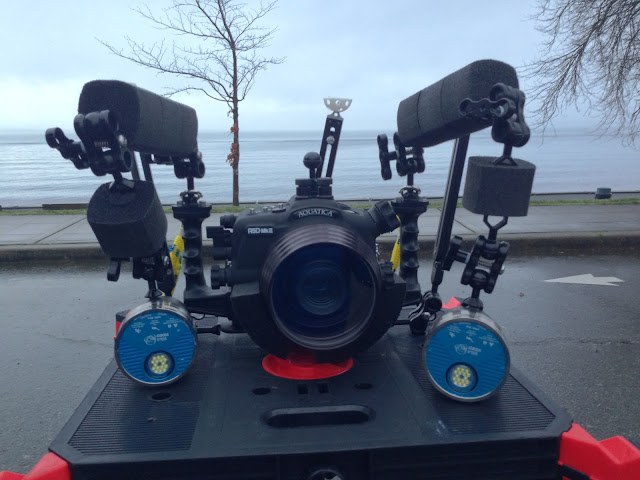
Hard to describe without a photo of my setup. I have two 8 and two 5 ULCS arms with StiX floats on them. I also have the float belt around my macro port. I also have XIT404 tripod bracket and three tripod legs from ULCS. With the float belt and the floats on the arms, the rig is just slightly negatively buoyant. The float belt helps helps keep the awesome Aquatica macro port with a manual focus knob in a mostly neutral position. The focusing was also aided by using Magic Lantern firmware that gives me a "Focus peaking" feature, which I find to be incredibly helpful since I have yet to consider buying an external monitor. The size of the rig helps too since it actually takes some effort to push around in the water column. Hope this helps.
Amazing...
Beautiful clip
Hard to describe without a photo of my setup.
A photo or more would really help, can you?
Regards,
Thani
Amazing...
Beautiful clip
A photo or more would really help, can you?
Regards,
Thani
Thanks! Sorry for the delay. Here it is. Let me know if you have any questions.
Nice video and rig.
The tripod leg is Ultralight?
Nice video and rig.
The tripod leg is Ultralight?
Thank you! Your work is a huge inspiration.
Yes, these are ULCS tripod legs. I like them, though I have no point of comparison. I wonder about the XIT404 legs with the twist clamps, but I don't find myself have to tighten the leg clamps all that often. I'm also a little worried about the spikes puncturing my dry gloves or dry suit, even with the half-cut whiffle balls attached, so I keep a close eye on them when entering the water.