



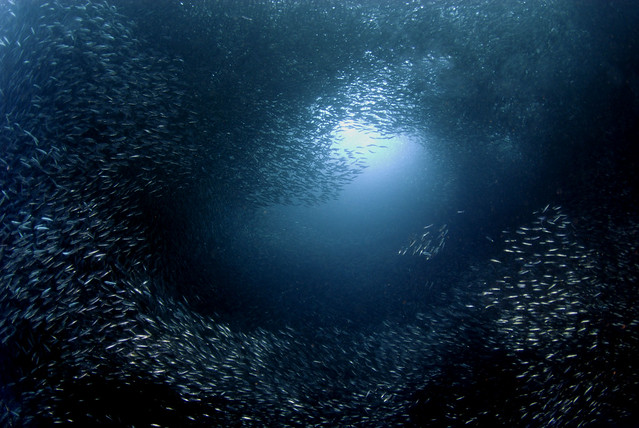
One of my pictures was published on the Smithsonian Institution's website. The title of the article was
Surprising Science: The Ten Best Ocean Stories of 2012
and the picture that they included was the one shown below.

- Erwin
Photo / Video Showcase / Archived topic
Started by edpdiver ·
Read-only discussion
One of my pictures was published on the Smithsonian Institution's website. The title of the article was
Surprising Science: The Ten Best Ocean Stories of 2012
and the picture that they included was the one shown below.
- Erwin
Now THAT'S a bait ball.
Congratulations Erwin!
:-)
Awesome buddy, I'm curious, did they ask before they used it?
It really is a great image!
Cheers,
Steve
Thanks Damo. You too, Steve.
@Steve, yes they asked before they used it. I have been a member of the Smithsonian for 25-30 years, so I was particularly pleased!
I was particularly pleased!
You should be partner. Want to tell us about the circumstances around the making the image?
Steve
Erwin - Congrats!! Awesome bait ball shot. Well done and well deserved.
Pam
Congrats, nice shot!
Jack, Pam, and Steve, thanks so much.
Steve, this photo was from a trip to Moalboal in 2009. The sardines would school around Pescador Island, and sometimes they would be so thick that they would block out the sun. They made for an amazing assortment of photographic opportunities. When this particular photo was taken, I was diving with my wife and son. My son was the one who spotted this sardine planet (a fact that he reminds me of frequently).
Just to give another example of how the sardines would play with light, here is another example from a more recent trip to Moalboal.
There were really some amazing effects. I have heard that the sardines have largely migrated away from this location. Fortunately, the rest of the diving scenery is sufficiently spectacular that it is well worth returning to even without the sardines!
Great photo, congrats.
Awsome!!
Sendt fra Samsung Galaxy S2, via Tapatalk forum app.
wonderful pic!!!

Terms of Use Privacy Policy Guidelines We have placed cookies on your device to help make this website better. You can adjust your cookie settings, otherwise we'll assume you're okay to continue.

A worldwide community for underwater imaging.
