WTS: Nauticam 4.33 Acrylic port for Tokina 10-17 (New lens), Lens, Zoom gear
Started by YUKI ·
16Posts
16Replies
Read-only discussion
WTS: Nauticam 4.33 Acrylic port for Tokina 10-17 (New lens), Lens, Zoom gear
16 posts
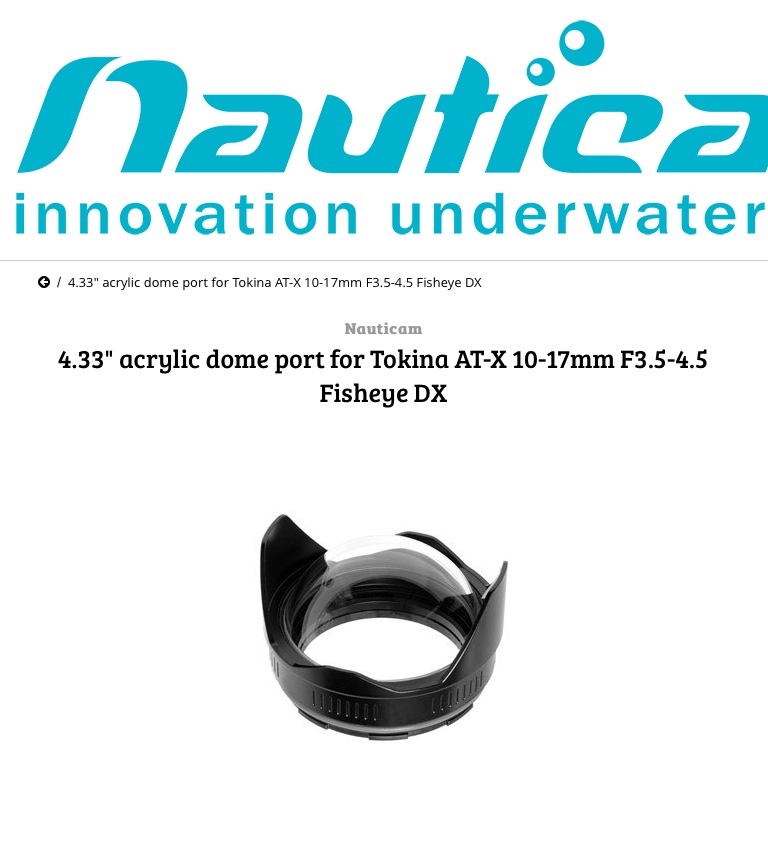
I want to sell my Nauticam dome port because I got a 8.5 glass port. It is compact and very good for traveling.
The authorized dealer has replaced its dome lens with new genuine lens and tested. I have just used it once and there is no scratch at all on lens. (Body is used)
It is specialized for Tokina 10-17 lens. Comes with original lens cover.
US retail price is 690USD. Selling at 550USD.
Very good condition Tokina 10-17 for Canon is available at 550USD. Zoom Gear for 10-17 is 150 USD.
Ship by postal parcel from Singapore.
Payment by Paypal.
PM me
Still available.
Does the hood come off this?
Sorry I did not notice your message.
The hood is fixed.
Upz
Anybody?
Hi, items still available?
Do you have any photos?
Hi. Sorry for my late reply.
Wetpixcel notification didn't come..
Still available.
>Njmpm
Photos of this port? Or photos taken with this port?
Hi Yuki,
Yes photos of the port.
It's just that Nuticam make two mini domes and one is specifically for the Tokina 10 - 17.
So just wanted to see if it's the one I was looking for.
Cheers
Nick
Hi guys.
Thanks for inquiry.
PM sent. Please check.
Hi
Anybody?
Up
UP
UP
Anybody?
US retail price is 690USD.
Selling at 450 USD.
Very good condition Tokina 10-17 for Canon is available at 450USD.