



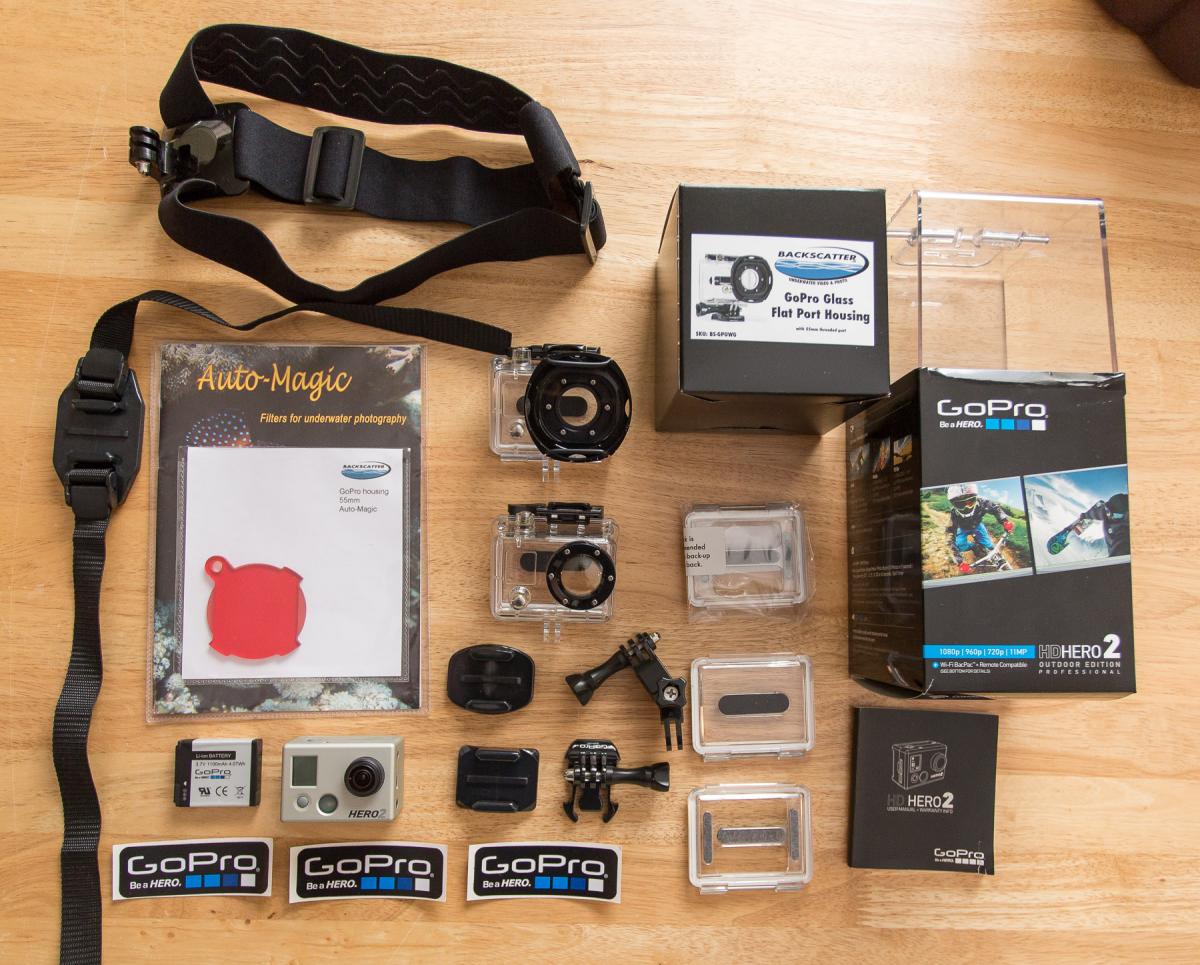
For sale, one GoPro Hero 2 HD unit with everything pictured for $275:
Backscatter scuba housing (original retail was $119)
Red Filter for Backscatter housing (original retail was $39)
Extra GoPro battery (original retail was $19)
Standard GoPro waterproof housing
One extra waterproof housing back
Two extra skeleton (non-waterproof) housing backs
One curved adhesive mount
One flat adhesive mount
Mount connection (base)
Three way connection arm
Head/helmet mount
Vented helmet mount
Hero 2 owner's manual
Original Hero 2 owner's manual, boxes, three GoPro stickers
The Hero 2 kit was the "Outdoor" version that currently retails for $228 on Amazon
Everything is in great shape and fully functional. The Backscatter scuba housing and filter have only been used about 15 dives. They do a fantastic job of eliminating distortion and correcting for color in the ocean. All you need to do is drop in an SD memory card and you are ready to shoot HD footage above or below water. I'm selling this gear because I have a Hero 3 and don't need two units.
Price is $275 shipped in the continental USA using PayPal. PM me to arrange purchase. Sorry no international deals or other payment methods. Will ship to buyer within one business day of receiving payment. I have sold items on Wetpixel before with positive results, I have all positive sales feedback on ScubaBoard (ID guediver), and 100% feedback on eBay (ID edmccarty). Thanks!


