



Skip to content

Lights, Strobes, and Lighting Technique / Archived topic

Painting with light - long shutter time and moving light

Started by oskar ·

  • 2Posts
  • 2Replies

Read-only discussion

Painting with light - long shutter time and moving light

2 posts
  1. I'm trying to light a large WA scene on a wreck fairly evenly.


    There is no ambient light, so I figure that a paint technique like commonly done in dry caving could work.


    I.e the shutter is opened in B or very long time, and then a diver swims around and lights different parts of the scene.


    Any experience and tips and tricks for doing this? To me it seems to be tricky to get the amount of light right.


    Maybe using a manually fired strobe is an option, and first one make a test shot to see that the exposure of that strobe is right. Depending on the subject-camera distance one could fire multiple times at the same subject.


    Thought on this?


    Cheers

    Oskar
  2. I've done this is caves both dry and wet, and it is ten times as tricky underwater. Exposure is the least of your worries!


    Some tips:

    - each time you put the tripod down or readjust it, you will get more silt in your picture.

    - the tripod needs to be very stable, so lots of weight on it

    - use a fixed shutter speed rather than bulb, or the camera will wobble (unless you have a remote trigger). A 2 second delay is a good idea too.

    - focus the camera at the start of the session and switch to manual focus

    - stay behind the camera and have a buddy/model/assistant do the lighting. Do a dry run first and work out your communications

    - manually triggering a strobe works, but the strobe must be hidden behind the diver to avoid hot spots

    - constant light can work, you will still need the light source hidden behind a diver, so the diver can only swim away from the camera


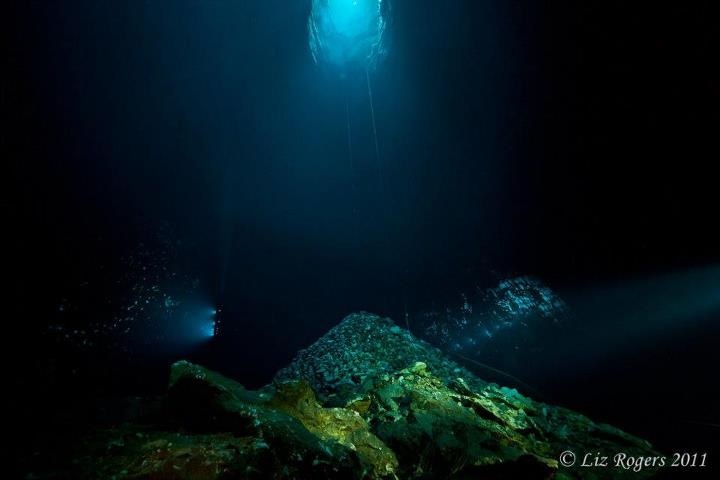
    Here's my cave shot - two divers, 3-5 flashes each over about 10 seconds. I had natural light to contend with as well so couldn't go longer.

    post-26465-0-94423000-1375752491_thumb.jpg

    I'd love to see your results!

Fotosub Shop

Account

Navigation

Search

Search

Configure browser push notifications

Chrome (Android)
  1. Tap the lock icon next to the address bar.
  2. Tap Permissions → Notifications.
  3. Adjust your preference.
Chrome (Desktop)
  1. Click the padlock icon in the address bar.
  2. Select Site settings.
  3. Find Notifications and adjust your preference.

