NEW PRICE- $250
Description:
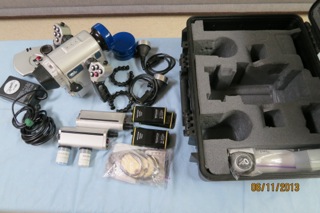
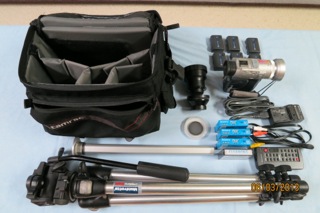
This is a very rugged and reliable video housing and camera. The camera works great and has many extras. Housing was pressure tested yearly at the factory and also has many extras.
U/W housing: Light & Motion Mako PC 110
-SunRay-S mini elite lighting system
-Mako monitor back
-macro lens
-extra batteries for lights
-100-240v smart charger for batteries
-2 spare light bulbs
-o-ring kits, grease, small batteries, wrenches, etc.
-custom foamed Pelican case
-all original manuals
Video camera: Sony DCR-PC100
-wide angle lens (Kendo 0.5x)
-tele converter (Kendo 3.0x)
-RMT-811 wireless remote controller
-DC-VQ800 (DC adaptor/charger)-run camera & charge batteries from a DC outlet in a vehicle
-DC-VM50 (AC compact travel battery charger)-great for travel
-MSAC-SR1 (serial port adaptor for memory stick)
-clear daylight lens filter
-polarizing lens filter
-(6)-NP-FM50 info-lithium batteries (fit perfect in u/w housing)
-(2)-NP-FM91 info-lithium batteries (great for long play)
-(3) new high grade Sony video tapes
-camera head cleaning tape
-Tamrac camera bag
-Bogan/Manfrotto tripod (very rugged and stable)
-all original manuals