



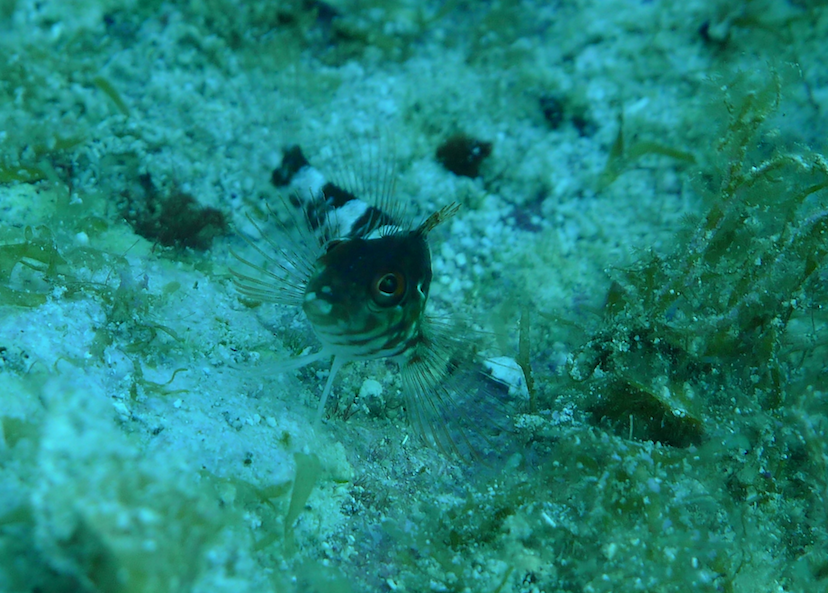
I need some insight on how to improve my sand shots. Not much contrast and pretty flat lighting.
I used a focus light and my strobe and shot 1/250 and f3.3.
Read-only discussion
I need some insight on how to improve my sand shots. Not much contrast and pretty flat lighting.
I used a focus light and my strobe and shot 1/250 and f3.3.
Hi. I'm no expert but this looks like an ambient light shot to me ie. your strobe hasn't lit this much, if at all. If you were shallowish on a bright day and had a high ISO, at f3.3 maybe the flash didn't light this image much at all? I would try cranking up your f-stop so your flash has to work harder against the ambient light. The white balance looks off too and it should help the image if you correct this.
I'm sure others way more experienced than myself will know exactly what is going on but hope this helps in the meantime.
Cheers
Looks like the camera is in auto mode and decided it did not need to flash because of the white sand and your focus light
You need the strobe to fire so shoot with fill flash and put the camera in manual as f/3/5 is not the way to go for that shot
Hi,
Thanks for the comments. The image is the raw image and was shot in manual. It sounds like I need to up the f-stop and utilized more flash power. I can not remember the flash setting put perhaps 1/4 power.
Thanks.
Shoot ttl and close the aperture would be step one

Terms of Use Privacy Policy Guidelines We have placed cookies on your device to help make this website better. You can adjust your cookie settings, otherwise we'll assume you're okay to continue.

A worldwide community for underwater imaging.
